
MCP Server Cards: what discovery before connection means for operators
SEP-2127 lets remote MCP servers publish a static card that clients find before connecting. What a card holds, what it leaves out, and the rules to set now.
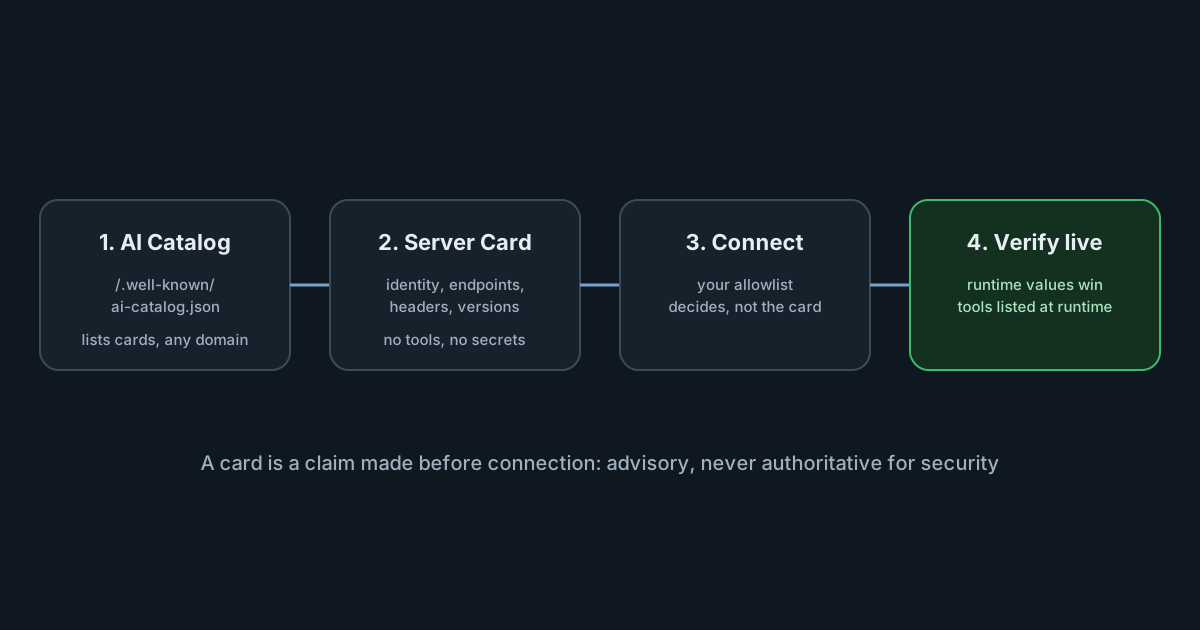
On 6 October 2026 the Model Context Protocol project merged SEP-2127, which defines MCP Server Cards: a small, public JSON document that tells a client where a remote MCP server lives and how to connect to it, before any connection is made. The SEP page lists it as Final, on the Extensions Track. For anyone running MCP servers, or deciding which ones their developers' AI tools may use, cards change one thing that matters: they are designed to let tools find and configure servers on their own. That is useful, and it is also a reason to write down now which servers you allow.
What a Server Card is
A Server Card describes one remote MCP server. According to the SEP, it holds:
- Identity: a
namein reverse-domain form, aversionand adescription, with optionaltitle,icons,repositoryandwebsiteUrl. - Remote endpoints: the URLs to connect to, the HTTP headers a connection needs or accepts, URL templates with variables, and the protocol versions each endpoint supports.
- Optional
_meta: namespaced, non-standard metadata.
Cards cover remote, HTTP-based servers only. Locally installed servers, packages and command-line arguments stay in the MCP Registry's own server.json format.
How clients find one
The discovery document describes two layers. A domain can publish an AI Catalog at /.well-known/ai-catalog.json, listing the cards relevant to its services. Each entry either links to a card or embeds it. A card itself can live at any URI; the recommended location is /server-card appended to the server's streamable HTTP URL, so a server at https://host/mcp has its card at https://host/mcp/server-card.
A catalog may point at cards on other domains. The SEP's example is a restaurant whose catalog lists two cards, one hosted by a reservations platform and one by a jobs platform, each describing a service that platform runs for the restaurant.
What a card deliberately leaves out
The most interesting design decision is what is missing. Cards do not list tools, resources or prompts, and they do not advertise capabilities or extensions. The SEP's reasoning is that a server's tools can differ by user, session, configuration and deployment, so a static document "cannot reliably represent this surface". Tools are still listed at runtime, with the signed-in user's identity, through the normal list operations.
The security model follows from that. The discovery document says clients "MUST NOT treat Server Card contents as authoritative for security or access-control decisions", and should check a card's claims against the live connection, preferring runtime values where they disagree. Cards are public by design: the SEP says they must not contain credentials, internal network details or user-specific data, and that wide-open cross-origin access is acceptable because the content is public and read-only.
Final, or still experimental
The sources don't quite agree on how settled this is. The SEP page says Final and calls itself a historical record of the design as accepted. The extension repository's README, at the time of writing, still opens with "Status: Experimental" and says the SEP is under review, and its discovery document is marked as a draft protocol revision. The Python and Go SDK implementations the SEP lists are described as experimental, and the client example it cites is a demonstration. The AI Catalog that cards rely on for domain-level discovery is a separate, cross-protocol effort with its own repository and no tagged release yet.
Read that as: the design is accepted, the wire format may still move, and client support is early. Don't assume your developers' tools act on cards yet; ask their vendors.
Analysis: convenience and its cost
Cards solve a real problem. Today, connecting an AI tool to a remote MCP server means copying a URL, headers and sometimes a protocol version into a configuration file by hand. The SEP's stated use cases are auto-configuration ("IDE extensions can automatically configure themselves when pointed at a domain"), crawling domains to build registries, and showing server details without opening each connection. All three are reasonable.
The cost is that discovery makes adding a server cheaper, and the decision about which servers an organisation's AI tools may reach was, until now, protected partly by that friction. Three points stand out.
A card is a claim, not a credential. Its name and description are written by whoever publishes it. The specification's own rule, that cards are not authoritative for security decisions, should be your internal rule too: allow servers by the endpoint you have reviewed, not by what a card says about itself.
Catalogs can delegate across domains. A catalog on a vendor's domain may list a card hosted by a third party. That suits hosted MCP platforms, and it means the domain you trust and the host you connect to can differ. Review both.
Headers can ask for secrets. The schema describes a card's headers so that clients can prompt the user for values and mark which are secret. A tool that auto-configures from a card may therefore ask a developer to paste an API key for a server nobody has reviewed. Decide in advance whether that is acceptable.
What it means for engineering and security leaders
- If you publish MCP servers, a card is low-risk to add once your SDK supports it, provided it carries nothing beyond public connection details. Keep it consistent with what the server reports at runtime.
- If you consume MCP servers, the question to answer before tools support cards is who approves a new server, and whether a tool may add one by itself.
- If you run a registry or allowlist, cards make crawling easier, but they do not replace review. Treat a card's content as a lead to check, not as the record.
Practical takeaways
- Write down your MCP server allowlist by endpoint, and the owner who approves additions.
- Ask your AI tool vendors whether, and when, their clients will act on AI Catalogs and Server Cards, and whether that can be turned off or restricted centrally.
- For servers you publish, plan a card at the recommended
/server-cardpath, with no credentials or internal hostnames in it. - Keep evaluating tools at runtime: tool lists and permissions come from the live connection, never from a card.
If your developers' AI tools reach MCP servers through the SpanDock MCP gateway (Premium and Enterprise plans), the gateway connects them to the connectors you add on your server, which can include your own MCP servers over HTTPS, and each person gets only the connectors and tools they're allowed. With Every computer set to Enforced, SpanDock also reports, or moves aside, the other MCP servers configured in each AI tool it finds. Related reading: The stateless MCP specification: what changes for teams running MCP servers.