
Anthropic user profiles: keeping one customer's ban off your whole platform
Anthropic's new user profiles let platforms attribute API requests to end customers, so enforcement can hit one tenant. What to send, and what is not live yet.
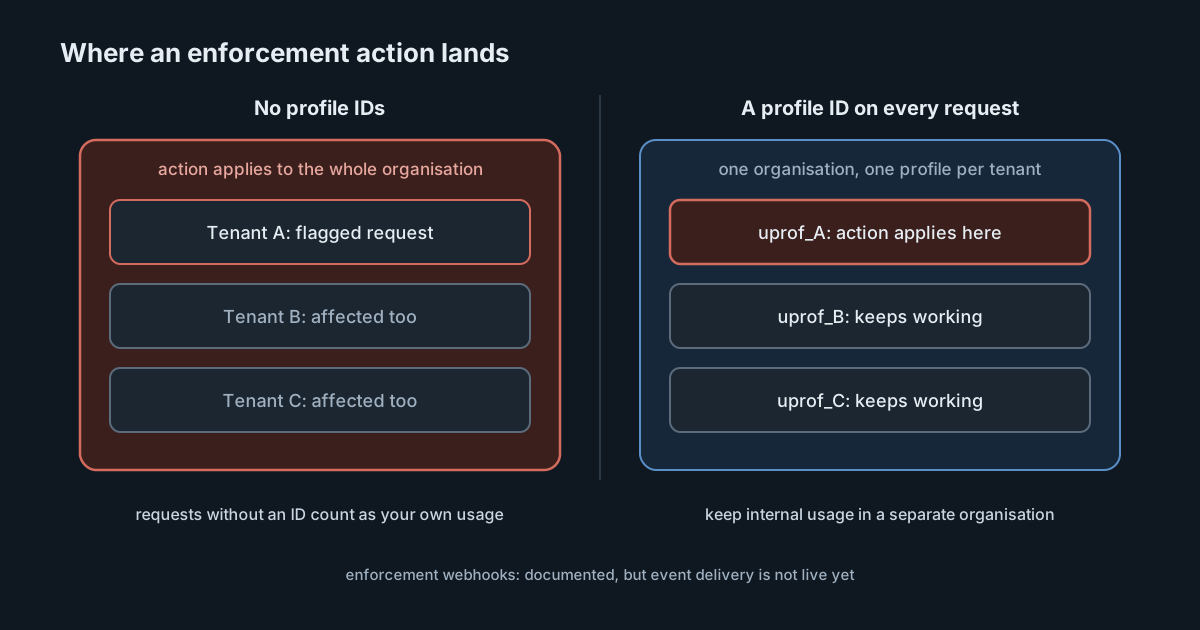
If your product calls a model API on behalf of your customers, every one of those requests arrives at the provider under your organisation. When one customer misuses your product, the provider's safety systems see your organisation misusing theirs. On 20 October 2026 Anthropic launched user profiles to change that: a way to tell the API which end customer each request is for, so that a restriction or ban can apply to that customer rather than to everyone you serve. For teams that run AI features, gateways or resold access on top of the Claude API, it is a small integration with a large effect on how far a single incident can spread.
What Anthropic released
The release notes describe two related changes on 20 October:
- User profiles, with new
/v1/user_profilesendpoints supported in the SDK and the CLI, so that "a safety enforcement action can then apply to one end customer instead of your whole organization." - Organization webhooks in the Admin API, in beta with the
webhooks-2026-10-07header, for two events: when Anthropic restricts or bans one of your profiles, and when that ends. Access is by request through your Anthropic account team.
The user profiles guide explains the reason directly: Anthropic runs automated safety classifiers over API traffic, and "without a profile on the request, one end customer can trigger an enforcement action that applies to your whole organization."
How profiles work
The integration has two steps. You create a profile once per end customer with POST /v1/user_profiles and store the uprof_ ID it returns. Then you send that ID in the anthropic-user-profile-id header on every request made on that customer's behalf. The SDKs have an argument for this (user_profile_id in Python, with each language's own naming), and the CLI has --user-profile-id. Profiles are not billable and do not affect pricing.
Each profile has an access_type that says what it stands for:
| Who the traffic is for | Profile | access_type |
|---|---|---|
| A signed-up user of your product | One per user | application (the default) |
| A company you resell API access to | One per company, not per person | passthrough (must be sent) |
| Your own organisation | None | Not applicable |
For a passthrough profile, the guide suggests also sending an identifier for the individual person in the request's metadata.user_id field, which helps Anthropic spot misuse by one person within a company.
Details that are easy to get wrong
The guide has several rules that change how you would naturally build this:
- Creation is not idempotent. Every call creates a new profile, even with a matching
reference_id. Create the profile once during onboarding and store the ID on the customer record. Do not let each service instance create its own. - Your own usage needs its own organisation. A request without a profile ID counts as your organisation's own usage. Profiles belong to an organisation, not a workspace, so the guide says separate workspaces are not enough: keep end-customer traffic in one organisation and internal usage in another.
- Values cannot be cleared. You can replace a field in
external_user_detailsbut not clear it, so leave unknown values out rather than sending placeholders. - Hashes instead of personal data. If you cannot share a name or email address, send
name_hashandemail_hash, computed with a function you choose and applied with the same normalisation every time. There is no field for the email address itself. - Anthropic does not verify the details. The profile holds only what you send, plus any programme status Anthropic sets, and no conversation content.
Cloud platforms behave differently
On the Claude API, Claude Platform on AWS and Microsoft Foundry deployments hosted on Anthropic, the ID is checked on every request: a malformed ID, or one from another organisation, returns a 400 error. Message Batches is the exception: creating a batch checks only the ID's format, and each request in it then fails with an errored result. Amazon Bedrock and Google Cloud do not have the profile endpoints. You create profiles in an organisation on the Claude API or Claude Platform on AWS, link your cloud accounts to it, and send the ID with inference requests. On Bedrock this works only with Claude in Amazon Bedrock, not the earlier integration called with InvokeModel or Converse, and the ID goes in a user_profile_id field in the request body. On those platforms, the guide says, the ID's format is checked but the profile is not looked up, so "a successful response doesn't confirm that the ID matches a profile." Test your attribution there separately rather than assuming it works because requests succeed.
Deletion and data erasure
Deleting a profile removes everything you supplied for it, but not the trust and safety records Anthropic keeps about that ID. For up to about 10 minutes after deletion, inference requests carrying the deleted ID can still succeed. If a customer asks you to erase their data but stays a customer, the guide's advice is to create a new profile, switch to its ID and then delete the old one. That fits into an existing erasure process, but it should be written down, because the provider-side record does not disappear with the profile.
Webhooks: announced, but not delivering yet
The release notes present the Organization webhooks feature as added. The webhooks page is more careful, and the two sources should be read together. It says: "Event delivery isn't live: Anthropic doesn't send the two events, so an endpoint you register receives nothing." You can register endpoints and build a handler from the documented event format, but you cannot rely on the events today.
When delivery does start, the design is conventional:
- Endpoints must be HTTPS on port 443 with a public domain name, and an organisation can have up to 32.
- Deliveries follow the Standard Webhooks specification, with signature headers to verify, and need a 2xx response within 5 seconds.
- Events can arrive more than once, late or out of order. They carry IDs only, so the handler should fetch the profile and act on its current state.
- An endpoint that redirects, keeps failing or resolves to a non-public IP address is disabled, and events for it are skipped.
- Organisations with HIPAA readiness enabled cannot use the feature.
Until then, the way the webhooks page describes to find enforcement actions is to list profiles by enforcement_status (restricted or banned). The same page notes that the enforcement_status and enforcement_actions fields appear only once enforcement actions are turned on for your organisation. With the user-profiles-2026-09-04 beta header or an earlier one, the fields are left out and the enforcement_status[] filter returns a 400 error.
What it means for engineering and security leaders
- The blast radius of one customer is a design choice. Without attribution, a single tenant's abuse can stop service for all tenants. With it, the provider has the information to act narrowly. It does not guarantee narrow action, but it makes it possible.
- Tenant identity now leaves your system. Profiles carry whatever you send, such as a company's legal name, country and your own reference ID. Treat that as a data transfer to the provider and record it in your privacy documentation.
- Your own staff traffic should not share the organisation. Internal tools, evaluations and test scripts in the same organisation count as your own usage, with no profile to contain an incident.
- Do not build alerting on an event that is not sent yet. Poll enforcement status for now, and switch to webhooks when the docs say delivery is live.
Practical takeaways
- Create one profile per end user or per resold company in your onboarding flow, store the ID and send it on every request.
- Move internal and test usage to a separate Anthropic organisation.
- Send hashes instead of names or email addresses where you cannot share them, with one consistent normalisation.
- On Bedrock (Claude in Amazon Bedrock only) or Google Cloud, link your accounts and check attribution explicitly, because successful requests do not prove a match.
- Add profile handling to your customer offboarding and data erasure procedures, including the 10-minute window.
- Ask your account team about webhook access if you want it, and build the handler to fetch current profile state, but keep polling until delivery is live.