
Copilot managed settings can now fail closed: forced refresh and minimum versions
Copilot clients can now be made to fetch current policy at startup and refuse to run on a stale copy. What that buys, what it costs, how to roll it out.
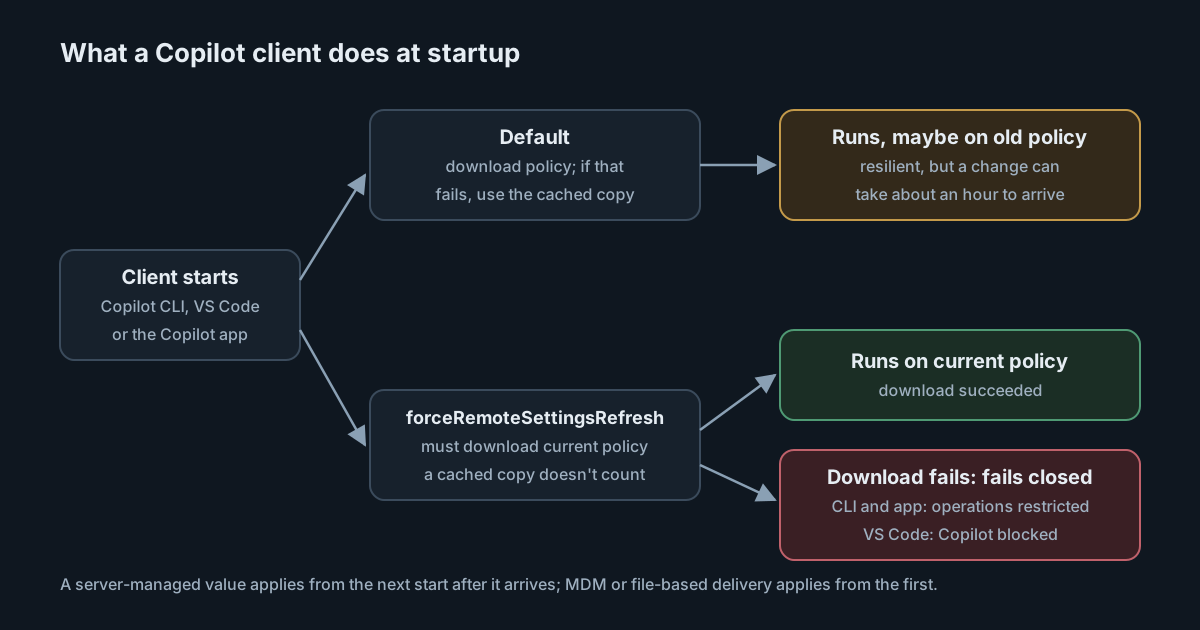
A policy for AI coding tools is only as current as the copy on each laptop. On 13 October 2026 GitHub gave enterprise administrators two ways to close that gap for Copilot: a setting that makes clients fetch current managed settings at startup and refuse to run on a cached copy, and a minimum client version for the sandbox policy. Both trade some availability for certainty. This article explains the mechanics and where each one fits.
What changed
Copilot's enterprise managed settings are a JSON policy covering permissions, MCP server allow and deny lists, plugin marketplaces, telemetry, computer use and the local sandbox. By default, clients cache that policy and keep using the cache when a download fails.
The changelog entry adds forceRemoteSettingsRefresh. Set to true, it requires supported clients (Copilot CLI, VS Code and the GitHub Copilot app) to download current server-managed settings when they start. A cached response no longer counts. If the client can't confirm current policy, GitHub says it "fails closed rather than running with a stale or unconfirmed policy."
The second change applies a minimum client version to the sandbox key. If your managed settings include it, users on older clients must update before they can use Copilot again. The reference documentation lists the minimums as VS Code 1.141.0, Copilot CLI 1.0.93 and the GitHub Copilot app 1.1.26. GitHub says more governance keys will get minimum versions over time.
The details that matter
"Fails closed" means different things per client
The changelog uses one phrase. The reference documentation is more precise. In Copilot CLI and the Copilot app, forced refresh skips the normal one-hour cache, and a failed download leaves the policy unconfirmed, so "affected operations are restricted". In VS Code, "Copilot features are blocked until the required refresh succeeds." Either way, users need a network connection when the client starts. Test each client you support rather than assuming they behave the same.
Server-managed settings can't protect the first start
Managed settings can be delivered three ways, described on the deployment page:
- Server-managed, from a
copilot/managed-settings.jsonfile in the enterprise's.github-privaterepository. It applies to users who get their Copilot license from your enterprise, and updates reach clients within about an hour. - MDM-managed, as string values in the Windows registry or macOS managed preferences. Linux isn't supported.
- File-based, a
managed-settings.jsonin a fixed system location on macOS, Windows and Linux.
A server-managed forceRemoteSettingsRefresh only takes effect on startups after the client has received it once. To require freshness from a device's very first start, deliver the key through MDM or a file. The documentation adds that helper scripts can't set this key, and that for Copilot CLI, registry or managed-preference values must be strings (true or false), not a native Boolean or DWORD.
The deployment page also warns that in Copilot CLI, if the server-managed request fails and there is no cached copy, the server-managed policy is simply unavailable for that session. Its advice is to put restrictions that must hold without a server response into MDM or file-based settings. Forced refresh and device-delivered settings are complementary, not alternatives.
Precedence still applies
When several sources are present, MDM settings win over server-managed ones, which win over file-based and then user settings. The exceptions are sandbox and the permissions.deny, ask and allow lists, which combine in the most restrictive direction across sources. For Copilot CLI on macOS and Linux, the file must be a regular file owned by root and not writable by group or others; the CLI rejects anything else, including a symbolic link.
The trade-off
Without forced refresh, a policy change takes about an hour to reach a client that is already running, and a client that can't reach GitHub keeps its last copy. That is the right default for resilience. It is the wrong one in an incident. If a plugin marketplace is compromised, or an MCP server you allowed turns hostile, you want the deny rule in force before the next session starts.
Forced refresh closes that window at the cost of a dependency on GitHub at startup. Developers on trains, behind captive portals or on networks that block GitHub's endpoints will find Copilot restricted or blocked. Turning it on everywhere, permanently, makes every network problem a Copilot outage.
The minimum version check has a similar shape. It stops people from escaping a sandbox policy by pinning an old client, which matters because older clients don't support local sandboxing. It also means a pinned dev container image or a slow internal software catalogue can lock a team out of Copilot until someone rebuilds it.
We have seen the same design question elsewhere this month. Claude Code hooks can now fail closed when enforcement breaks, and Copilot's local sandboxing has its own failIfUnavailable switch. The pattern is consistent: the safe choice is available, it isn't the default, and it costs availability.
What it means for engineering and security leaders
- Decide which policies are emergency policies. Deny rules for MCP servers and plugin marketplaces are the ones you will need to change quickly. Those justify forced refresh, at least for teams handling sensitive code.
- Put the non-negotiables on the device. Anything that must hold offline belongs in MDM or file-based settings, not only in the repository.
- Treat client versions as part of the policy. Once
sandboxis managed, the client version is enforced too. Images, golden machines and package catalogues need to keep up. - Remember who server-managed settings reach. They apply to users licensed through your enterprise. People using a Copilot license from elsewhere, a case we covered in separate license and repository accounts, are reached only by device-delivered settings.
Practical takeaways
- Inventory Copilot clients and versions against the minimums: VS Code 1.141.0, Copilot CLI 1.0.93, Copilot app 1.1.26.
- Pilot
forceRemoteSettingsRefreshwith one team, delivered through MDM or a file, and test startup with the network off in each client. - Write down how long a policy change takes to reach a running client today, and how you would shorten it in an incident.
- Check that file-based settings for Copilot CLI on macOS and Linux are root-owned regular files with safe permissions.
- Tell developers before you turn it on, including what they will see when the refresh fails.
The same fail-open or fail-closed decision exists for checks you run yourself. SpanDock's guardrails on computers let you choose what happens when SpanDock can't check a prompt or tool call, for example because it isn't running: let it through, which is the default, or block. Computers keep enforcing their guardrails while the server is unreachable, and a changed guardrail reaches every computer within a minute. Guardrails on computers are on the Enterprise plan.