
Roo Code's five unpatched approval bypasses: retiring an abandoned AI extension
Five high-severity CVEs let injected prompts slip denied commands past Roo Code's auto-approve. No fix will ship. How to find and remove dead AI tools.
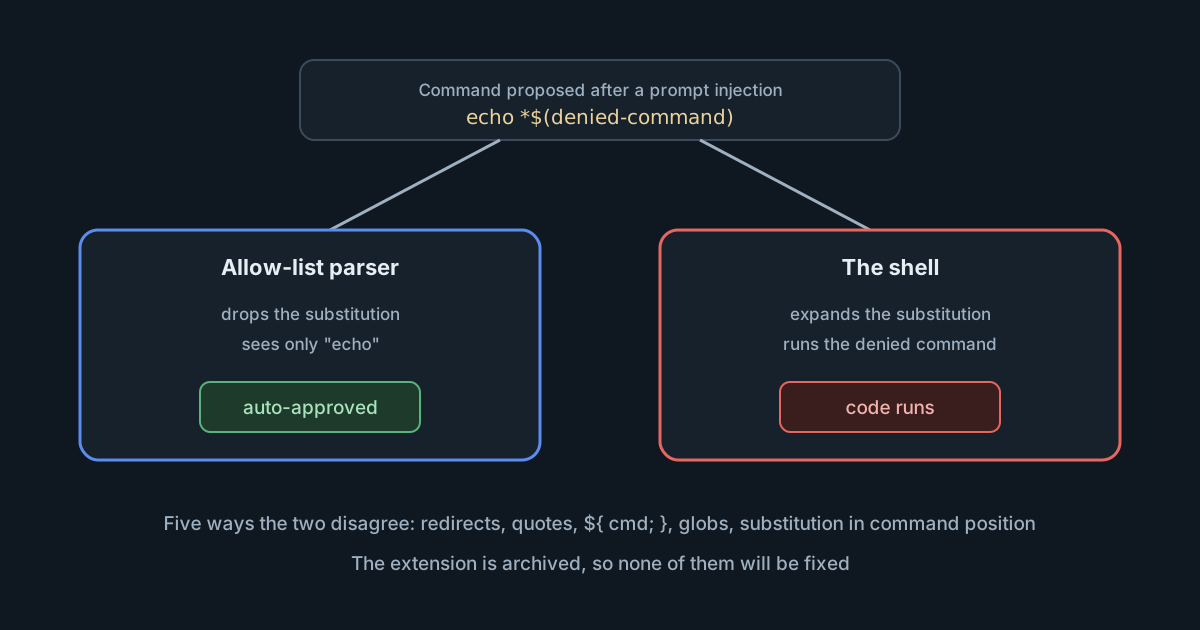
On 13 October 2026, five CVEs were published for Roo Code, the AI coding extension for VS Code. Each describes a way for an injected prompt to get a denied shell command approved automatically. They are rated high, and they will never be fixed: Roo Code's makers shut the extension down on 15 May 2026 and archived its repository. Anyone still running it with auto-approval on has a known, unpatchable path from a malicious web page, issue or file to commands on their machine. The case is also a useful prompt to ask a broader question: which AI tools on your developers' machines no longer have anyone maintaining them?
What the five CVEs describe
Roo Code could auto-approve terminal commands that matched an allow-list, so a developer could let it run echo or npm test without being asked each time. The advisories, published through the GitHub Advisory Database and by VulnCheck, cover Roo Code through 3.54.0, its last release. In each, Roo Code's command parser and the real shell disagree about what a command does:
- CVE-2026-110202: a command prefixed with a bare
>&redirect makes the allow-list match the redirect target, such asecho, while the shell runs the denied command. - CVE-2026-110203: escaped or single-quoted double quotes fool the quote-masking logic, so a separator slips past a command that looks allowed.
- CVE-2026-110204: the parser treats
${ command; }as a parameter expansion, but on bash 5.3 and later, or ksh93, it runs a command. - CVE-2026-110205: a command substitution placed next to a
*or?glob character, as inecho *$(...), is discarded by the parser but still runs. - CVE-2026-110206: a substitution in command position, such as
$(echo touch /tmp/x), passes theechocheck, and the shell then runs its output.
All five need two things: auto-approval turned on, and an attacker who can get instructions in front of the model, which the advisories describe as indirect prompt injection. The GitHub entries give a CVSS 3.1 score of 8.8 and a CVSS 4.0 score of 7.7, both high rather than critical. The GitHub entries are marked unreviewed and list no patched version, because there isn't one.
Why no fix is coming
The Roo Code documentation announced on 21 April 2026 that all Roo Code products (Extension, Cloud and Router) would shut down on 15 May 2026, and that the extension repository would be archived. The notice said the extension had passed 3 million downloads. Version 3.54.0 was released on 15 May, and the repository has been read-only since. Its README now says "The Roo Code Extension was shut down on May 15th", disclaims any warranty, and points users to ZooCode, a community fork, and Cline, the project Roo Code came from.
Shutting down a hosted service stops it working. Shutting down a local extension doesn't: the code keeps running for anyone who installed it. On 17 October, the VS Code Marketplace page still listed version 3.54.0.
If you moved to a fork, don't assume it is unaffected. Ask the maintainers of any fork you use whether their command parser inherited this code.
The pattern behind the bugs
The CWE on these entries is "interpretation conflict", and it is the right label. An allow-list that decides by parsing a shell command string has to understand shell syntax exactly as the shell does: quoting, redirects, globbing, every form of substitution, and differences between shell versions. Each new shell feature, such as bash 5.3's ${ command; } form, is a new way for the two to disagree.
Roo Code is not alone. Between 3 and 14 October, Claude Code fixed several cases where its deny and ask rules for commands could be skipped, covered in Claude Code closed permission bypasses. The difference is that Claude Code shipped fixes. The lesson is the same for both: string matching on commands is a convenience that reduces prompts, not a security boundary. Where an agent runs commands without asking, the boundary has to be something the shell can't talk its way around, such as an operating system sandbox that limits files, network and credentials. What the built-in sandboxes do and don't cover goes into the options.
What it means for engineering and security leaders
- Abandoned AI tools are an inventory problem. Vulnerability management often focuses on packages and containers rather than editor extensions. A dead extension with auto-approve on can sit on a laptop for months.
- "End of life" needs a removal step. When a vendor sunsets a local tool, someone has to uninstall it or block it. The vendor can't do that for you.
- Auto-approve settings deserve a policy. Whether agents may run commands without asking should be a decision your organisation makes, not a default each developer chooses.
Practical takeaways
- Find it. On each machine,
code --list-extensions --show-versionslists installed extensions. Look forRooVeterinaryInc.roo-cline, the Marketplace identifier. - Remove or block it. On managed machines, VS Code's
extensions.allowedsetting (VS Code 1.96 and later) controls which extensions can be installed. The documentation says that if you block an extension that is already installed, it is disabled. For example:
"extensions.allowed": {
  "RooVeterinaryInc.roo-cline": false
}- If someone must keep using it briefly, turn off auto-approval for commands, so every command needs a person's approval.
- Treat content the agent reads, such as web pages, issues and files from outside, as untrusted input that can steer it. These bypasses only matter because the agent can be given instructions by someone other than the developer.
- Add AI extensions and agents to the software inventory you already keep, with an owner and a review date, and check vendor status pages and repositories for sunset notices.
- When you evaluate a replacement, ask how it enforces command permissions: by parsing strings, or with an operating system sandbox.
Sources
- GitHub Advisory Database: GHSA-v45q-xfmj-r4wr (CVE-2026-110202), Roo Code command approval bypass via bare redirect
- VulnCheck: Roo-Code through 3.54.0 auto-approve bypass via command substitution at command position (CVE-2026-110206)
- Roo Code repository (archived), README disclaimer: the extension was shut down on 15 May
- Roo Code documentation: sunset notice for the 15 May 2026 shutdown (commit, 21 April 2026)
- Visual Studio Code documentation: Manage extensions in enterprise environments (allowed extensions)