
An MCP server entry is a command: three October flaws and headless runs
Junie CLI, ZCode and the Claude Agent SDK all had paths from untrusted input to an MCP server launch. What they share, and where trust prompts disappear.
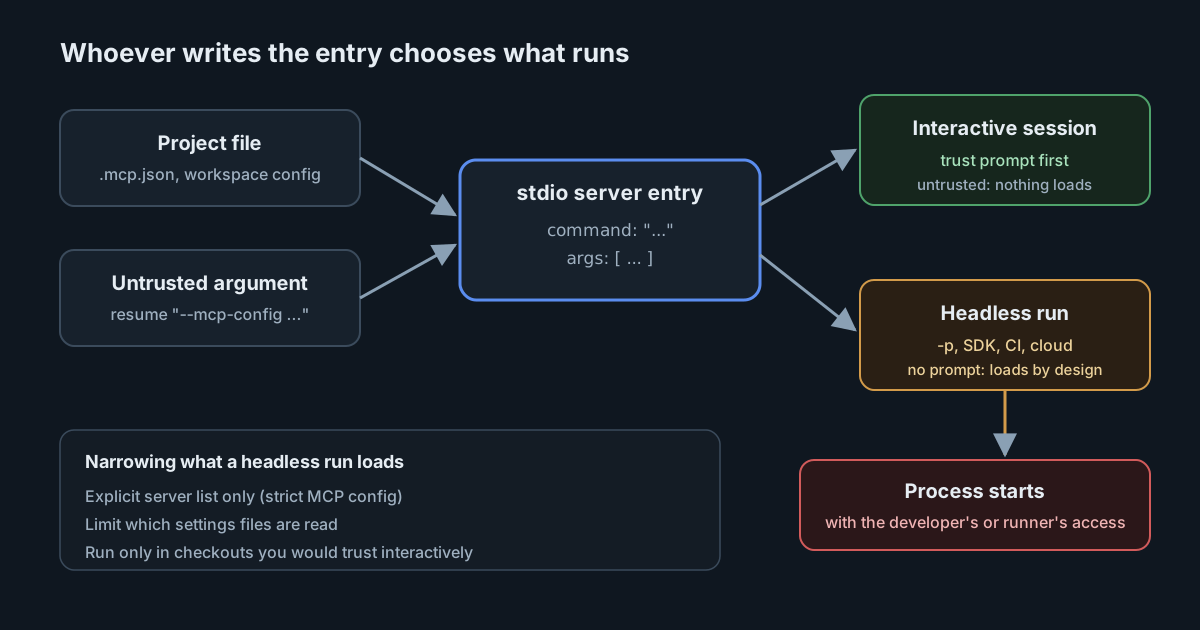
A local MCP server is not a URL. In most AI coding tools, a stdio server entry is a program name and a list of arguments, and the tool starts that program when it loads the entry. Whoever writes the entry chooses what runs on the developer's machine, with the developer's access.
Three CVE records published between 15 and 16 October 2026 show the same path from different directions: a project file in JetBrains' Junie CLI, a workspace file in Z.ai's ZCode, and an argument string in Anthropic's Claude Agent SDK. Read together with the vendors' own documentation, they also show where the usual safeguard, a trust prompt, is switched off by design.
Three records, one mechanism
Junie CLI. JetBrains published CVE-2026-111091 on 15 October as its own numbering authority. The description is short: in Junie CLI before 26.8.3, "code execution was possible via an untrusted project's MCP server configuration." JetBrains scores it 7.8 (high) under CVSS 3.1, with a local attack vector and user interaction required. In plain terms, someone has to open the project.
ZCode. CVE-2026-88755, published on 16 October, says ZCode v3.11.2.6792 "was discovered to automatically establish connections with MCP servers declared inside a repository's workspace configuration", which could let an attacker run code when a victim opens a crafted repository. MITRE's entry has no score; CISA's enrichment rates it 7.8 (high) and links a public proof of concept. The record names no fixed version. If your developers use ZCode, ask the vendor directly before assuming a later build is safe.
Claude Agent SDK. The third case starts with an argument string, not a file. Anthropic's advisory GHSA-h4mw-j7qp-8mwm for the Python SDK explains that a resume session ID beginning with - was passed to the Claude Code command line as a separate flag. If an attacker controlled that value, they could slip in --mcp-config carrying an inline stdio server of their choosing. That server's command then started along with the command-line tool, before any of the SDK's permission checks applied. It only applies to applications that pass untrusted input as the resume ID, for example a session ID taken from a web request. Versions before 0.2.121 are affected.
When the fix came first
The SDK case is worth reading for its timeline. The fix is pull request 1123, merged on 16 July 2026. It passes the value as --resume=<value> so the command line can't read it as a flag, and version 0.2.121 shipped the next day. The pull request says the TypeScript SDK made the same change in 0.3.208. The GitHub advisory followed on 12 September, and the CVE record on 16 October. If you track this by CVE, you are three months behind the fix.
The sources also disagree on severity. The pull request described the impact as bounded: "no shell is involved, so this is flag injection, not arbitrary command execution." The advisory, published later, rates it 9.2 under CVSS 4.0, which is critical, because --mcp-config turns a flag injection into a command that runs. Both statements are accurate for what each author had in view. The second is the one to plan around.
A follow-up release, v0.2.124 on 20 July, closed nearby gaps. On Windows it refuses to launch the command-line tool through .bat or .cmd shims and rejects cmd.exe metacharacters in resume and session_id. On every platform it now binds dash-prefixed extra_args values with = as well. If you pinned 0.2.121 for the advisory, move to at least 0.2.124.
Where trust prompts stop
Interactive tools now mostly ask before loading servers that a project defines. The Claude Code MCP documentation says it "prompts for approval in interactive sessions before using project-scoped servers from .mcp.json files." Junie's configuration page describes a project trust choice when you open a directory. An untrusted project doesn't load its project configuration, MCP servers, hooks, skills or guidelines.
Both vendors document the same exception. Claude Code says that in claude -p runs, Agent SDK sessions and cloud sessions it "can't show that prompt: it loads project-scoped servers without asking." Junie's headless mode page says non-interactive runs "are trusted by design" and load the project's MCP servers, hooks, agents, skills and guidelines, and adds: "Only run Junie non-interactively in projects you trust." Junie CLI is still an early access programme release, so this behaviour may change.
The two Junie pages differ on one point. The configuration page says hooks from the default project configuration file are ignored "for safety", while the headless page lists hooks among what a non-interactive run loads. We could not tell from the documentation which one applies to a given setup. Test it in your own pipeline rather than relying on either page.
This matters because headless runs are where agents meet the most untrusted input. A CI job that runs an agent against a pull request branch, a bot that triages issues in a checked-out fork, or an internal service that resumes sessions by ID are all non-interactive. The prompt that protects a developer at their desk isn't there.
The controls that exist
Claude Code documents three ways to narrow what a headless run loads. You can list servers in disabledMcpjsonServers, restrict which settings files are read with --setting-sources (or settingSources in the SDK), or pass --strict-mcp-config so that only the servers you supply on the command line load. The docs note that before v2.1.246 a strict session still waited on approval. It also notes that a cloned repository can't approve its own servers: an enableAllProjectMcpServers setting committed to the repository is ignored in a folder you haven't trusted.
For Junie, the documented control is the trust decision itself, so the safe pattern is to run it non-interactively only against checkouts you would trust interactively. For ZCode, the record gives no workaround.
We covered a close relative of this pattern in git configuration that runs code: a file the repository's author controls, read as if the tool's user had written it. The three Claude advisories in October showed the same gap between a shipped fix and a published record.
What it means for engineering and security leaders
- Treat MCP server entries as code. A stdio entry in
.mcp.json, a workspace file or an SDK option is the same as a script in the repository. Review it the same way. - Find your headless agent runs. List the CI jobs, bots and services that run coding agents non-interactively, and note what they check out. Anything that runs on contributor or fork branches needs explicit settings that don't read project configuration.
- Check where session IDs come from. If a service passes externally supplied values to an agent SDK, make sure they are validated, and that the SDK version binds them safely.
- Ask vendors two questions: what does your tool load from a project without asking, and does that change in non-interactive mode?
Practical takeaways
- Upgrade Junie CLI to 26.8.3 or later.
- Upgrade the Python Claude Agent SDK to 0.2.124 or later, and the TypeScript SDK to 0.3.208 or later.
- In headless Claude Code runs on untrusted branches, use
--strict-mcp-configwith an explicit server list, or limit--setting-sources. - Search your repositories and CI caches for project-level MCP files and check every
commandthey name. - Don't run agents non-interactively in checkouts you wouldn't open interactively.
SpanDock's MCP gateway can be set to Enforced for every computer, which adds its own MCP server to each AI tool it finds and also reports, or moves aside, the tools' other MCP servers. The docs don't say whether that covers server entries committed inside a repository, so treat it as a check on each tool's own configuration rather than on every project a developer opens. The gateway is on the Premium and Enterprise plans.
Sources
- CVE-2026-111091: JetBrains Junie CLI, code execution via an untrusted project's MCP server configuration
- JetBrains Junie documentation: Junie CLI configuration (project trust)
- JetBrains Junie documentation: headless mode
- CVE-2026-88755: Z.ai ZCode connects to MCP servers declared in a repository's workspace configuration
- Claude Agent SDK for Python advisory GHSA-h4mw-j7qp-8mwm (CVE-2026-96620)
- claude-agent-sdk-python pull request 1123: pass --resume and --session-id as a single argv token
- claude-agent-sdk-python release v0.2.124
- Claude Code documentation: connect Claude Code to tools via MCP