
GitHub's package firewall preview: a checkpoint between coding agents and npm
GitHub's package firewall checks npm installs from CI runners and coding agents against age, malware and attestation rules. How it works, and its limits.
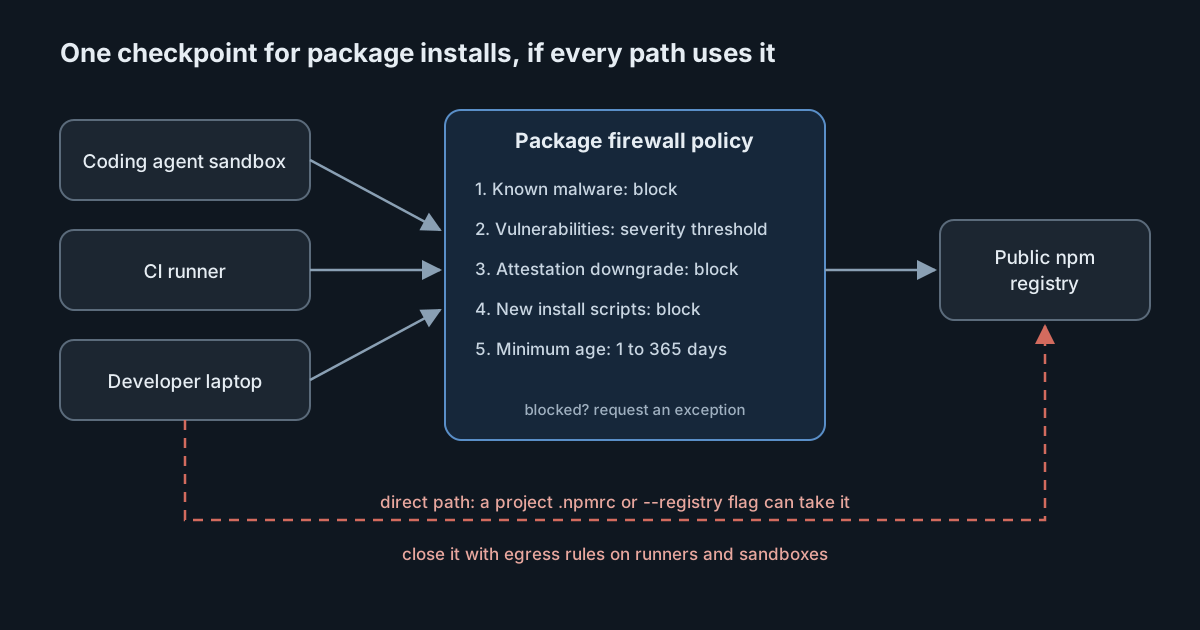
Coding agents install packages the way developers do, only more often and with less hesitation. When a malicious version lands on npm, an agent can pull it within minutes of publication and run its install script with whatever credentials sit in the environment. On 20 October 2026 GitHub put a package firewall into public preview: a service that sits between those installs and the public registry and refuses downloads that fail an enterprise policy. This article explains what the firewall checks, what it takes to route agents through it, and the gaps a team still has to close itself.
What GitHub released
The changelog entry describes the firewall as sitting "between endpoints like Actions runners or coding agents and the upstream package repositories", inspecting both metadata requests and package downloads. Its stated reason is that a growing number of attacks harvest credentials at installation time, before anyone runs the package's code.
The terms of the preview matter for planning:
- It is available to GitHub Enterprise Cloud customers, including those with data residency.
- It supports npm only for now.
- It is free during the preview. GitHub says that at general availability it will be charged on metered usage, similar to Actions billing, without giving prices yet.
- If a package is blocked by mistake, the user can request an exception through a workflow similar to other GitHub Advanced Security features.
The five policy controls
The setup guide lists the controls an enterprise administrator or security manager (or a custom role with the policy permission) configures under the enterprise's policies. They apply to every request that passes through the firewall.
| Control | What it blocks | Default |
|---|---|---|
| Block known malware | Packages with an active malware advisory in the GitHub Advisory Database | On |
| Block vulnerability advisories | Versions with a vulnerability advisory at or above a chosen severity | Critical only |
| Block attestation downgrades | A version without SLSA attestations when earlier versions had them | On |
| Block newly-introduced install scripts | Packages that recently added scripts such as preinstall or postinstall | On |
| Minimum package age | Versions newer than a set age, from 1 to 365 days (0 turns it off) | 1 day |
The changelog describes the controls more loosely: a configurable cooldown, advisory checks for malware or vulnerabilities, and "supply-chain checks like attestation downgrades". Only the guide names the install-script check, so treat the guide as the reference for what a policy can contain. It also notes that the preview is subject to change.
The age rule and the install-script rule are the most relevant to agents. The guide describes the cooldown as "allowing time for threats to be discovered before you install them", and a short window can be enough. We saw this in the tensorlake npm worm, where the bad version was live for less than two hours. And a long-standing package that suddenly gains a postinstall script is exactly the change an attacker who has taken over a maintainer account tends to make.
What routing an agent through it involves
The firewall protects only the endpoints that use it. Each one has to be pointed at an enterprise-specific registry URL, typically in its user-level .npmrc, with a token:
registry=https://package-firewall.githubapp.com/npm/enterprises/ENTERPRISE
//package-firewall.githubapp.com/npm/enterprises/ENTERPRISE/:_authToken=${GITHUB_TOKEN}
The guide says the token must be associated with a user or bot account that is a member of the enterprise, and that it does not need any elevated permission beyond read-only access to public repositories. That is a modest privilege, but it is still a credential that has to exist in every CI job and agent sandbox. Keep it in the secret store you already use for those environments, not in a repository.
Teams that already proxy npm through JFrog Artifactory can add the firewall as a remote repository instead. The guide marks this as experimental, and tells administrators to exclude any remote that fetches packages directly from the public npm registry, "so they cannot bypass the firewall."
The bypass problem
That warning applies well beyond Artifactory. The npm configuration reference describes a standard precedence for its settings, command line, then environment, then project, then user, then global, and notes in its release-age entry that "a higher-priority source can always relax or override a lower-priority one." A user-level .npmrc is near the bottom of that list. A project's own .npmrc, an environment variable or a --registry flag can point npm somewhere else, and an agent that follows a repository's instructions may do exactly that.
So the firewall is a policy decision point, not an enforcement boundary by itself. To make it one, the machines where agents run must be unable to reach registry.npmjs.org directly, through egress rules on the runner or sandbox network. Without that, the firewall protects the installs that choose to use it.
What is new, and what is not
Some of these checks already exist on the client. The npm configuration reference documents min-release-age, which installs only versions older than a given number of days, and an allowScripts field in package.json that lists which packages may run install scripts.
What the firewall changes is where the policy lives. Client settings are spread across thousands of machines and can be overridden locally. A firewall policy is set once, by the enterprise, with named roles that may change it and a list of exceptions that administrators can review and remove. For coding agents, whose environments are often created fresh for each task, a central rule is easier to keep consistent than a dotfile.
The trade-offs are real:
- Coverage. npm only. Python, Go, Rust and container images still need their own controls.
- Exceptions can widen quietly. A reviewer approving a request can replace the version with
*, which the guide notes "broadens the exception beyond the requested version." That is useful for packages your own organisation publishes, and risky for anything else. - Cost is unknown. Metered billing at general availability makes high-volume CI and agent fleets the expensive case. Measure request volume during the free preview.
- Security fixes can be delayed. The age rule also blocks a new version that fixes a vulnerability. The guide's answer is the exception workflow, so someone needs to own those requests on a working day.
What it means for engineering and security leaders
- Treat agent installs as untrusted code execution. An
npm installin an agent sandbox runs install scripts from strangers, with whatever tokens are in the environment. A cooldown and an install-script rule shrink that exposure cheaply. - Pair the firewall with egress control. Route installs through it and block the direct path. Otherwise the policy is advisory.
- Decide the severity threshold on purpose. "Critical only" is the default for vulnerability blocking. A stricter setting will block more builds, so agree it with the teams who own the pipelines.
- Name an owner for exceptions. Blocked security fixes and internal packages will generate requests. Slow answers push people to bypass the firewall.
Practical takeaways
- If you are on GitHub Enterprise Cloud, turn the firewall on in a test enterprise or for one pipeline, and route one coding agent sandbox through it.
- Start with the defaults, then consider a longer minimum age (for example three to seven days) for agent environments specifically.
- Add egress rules so runners and agent sandboxes cannot reach the public npm registry directly.
- Check repositories for project-level
.npmrcfiles that setregistry, and decide whether to allow them. - Keep
min-release-ageandallowScriptsin client configuration as a second layer for machines that are outside the firewall. - Record request volumes during the preview so you can estimate the metered cost later.