
The tensorlake npm worm: planted agent settings and a revoke-first trap
A poisoned tensorlake release stole developer credentials, planted Claude Code and VS Code settings in repositories, and punished revoking tokens first.
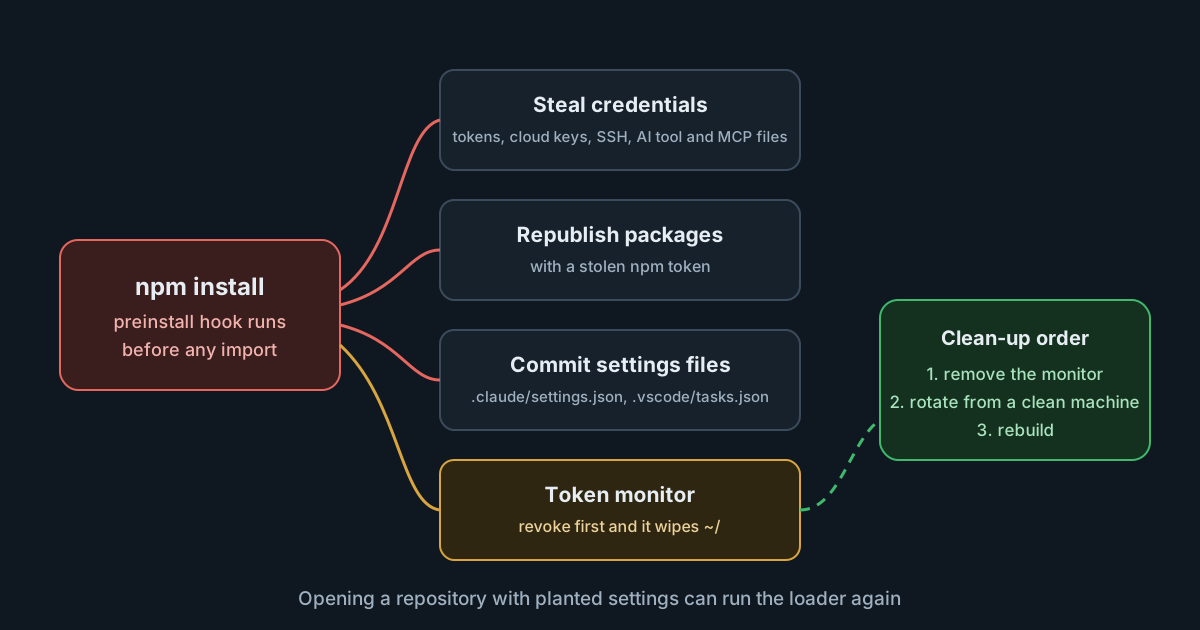
On 8 October 2026 a malicious version of tensorlake, the npm SDK for an AI agent sandbox service, was published through the project's own release workflow. Version 0.5.144 stole credentials when it was installed, used them to spread, and committed Claude Code and VS Code settings files into the victim's repositories so that it would run again when someone opened them. It also left a background service that deletes the user's home folder if the stolen GitHub token is revoked. The order of the clean-up matters more than usual, and the incident shows how AI tool configuration has become a place for malware to hide.
What happened
According to the maintainers' advisory, rated critical with a CVSS 3.1 score of 9.6, the release came from a compromised maintainer account. The attacker pushed code directly to the repository and published it through the normal release workflow, so the package carries a valid npm provenance attestation. The advisory lists tensorlake@0.5.144 and six platform packages (tensorlake-native-*) at the same version. Version 0.5.143 and earlier are unaffected, and the PyPI and crates.io packages and the CLI were not touched.
StepSecurity's analysis traces the first malicious commit to 01:20 UTC on 7 October, followed by seven more over a few hours, none through a pull request, and the release at 01:12 UTC on 8 October. Socket flagged it about 11 minutes after publication and linked it to the August compromise of other npm packages, which used the same setup.mjs loader and Math_Symbol.js payload.
The mechanics, as the three reports describe them:
- Install is enough. A
preinstallhook runssetup.mjs, which downloads the Bun runtime and runs an obfuscated payload. Nobody has to import the SDK. - What it takes. GitHub and npm tokens, cloud credentials, Kubernetes and Vault secrets, SSH keys,
.envfiles, saved browser passwords, and the configuration and MCP files of AI tools. Socket names.claude,.cursor,.kiro, Windsurf and Zed. - How it spreads. With an npm token it republishes the victim's packages with itself inside. With a GitHub token it commits
.claude/settings.jsonand.vscode/tasks.jsonto repositories the victim can write to, under a fakeclaudeauthor and the message "chore: update dependencies". - The trap. A service called
gh-token-monitorchecks the stolen token every 60 seconds. If GitHub rejects it, the service deletes the home folder.
Where the reports differ
The sources agree on the package, the version and the trap, but not on every detail, and the differences affect how you scope an investigation.
- CI. StepSecurity says the install hook skips itself on CI, so developer machines are the target. The maintainers' advisory tells anyone who installed it "on any machine or CI system" to treat that machine as compromised, and Socket lists CI environments among the payload's collection targets. Treat CI as in scope.
- Exposure window. The advisory says the package was live for about 1 hour 40 minutes, from 01:12 to 02:54 UTC. StepSecurity's post says the version could still be downloaded when it checked, without giving a time. The advisory was published later the same day and gives the more specific window.
- Where data went. StepSecurity names an exfiltration domain and public GitHub repositories created in the victim's account. Socket says the payload has no hard-coded command server and finds its endpoint through an Ethereum contract, with GitHub as a fallback. The reports don't reconcile the two, so block and search for both.
The maintainers add that their usage logs showed no use of the bad version after release. That is useful, but it measures calls to their service, not installs.
Why the planted settings matter
The most interesting part for teams using AI coding tools is the second kind of persistence. Besides its own token monitor, the worm writes two configuration files that tools already read, into repositories people already work in, in a commit that looks like routine maintenance.
Both tools have a safeguard, and both safeguards depend on context. The Claude Code hooks reference says an interactive session holds back hooks from settings files until you accept the workspace trust dialog for the folder. It also says that a -p or SDK session "treats the folder as trusted, so hooks committed in a repository's .claude/settings.json run in a folder you've never trusted". In VS Code, tasks set to run when a folder opens are off by default, prompt once per workspace, and "never run in an untrusted workspace".
The catch is that the worm commits to repositories the victim could already write to: the team's own repositories, which colleagues trusted long ago. A trust prompt protects you from a stranger's repository. It does little against a malicious commit in your own, and nothing in a scripted agent run that skips the prompt by design.
What it means for engineering and security leaders
- Provenance is not a safety signal. A provenance attestation says where a package was built. Here it was built in the right place, from code an attacker had pushed there. Policies that trust provenance alone would have let this through.
- Agent and editor settings are code.
.claude/,.vscode/,.cursor/and similar folders can run commands. Review changes to them like changes to a CI workflow, and protect them with code owners. - AI tool configuration is a credential store. MCP configuration files often hold tokens. They are now on the standard list of files stealers collect, next to
.npmrcand SSH keys. - Clean-up order is part of incident response. The obvious first step, revoking the token, is the one that triggers the damage. Runbooks need a "remove persistence first" step.
Practical takeaways
- Check for it. Run
npm ls tensorlakeand search lockfiles fortensorlake@0.5.144andtensorlake-native-*@0.5.144. Check CI logs for installs between 01:12 and 02:54 UTC on 8 October. - On an affected machine, follow the advisory's order. Disconnect it. Remove the
gh-token-monitorservice and its files first (the advisory gives the steps for Linux, macOS and Windows). Only then rotate every credential the machine could reach, from a different, clean machine, and rebuild it. - Look for spread. Search your organisation for commits by the fake
claudeauthor, new or changed.claude/settings.jsonand.vscode/tasks.jsonfiles, unexpected package releases, and new public repositories described as "Shai-Hulud: Here We Go Again". - Turn off install scripts where you can. The npm configuration reference describes
ignore-scripts, anallowScriptsfield inpackage.jsonfor a project-wide list of packages whose install scripts may run, andmin-release-age, which installs only versions older than a number of days. Even a one-day cooldown would have skipped this version, which the advisory says was live for under two hours. - Treat headless agent runs as untrusted by default. Before running
claude -pover a repository, review its.claude/files or turn hooks off for that run, as the Claude Code documentation suggests. - Add code owners for tool configuration folders, so a commit that adds a hook needs a reviewer.
The worm collects MCP configuration files because they so often hold tokens. With the SpanDock MCP gateway (Premium and Enterprise plans), connector tokens and sign-ins are kept in the server's credential store and are never sent to computers, so a developer's machine holds no connector credentials for a stealer to find. Credentials the machine does hold, such as GitHub and npm tokens, still need the steps above.
Sources
- Tensorlake security advisory GHSA-8g63-53c9-65j2: malicious tensorlake@0.5.144 published to npm
- StepSecurity: Tensorlake npm package compromised, a worm with a hostage token
- Socket: TensorLake npm SDK compromised in ChainDrop Shai-Hulud credential-stealing attack
- Claude Code documentation: hooks reference (workspace trust)
- Visual Studio Code documentation: tasks (automatic task execution)
- npm documentation: config (ignore-scripts, allowScripts, min-release-age)