
Copilot local sandboxing is generally available: what it actually restricts
Copilot local sandboxing is GA in the CLI, app and VS Code Agent Host. What OS limits cover, leave out, and how they sit with policy.
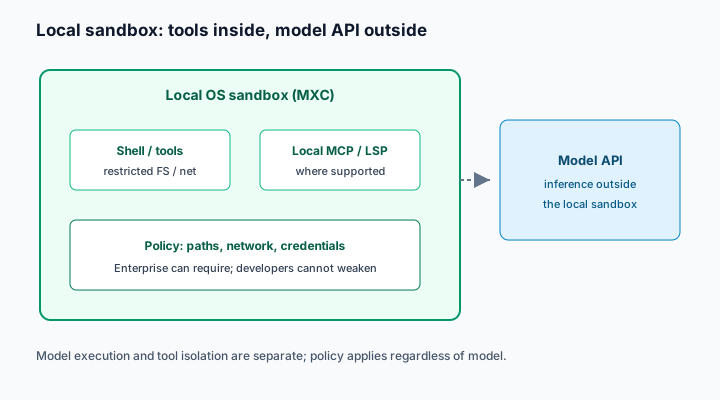
On 7 October 2026 GitHub announced that local sandboxing for GitHub Copilot is generally available in Copilot CLI, the Copilot app and VS Code sessions using Agent Host. It is included with Copilot at no extra cost. The weekly Copilot changelog for 5 October restates the same GA scope. The useful question for security and platform teams is what the sandbox actually restricts, and what it deliberately leaves alone.
Context: OS controls on the laptop, not on the model
GitHub's GA post says local sandboxes give a secure execution boundary for agentic workflows on the developer's machine. Tools and commands initiated by Copilot run with restricted access to the filesystem, network, credentials and other system capabilities, based on developer or organisation policy. The stack is powered by Microsoft eXecution Container (MXC), which maps a common policy onto native OS controls on Windows, macOS and Linux.
The concepts documentation is explicit that model execution and tool isolation are separate. Sandbox policies apply to tool execution regardless of which model Copilot uses. Local sandboxing does not sandbox model weights or cloud inference. It also does not cover remote or cloud sandbox sessions; those are a different product surface (cloud sandboxes remain in public preview per the concepts page).
Platform prerequisites matter. The how-to requires Windows 11 25H2 with update KB5124010 or later, or 26H1 with KB5124006 or later. Linux needs Bubblewrap (bwrap) 0.5.0 or later and slirp4netns on PATH. Concepts docs add further Linux networking packages for outbound traffic.
Analysis: defaults and enterprise force-on
Default CLI behaviour, once enabled, allows writes in the current working directory and temporary folders. In a Git repository, Git metadata is writable; the rest of the repository above the current directory is readable but not writable. Outbound internet is on by default; local network access is off. Git and gh authentication can run through a local proxy that replaces placeholder credentials only for approved HTTPS destinations. Enterprises can require sandboxing so that ordinary settings and --no-sandbox cannot turn it off; where policy permits bypass, a session-only opt-out may still exist without loosening the saved policy.
That combination is useful and incomplete. Useful: a clear OS boundary around shell, many local tools, and, where supported, local MCP and language servers. Incomplete: built-in file tools that run in-process in the CLI check policy themselves on a best-effort basis because the CLI process is not sandboxed; remote MCP servers are never sandboxed; credential masking covers configured variables and enabled Git/gh auth, not secrets in arbitrary files.
Local sandboxing is also distinct from the built-in sandboxes discussed in sandboxing coding agents. Treat Copilot's MXC path as one control among several, not as a substitute for least-privilege MCP and secrets hygiene described in prompt injection to code execution.
Developer experience trade-offs
Sandboxing changes day-to-day agent workflows. Package managers that reach private registries, Docker daemons on the local socket, and tools that talk to localhost services will fail until policy allows them. The how-to documents that local network access is off by default; many monorepo setups need an explicit allow for internal package feeds or sidecar APIs. Plan a short policy workshop with one platform engineer and one security owner before mandating the control organisation-wide.
GitHub's concepts page also notes that cloud sandboxes remain a separate surface (public preview at the time of writing). Do not write a single "Copilot sandbox" control in your ISMS that conflates MXC on the laptop with a billed cloud environment. They share a product family and different threat models.
What it means for engineering and security leaders
Turn enterprise require-on where agent autonomy is rising. If teams are expanding Agent Host or CLI autonomy, managed settings that require sandboxing remove the "developer forgot /sandbox enable" failure mode.
Do not confuse local and cloud sandboxes in policy. Local is on-device, free with the seat, lighter-weight OS containment. Cloud is billed, ephemeral and hosted. Write playbooks for each.
Keep MCP and secret policy separate. A sandboxed shell that still reaches a permissive remote MCP server can move data the OS sandbox never saw. Pair OS limits with connector permissions.
Validate the host fleet. Unsupported Windows builds and missing bwrap/slirp4netns fail open or refuse enablement depending on managed settings. Inventory before mandating.
Credential placeholders for Git and gh reduce one class of token theft from the agent transcript, but they are not a secrets vault. Files on disk, environment variables the proxy does not know about, and remote MCP servers remain out of scope. Keep rotating tokens and prefer short-lived credentials regardless of sandbox status.
Practical takeaways for this week
- Enable local sandboxing in a pilot CLI and Agent Host cohort; run
/sandbox statusand/sandbox policyon a real repo. - Decide whether outbound internet stays on by default for that cohort, and document approved hosts for credential injection.
- If you manage Copilot for an organisation, test enterprise-required sandboxing and confirm developers cannot weaken it.
- List which MCP servers are local versus remote; assume remote ones sit outside the sandbox.
- Cross-check Linux package baselines (
bwrap≥0.5.0,slirp4netns) and Windows 11 update levels before a broad mandate. - Keep cloud sandbox and local sandbox runbooks separate, including billing owners for cloud.
Complementary controls in SpanDock
SpanDock does not claim an OS sandbox. On Enterprise (and in the trial), guardrails are rules enforced on each computer for prompts and tool calls, with matching on the computer itself. The MCP gateway (Premium and Enterprise, and the trial) puts one governed MCP server in front of organisation connectors with permissions, approvals and recording. Use those for tool and data policy alongside Copilot's OS boundary, not instead of it.