
VS Code 1.141.1 stops Copilot agents from silently editing hook files
A VS Code flaw let a Copilot-harness agent add a shell command to a hook file without asking. What was fixed, how the ratings differ, and what to check.
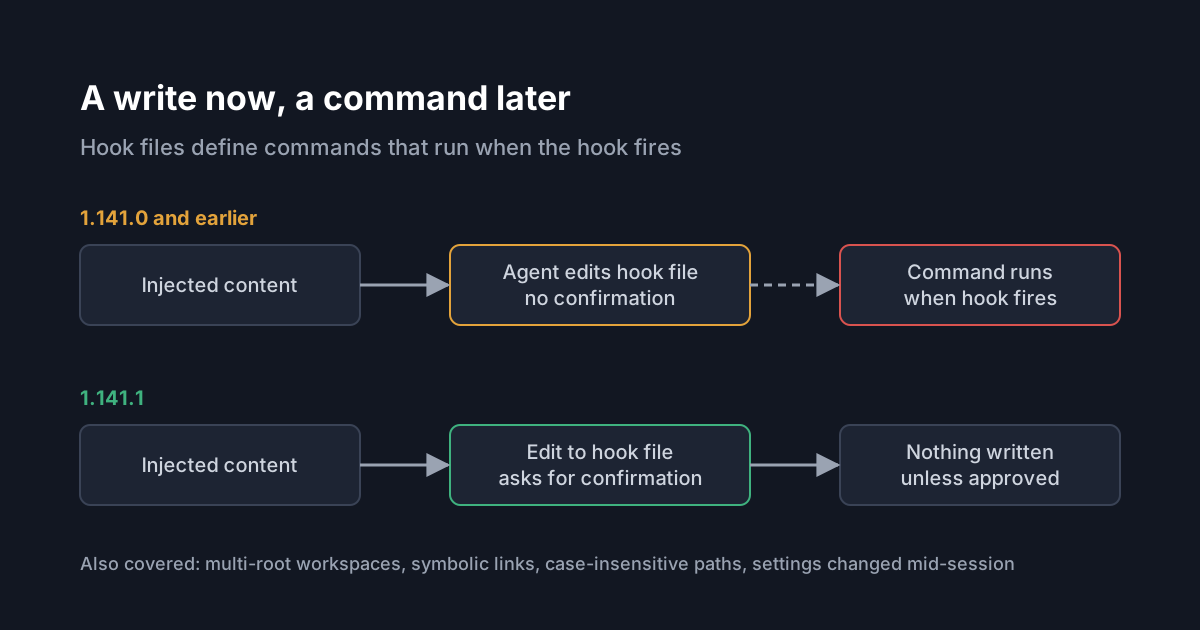
On 13 October 2026 the VS Code team published an advisory for a flaw in how GitHub Copilot agent sessions treat hook files. In VS Code 1.141.0 and earlier, an agent running on the local Copilot harness could edit the files that define hooks and custom agents without asking first, as if they were ordinary workspace files. Because hooks run shell commands, an agent steered by prompt injection could plant a command that later ran with the developer's privileges. VS Code 1.141.1 fixes it. If your developers use Copilot agent sessions in VS Code, check the version and how hook locations are configured.
What the flaw was
Hooks run custom actions at fixed points in an agent's lifecycle, for example to validate a tool call, run a formatter or record an event. The VS Code hooks documentation describes several places hook definitions can live, including user folders, .github/hooks/*.json in a repository and inline settings files. Editor settings such as chat.hookFilesLocations and chat.agentFilesLocations point VS Code at extra locations for hook and agent-definition files.
According to the advisory, GHSA-fq62-m6f5-c7h9, the harness could automatically approve edits to those configured locations. An attacker who can influence the agent, through malicious content or prompt injection, could get it to add a shell command to one of these files without the approval prompt the user expected. Nothing runs at that moment. The command runs later, when the affected hook is invoked.
The advisory sets out the conditions. The user must have an affected custom location configured, hooks enabled, and must run a Copilot-harness session against attacker-controlled content.
What the fix changes
VS Code 1.141.1 treats enabled, workspace-relative hook and agent-definition locations as sensitive. Direct writes and shell redirections that target them now ask for confirmation instead of being approved under normal permission settings. The advisory says the protection covers Copilot-harness sessions in both the Agents window and the regular Chat view, and that it accounts for multi-root workspaces, symbolic links, case-insensitive paths, and settings changed while a session is running.
That last list is a useful reminder of how such checks fail. A rule that protects .github/hooks/ by exact path is easy to get around with a symlink, a different letter case on a case-insensitive file system, or a second workspace root.
The two ratings do not match
The GitHub advisory and Microsoft's own record describe the same issue differently, and it is worth knowing both before you triage it.
- The GitHub advisory is titled as remote code execution and rated high.
- Microsoft's entry for CVE-2026-102232 calls it a security feature bypass, rates it "Important", and gives a CVSS 3.1 base score of 7.0, which falls in the high band. Its vector marks the attack as local, with high complexity and user interaction required. Microsoft lists it as not publicly disclosed, not exploited, and with exploitation "less likely".
Microsoft explains the high complexity by the chain an attacker needs: prompt injection, an interaction with the Copilot agent, and something that triggers the hook afterwards. The two descriptions are consistent about the mechanism. They differ in emphasis: one names the end result, a command running on the machine; the other names the control that was bypassed, the approval prompt.
Workarounds, and a caveat
For anyone who cannot update yet, the advisory suggests setting chat.useHooks and chat.useClaudeHooks to false, or removing custom entries from chat.hookFilesLocations and chat.agentFilesLocations.
Read that alongside the current hooks documentation, which says local settings such as chat.useHooks "do not prevent the Copilot harness from loading a configuration". We have not tested how the two interact, and the sources do not settle it. Treat updating to 1.141.1 as the fix, and the settings as a stopgap at best.
What it means for engineering and security leaders
This is one more case of a pattern we have covered before, in git config poisoning and in MCP server entries that are really commands: a coding agent can write to a file that something else will later execute. The write looks harmless in isolation. The danger is in what reads the file next.
Approval prompts are only as good as the agent's idea of which files are sensitive. Every tool that adds a new executable configuration file, whether hooks, custom agents, task definitions or settings that start processes, adds a path that needs the same protection. When you assess an agent, ask which files it can change without asking, and which of those can make something run.
Hooks are also a place where enforcement lives. Teams use them to block risky tool calls or log activity. An agent that can rewrite its own hooks can, in principle, switch those controls off, which is a second reason to keep hook files out of an agent's unprompted reach.
Practical takeaways
- Update VS Code to 1.141.1 or later on every machine that runs Copilot agent sessions, and check the version in your device management reports.
- List where hook and agent-definition files live in your repositories and user profiles, and review changes to them in code review like any other executable code.
- Don't approve unexpected edits to hook or agent files during an agent session, even when the change looks small.
- Avoid running agent sessions against untrusted repositories or content without a sandbox.
- If you rely on hooks for enforcement, look at managing them centrally. The hooks documentation notes that an organisation can restrict which hooks run, and links to guidance for administrators.