
Copilot model policies now have a REST API: managing model access as code
GitHub's new endpoints read and set which Copilot models each enterprise, team, app and organisation may use. How the policy states work and what to automate.
Which AI models a developer may use is now a policy decision with cost, compliance and quality consequences, and for Copilot it has mostly been made by clicking through settings pages. On 19 October 2026 GitHub made REST endpoints generally available for reading and updating Copilot model policies at the enterprise, enterprise team, enterprise app and organisation level. That makes model access something you can review, version and audit like any other configuration. This article explains how the policy states fit together, a few details in the documentation worth checking, and what to automate first.
What GitHub released
The changelog entry lists GET and PATCH endpoints at four levels: the enterprise, enterprise teams, enterprise apps and organisations. In GitHub's words, "Enterprise policies can delegate model control to organizations in organization mode, or to teams and apps in enterprise teams mode."
The same day, GitHub deprecated six models across most Copilot experiences, including GPT-5.5, GPT-5.4 and Gemini 3.7 Flash, each with a suggested alternative. The notice says Copilot Enterprise administrators "may need to enable access to alternative models through their model policies." That is exactly the job the new endpoints make scriptable. More is already scheduled: a 15 October notice says Claude Opus 4.8, Claude Opus 5 and GPT-5.6 Terra will be deprecated across Copilot on 16 November 2026 (with an exception that keeps Claude Opus 4.8 for individual subscribers on annual plans). It adds that the suggested alternatives are enabled automatically for Copilot Business and Enterprise customers unless an administrator has turned off the global default or explicitly disabled the model.
How model policies fit together
The model availability guide applies to enterprises on Copilot Business or Copilot Enterprise and describes two layers.
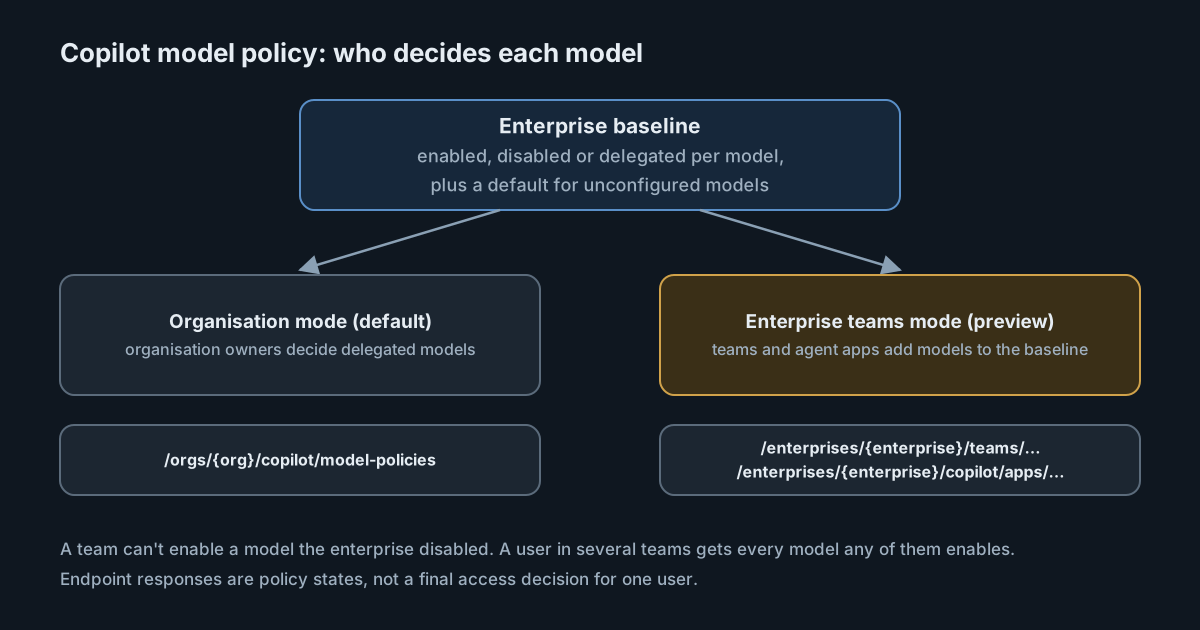
The enterprise baseline. For each model, enterprise owners choose enabled for everyone, disabled for everyone, or delegated. GitHub recommends explicitly configuring every model that should be on or off for everyone. A separate "Default availability" policy decides what happens to generally available models nobody has configured: if it is on, they are available to everyone.
Granular access, in one of two modes.
- Organisation mode, the default. Delegated models are decided by each organisation's owners. Enterprise owners can also create targeted rules that enable models for specific organisations.
- Enterprise teams mode, an opt-in preview. Organisation-level model settings are switched off, and delegated models are enabled per enterprise team instead. Team settings only add to the baseline: a model the enterprise disabled can't be enabled for a team, and a user in several teams gets every model any of them enables.
Agent apps, which the guide describes as GitHub Apps that expose agents on GitHub, built by GitHub partners, have their own setting. By default they get the models enabled where they are installed. In enterprise teams mode, their models are controlled at the enterprise level.
The REST reference maps this onto policy states. At the enterprise level a model can be enabled, disabled, delegate_to_teams_and_apps or delegate_to_organizations, and default_availability takes enabled, disabled or delegate_to_organizations. At the team and app level, the descriptions say to set a model to enabled or to optional to clear the setting. Team and app responses both include an editable flag, because models the enterprise has locked can't be changed there.
Details worth checking before you automate
The responses are not an access decision. The reference says of the team and app states that they "do not necessarily determine whether an individual user can access a model." If you want to answer "can this person use this model?", you have to combine the enterprise baseline, delegation and every team the person belongs to. Build that logic deliberately, and test it against what users actually see.
Two small documentation mismatches. The changelog writes the team endpoint as /teams/{team_slug}/, while the REST reference uses a numeric team_id. And for team policies, the how-to guide says:
There is no option to explicitly set a model to "disabled" for a team in the team's settings.
That sentence is about the team settings page, so the API may simply offer more than the page does. The REST reference itself is less consistent: its prose describes only enabled and optional for teams and apps, while its parameter list also accepts disabled. Test against the API itself before relying on either reading.
The token you use matters. Read endpoints need the read:enterprise scope on a classic personal access token or OAuth app token. Writes need admin:enterprise, which is a broad scope to hand to a script. For fine-grained access, the reference lists GitHub App user and installation tokens with the "Enterprise AI controls" enterprise permission. An app with only that permission is the narrower choice for automation. The endpoints also accept users who hold the read_enterprise_ai_controls or write_enterprise_ai_controls permission, so the job doesn't have to run as an enterprise owner.
Enterprise teams mode can remove access when you switch. The guide warns that models currently delegated to organisations "will be unavailable until they are enabled for specific teams" once you opt in. Exporting the current state through the API before the switch, and comparing after, is a cheap way to avoid a surprise.
What it means for engineering and security leaders
- Model access belongs in version control. A JSON file describing which models are enabled, disabled or delegated can be reviewed in a pull request and applied by a job. It gives you a history of who changed what and why, which a settings page doesn't.
- Deprecations are a recurring workload. GitHub deprecated six models on one day this month and has announced three more for 16 November. A script that lists models in a "delegate" or "default" state, and flags any that lack an explicit decision, turns each notice into a routine check.
- Default availability is the setting to decide on purpose. With it on, new generally available models reach everyone automatically. That suits some organisations and not others, for reasons of cost, data handling or evaluation.
- Different teams can reasonably have different models. The guide's own example is enabling higher-cost models for development teams or people who have had specific training. Enterprise teams mode is built for that, but it is still a preview, and GitHub notes that changes to enterprise-level model policies made in that mode are not kept if you roll back.
Practical takeaways
- Export your current enterprise and organisation model policies through the GET endpoints and store the result in a repository.
- Decide explicitly whether "Default availability" should be on, and record the reason.
- For each model in this month's and November's deprecation notices, confirm its suggested alternative is enabled where people need it.
- Create a GitHub App with only the "Enterprise AI controls" permission for automation, instead of a classic token with
admin:enterprise. - If you plan to move to enterprise teams mode, compare delegated models before and after on a test enterprise or with a short pilot.
Model policy decides what people may use; it doesn't show what they do use. SpanDock receives OpenTelemetry from AI coding tools including GitHub Copilot, and its Models page ranks the models your tools used by spend, tokens, calls, speed, reliability or value, with each model's list price for comparison. That gives you a usage baseline to check before you disable or retire a model. The getting started guide lists which Copilot surfaces SpanDock configures for you.
Sources
- GitHub Changelog: Copilot model policy API for enterprise, orgs, and teams (19 October 2026)
- GitHub Docs: REST API endpoints for enterprise AI controls
- GitHub Docs: Managing availability of models in your enterprise
- GitHub Changelog: GitHub Copilot models deprecated on October 19, 2026
- GitHub Changelog: Upcoming deprecation of selected GitHub Copilot models in mid-November (15 October 2026)