
GitHub's AI Scan and agentic autofix are GA: what they will and won't do
AI Scan adds advisory findings to pull requests; agentic autofix turns alerts into draft fixes. Coverage, limits, billing and how to fit both into review.
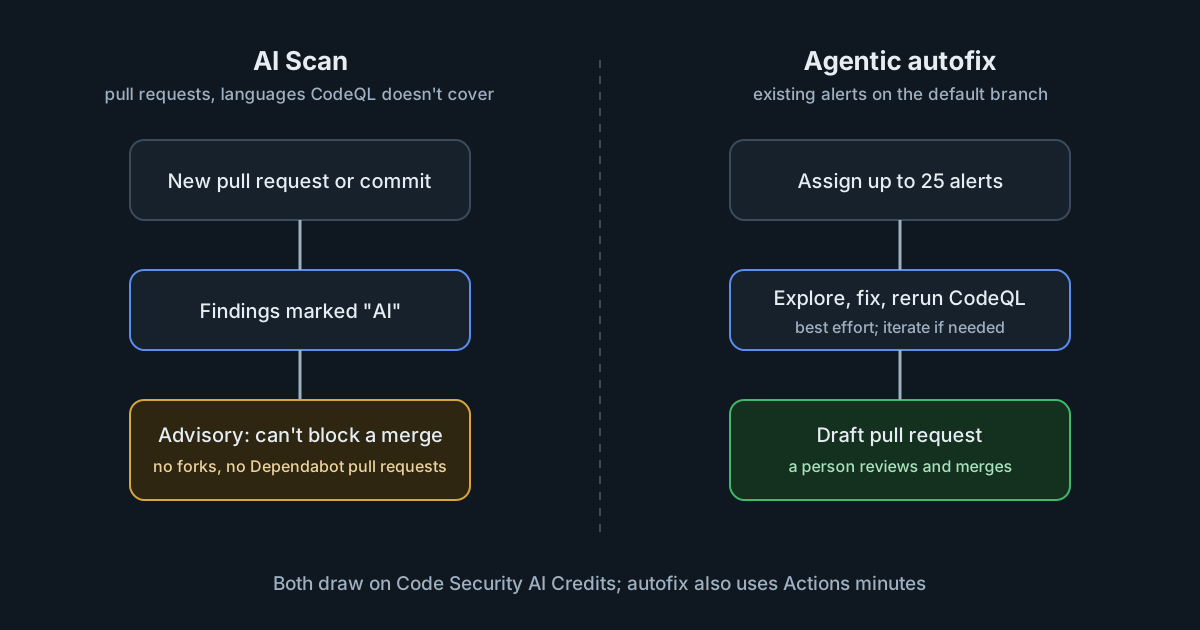
On 15 October 2026 GitHub made two AI security features generally available. AI Scan for pull requests looks for vulnerabilities in pull request changes written in languages and formats that CodeQL doesn't cover, such as PHP, shell scripts, Terraform and Dockerfiles. Agentic autofix takes existing code scanning alerts, works out a fix across the codebase and opens a draft pull request. Both are useful, both are metered, and both are designed to inform people rather than to decide for them. Getting value from them depends on fitting them into review and budgets deliberately.
AI Scan: more coverage, as advice
According to the AI Scan documentation, the scanner runs when a pull request is opened and after each new commit, if code scanning and the repository's AI Scan setting are on. It needs no build and doesn't depend on CodeQL, so it still runs if CodeQL analysis fails. Findings appear on the pull request next to CodeQL's, marked "AI", usually with an explanation and a suggested fix. The documentation lists nine detection categories, from string injection and weak cryptography to server-side request forgery and supply chain risks such as unpinned actions, packages or images.
The limits are as important as the coverage:
- Advisory only. Findings don't fail the code scanning check and can't yet be used in rulesets to block a merge.
- Pull requests only. There are no full-repository scans, and findings don't become backlog alerts in the security view.
- Not every pull request. It doesn't run on pull requests from forks or on those created by Dependabot.
- False positives. The documentation says findings "may include false positives", and offers a feedback control.
One design choice is worth noting. The scanner uses its own prompts, not the repository's custom instruction files such as .github/copilot-instructions.md or CLAUDE.md. That means a repository's instructions can't steer what the security scanner looks for, which is the right default for a security tool reading code that anyone might have written.
Who gets it, and what it costs
AI Scan is available on public repositories owned by organisations or personal accounts. Private and internal repositories owned by organisations need GitHub Code Security or GitHub Advanced Security. Private repositories in personal accounts can't use it, and no Copilot license is required.
Usage is billed as Code Security AI Credits, separately from active-committer licensing. Included credits from a Copilot entitlement are used first, then metered usage under your budgets. Two details from the documentation are easy to miss. Enterprise owners must first allow organisations to enable it (the policy defaults to "Not allowed"), but once an organisation turns it on, it applies at once to every eligible repository, and qualifying pull requests can consume credits before a repository administrator opts out. And if a hard budget leaves no credits, AI Scan "cannot produce findings" until the budget is raised or a new billing cycle starts.
That last point turns a billing setting into a coverage setting. A team that relies on AI Scan for its Terraform or shell code needs to know when the budget has run out, because the pull requests will simply arrive without findings.
Agentic autofix: draft pull requests from alerts
Agentic autofix starts when someone assigns a code scanning alert to Copilot, from the alert, from a list of up to 25 alerts to fix together in one pull request, or through the REST API. The changelog describes the loop: explore the relevant files, propose a fix, rerun CodeQL to check that the alert closes, iterate if needed, and open a draft pull request that explains the fix and the validation. It works on alerts from the repository's default branch only, and each session consumes AI credits and GitHub Actions minutes. When it is enabled, it replaces the free "Generate Fix" option on individual alerts with an "Assign to Copilot" button.
The autofix documentation adds the caveats. Agentic autofix works "on a best-effort basis". It validates by rerunning CodeQL with the code scanning query suite, so it can't confirm fixes for alerts from custom CodeQL queries, the security-extended suite, or third-party tools. Unlike AI Scan, it does use the repository's custom instructions when it generates a fix. And the older Copilot Autofix, a single suggested change for one alert, remains available and doesn't consume AI credits.
Where the sources differ on access
The changelog says agentic autofix is for Code Security and Advanced Security customers on GitHub Enterprise Cloud, needs an enterprise administrator to enable a new policy, and needs a Copilot billing method. The documentation describes a wider picture: an organisation owner or security manager enables it for organisation repositories (with the enterprise's permission if the organisation belongs to one), a repository administrator can enable it directly on an eligible public repository owned by a personal account, no Copilot license is needed, and it isn't available for repositories owned by Enterprise Managed Users. The two aren't necessarily in conflict, since a billing method is not a license, but check your own settings rather than relying on either summary.
What it means for engineering and security leaders
These features change where security work happens, not how much of it needs a person. AI Scan adds findings to pull requests, which reviewers then have to read and judge. Agentic autofix turns alerts into more pull requests, which someone has to review and merge. Where review is already the bottleneck (see why review still sets how much software ships), both features add to that queue.
They do fit a control that Singapore's CSA lists as fundamental in its handbook for coding assistants: detecting vulnerabilities in agent-generated code before it is deployed. Scanning languages that code scanning didn't cover before, such as infrastructure code and shell scripts, closes a real gap.
Practical takeaways
- Before enabling AI Scan for an organisation, set a Code Security AI Credits budget, and decide whether a hard limit is acceptable given that scanning stops when it is reached.
- Treat AI Scan findings as review comments, not gates. Track how often they are accepted, using the security overview's AI Scan reporting, before deciding how much weight to give them.
- Remember the gaps: forks, Dependabot pull requests and existing code are not scanned by AI Scan.
- Start agentic autofix on a security campaign with a small batch of well-understood alerts, and review its draft pull requests as you would any agent's work.
- Prefer the single-alert Copilot Autofix, which doesn't consume AI credits, where one suggested change is enough; keep agentic sessions, which cost credits and Actions minutes, for fixes that span files.
- Check that the alerts you care about come from the default query suite; fixes for custom and
security-extendedqueries can't be validated automatically.