
MCP SDKs can now check a token's audience, but only if you turn it on
The MCP Python and TypeScript SDKs accepted tokens issued for other services. The fix is opt-in: what to upgrade, what to configure and how to test it.
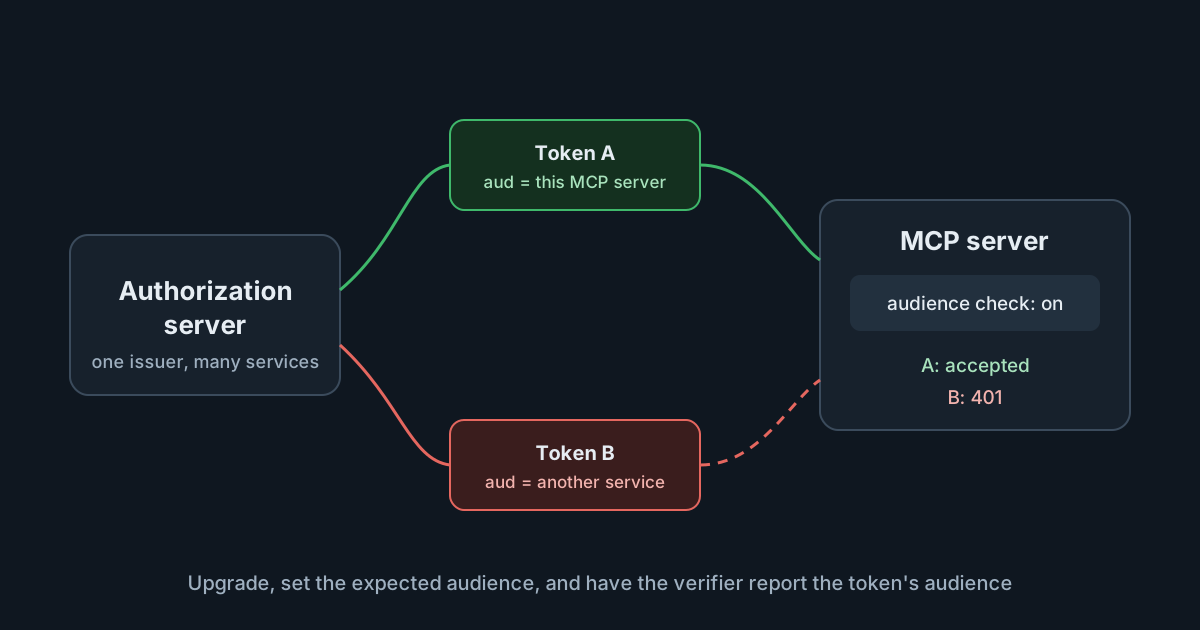
On 5 October 2026 the maintainers of the official MCP SDKs published two matching advisories: the Python SDK and the TypeScript SDK had no way to check that a bearer token was issued for the MCP server receiving it. Where one authorization server issues tokens for several services, a valid token for one of them was also accepted by an MCP server built on the SDK. The patched releases add the check, but leave it off. Teams that run their own MCP servers behind OAuth need to upgrade and then switch the check on, and the switch has a trap that turns every request into a 401 if it is half done.
What the advisories describe
Both advisories are rated Moderate, with a CVSS v3 score of 6.8, and both describe the same gap. The SDKs' server-side bearer authentication verified that a token was valid, but not who it was for. A token's audience, usually the aud claim, names the service it was issued to. Without that check, a token a user obtained for, say, an internal reporting API would also open an MCP server that trusts the same authorization server.
You are affected, in either language, when three things are true: your HTTP MCP server uses the SDK's bearer authentication, its authorization server also issues tokens for other services, and your own token verifier doesn't check the audience itself. The specification tells servers on the stdio transport to take credentials from the environment instead, so this is a gap in HTTP servers.
The affected and fixed versions:
| Package | Affected | Fixed |
|---|---|---|
mcp (Python), 1.x | 1.10.0 to 1.29.1 | 1.30.0 |
mcp (Python), 2.x | 2.0.0 to 2.1.1 | 2.2.0 |
@modelcontextprotocol/sdk | 1.6.0 to 1.31.0 | 1.32.0 |
@modelcontextprotocol/server | 2.0.0 to 2.2.0 | 2.3.0 |
@modelcontextprotocol/express | 2.0.0 to 2.0.1 | 2.0.2 |
@modelcontextprotocol/server-legacy | 2.0.0 to 2.3.0 | 2.3.1 |
Why the specification already required this
The MCP authorization specification is not ambiguous here. It says MCP servers "MUST validate that access tokens were issued specifically for them as the intended audience", following RFC 8707, and that they must not accept or pass on any other tokens. Clients have their half of the contract: they must send a resource parameter naming the MCP server in both the authorization and token requests, so that the authorization server can stamp the right audience into the token.
The SDKs left the audience check to whoever wrote the token verifier. A verifier that checks the signature, expiry and scopes looks complete, and passes every test that uses tokens issued for the server itself. The advisories close that gap by giving the SDK's own middleware something to compare.
The fix is opt-in, in two parts
The most important sentence in both advisories is the shortest: "Upgrading alone changes nothing." The patched versions add a setting that is off unless you set it. Turning the check on takes two changes, made together.
In Python:
- Set
validate_token_resource=TrueinAuthSettings, withresource_server_urlset to the audience your authorization server puts in tokens for your server. - Return the token's audience from
verify_token()asAccessToken.resource.
In TypeScript:
- Pass
expectedResourcetorequireBearerAuth(), as a URL, set to that same audience. - Return the token's audience from
verifyAccessToken()asAuthInfo.resource, also a URL.
With both changes, a token for another service gets a 401. With only the first, every request gets a 401, because the middleware has nothing to compare against. That is the trap: the change looks like a one-line configuration edit, and a team that ships only that line takes its own server down.
Two details are easy to miss. The TypeScript SDK's authorization guide notes that aud can be a single value, a list or absent, so the verifier should report the entry that belongs to this server and leave the resource unset when there is none. And on Express, @modelcontextprotocol/express must be upgraded together with @modelcontextprotocol/server: version 2.0.1 does not pass the option on, so nothing is compared.
The Python advisory adds that validate_token_resource will default to on in version 3.0, and that a verifier which already checks the audience can set it to False to silence the deprecation warning.
Reading the risk
A Moderate rating fits. Exploiting the gap needs a valid token from the same authorization server, which means an insider, a compromised account or a token leaked from another service. Nobody on the open internet gets in with this alone.
But the scenario is common in exactly the companies building internal MCP servers. A single identity provider issues tokens for many internal services, and MCP servers are often the newest of them, written quickly to give AI agents access to internal data. If an agent's token for a low-risk tool can also open the MCP server in front of the finance system, the boundary between those services is gone. Tokens also travel: they can end up in logs, in agent transcripts and in the environment of tools that should never have seen them. Audience checks are what keep a token leaked from one service from being a key to all of them.
There is a related lesson for anyone writing MCP servers. The SDKs give you working defaults for transport and sessions, but authorization decisions remain partly yours. It is not the first credential-handling fix in the SDKs this autumn: the client side had its own fixes for credentials sent to the wrong place, covered in the TypeScript SDK's OAuth flaw and the Python SDK's cross-origin redirect fix.
What it means for engineering and security leaders
- Inventory your own MCP servers. The question is not whether you use MCP, but which HTTP MCP servers your teams have written, which SDK version each one pins, and which authorization server each one trusts.
- Treat the upgrade and the configuration as one change. A ticket that says "upgrade the MCP SDK" closes nothing. The ticket should say "upgrade and enable the audience check", with a test.
- Check what your identity provider puts in
aud. The value you configure has to match what the authorization server actually issues, and that depends on clients sending theresourceparameter the specification requires.
Practical takeaways
- Upgrade to the fixed version for your package line, from the table above.
- Make both changes together: configure the expected audience, and have the verifier return the token's audience.
- Test with three tokens before you deploy: one for this server (accepted), one for another service from the same authorization server (401), and one with no audience (401).
- If you can't upgrade this week, add the check inside your own verifier: reject any token whose
auddoesn't include your server. The advisories note this works on every version. - On Express, upgrade
@modelcontextprotocol/expresswith@modelcontextprotocol/server.
If your AI tools reach your organisation's connectors through the SpanDock MCP gateway (Premium and Enterprise plans), connector tokens and sign-ins are kept in the server's credential store, are never shown again or logged, and are never sent to computers. A connector can use one shared sign-in or each person's own account, so the service's own permissions apply as well. That keeps connector credentials off developer machines; servers you write yourself still need the audience check.
Sources
- MCP Python SDK advisory GHSA-w4fh-qvv9-3v23: bearer-token authentication accepts tokens issued for a different resource server
- MCP TypeScript SDK advisory GHSA-rvq5-wwqv-78pq: server bearer authentication accepted tokens issued for another service
- Model Context Protocol specification (2026-07-28): Authorization
- MCP TypeScript SDK documentation: Require authorization