
The 2026 Stack Overflow survey on AI: cost controls, trust and what to measure
Daily coding agent use is the norm, cost controls are mostly blunt limits, and developers switch tools for quality, not price. What leaders can take from it.
Stack Overflow published its 2026 Developer Survey results on 6 October 2026, and the AI sections read like a report on infrastructure rather than an experiment. Most respondents who use coding assistants or agents use them every day, nearly a third of daily users spend four hours or more with AI, and organisations have started to put limits on cost. The data also shows where those limits are crude, and where trust still runs out. This article pulls out the figures that matter for engineering leaders, with their caveats.
Who answered
The methodology page counts 30,903 valid responses from 169 countries, out of 39,266 recorded, collected from 23 June to 5 August 2026. The survey was promoted on Stack Overflow's own site, blog and email list, so respondents are people who engage with Stack Overflow, not a random sample of developers. The results announcement describes the fielding period as seven weeks; the dates on the methodology page cover just over six.
Not every question was shown to every respondent, and the answer counts vary a lot. That matters for the cost questions below, where the published counts are in the hundreds or low thousands, not the tens of thousands.
Use is daily and long
On the AI results page, coding assistants and agents are the most common use of AI at 66%, ahead of general chatbots at 63%. Of respondents who use coding assistants or agents, 73% use them daily. The page says 31% of daily AI users spend four or more hours a day with it. The table behind that figure has a wider base, all 10,926 respondents who answered: 30.9% chose four hours or more, 24.1% two to four hours, 25.3% one to two, and 0.5% none.
Claude Code (66%) and GitHub Copilot (59%) lead the coding agents respondents use. For orchestration, LangChain (30%) and the OpenAI Agents SDK (24%) lead.
The tasks are the familiar ones: generating code in a familiar area, debugging and refactoring, answering technical questions and writing tests. The page's text gives 67% and 61% for the first two, while its own table shows 69.3% and 63.8%. The announcement uses the lower figures. The difference is small but worth knowing if you quote them. The announcement adds that only 20% use AI for deploying, operating or troubleshooting production systems.
Developers switch for quality, not price
Asked whether they had switched AI tools in the past year, 33.7% said no. The question allowed one answer, and the shares below are of all respondents to it, including those who did not switch. The most common reason was better output quality, at 25.1% of respondents, followed by an organisation requiring or recommending a different tool (10.6%). Lower cost accounted for 6.4%, and a previous tool becoming too expensive, limited or unavailable for 3.3%. Better security, privacy or compliance was 2.2%.
The knowledge page asked whether people had changed how they write prompts. 75.4% said yes, to improve quality, against 38.4% to reduce cost. The published answer count for that question is a few hundred people, so treat it as a direction rather than a measurement.
Organisations mostly use blunt cost controls
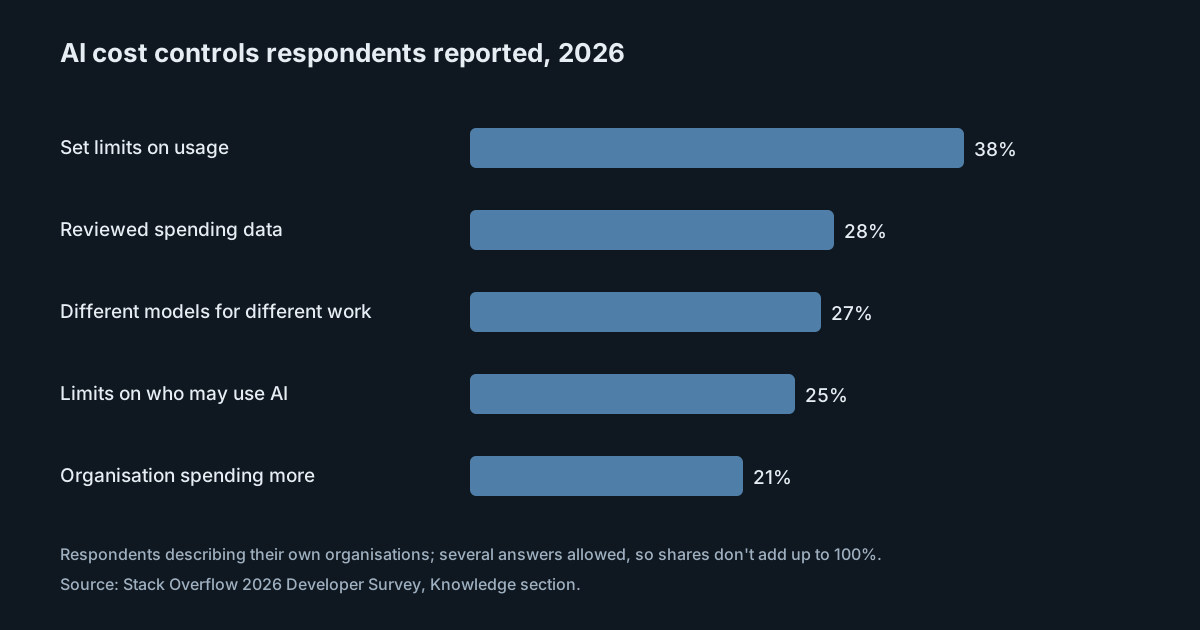
The same page reports what respondents' organisations do about cost: 38% set limits on usage, 28% reviewed spending data, 27% use different models for different work, and 25% limit who may use AI at all. 21% said their organisation saw results and started spending more.
At the individual level, 32.6% monitor their own use, 25.3% choose cheaper models when they can and 23.8% say their usage is metered. 22.4% say cost or limits haven't affected them, and 20.6% haven't met a limit at all. The published counts here are around a thousand respondents.
These figures come from developers describing their employers, and respondents could pick several answers, so they don't tell you what share of companies do each thing. Read side by side, though, they show a pattern. Usage limits are reported more often than reviewing spending data, and restricting who may use AI is about as common as matching models to work. It suggests that some teams limit use before they measure it.
Trust depends on checking
The survey's trust questions explain why developers resist controls that lower quality. 48% trust AI when they can easily validate the answer, and only 16% extend that trust to most tasks that aren't important decisions. 93% call source attribution at least somewhat important when deciding whether to trust an AI answer, and 79% call it important or very important.
Asked which context matters most for AI at work, respondents put project goals or requirements (85.2%) and code and documentation (73.3%) far ahead of anything else. Compliance, security or policy requirements came in at 19.7%. If you rely on AI tools to respect internal policies, most of the people using them don't see that context as essential. The policy has to reach the tool another way.
What it means for engineering and security leaders
- Measure before you limit. A usage cap without spending data is a guess. Look at spend by person, team and model first, then decide where limits belong.
- Prefer model choice over access bans. Matching cheaper models to simpler work keeps everyone working. Restricting who may use AI at all can move the cost elsewhere: to slower delivery, or to tools nobody approved.
- Protect quality explicitly. Developers switch tools for output quality, so a control that quietly degrades results will be worked around. Say which tasks get which models, and review the effect.
- Don't count on prompts carrying policy. With so few respondents treating compliance context as essential, enforce data and security rules in the tooling, not in guidance. We made a similar argument about review capacity in AI agents and the review bottleneck.
Practical takeaways
- Get one month of AI spend by person and by model before setting or changing limits.
- For each limit you already have, write down what happens when someone hits it: blocked, downgraded or flagged.
- Pick two or three task types where a cheaper model is good enough, and route them deliberately.
- Ask your own developers the survey's switching question. If quality is why they would leave your approved tool, fix that first.
- Quote survey figures with their answer counts, especially the cost questions.
Per-person budgets are one way to apply limits with data behind them. With the model proxy on, SpanDock records each call's requested and answering model, tokens and cost. A budget has a period and a limit: near 80% of it only cheaper models are used, and over it calls are blocked, sent to the cheapest model or just flagged, as the administrator chooses. SpanDock Mind can pick a cheaper model for a conversation when it is good enough. Only API-key traffic goes through the proxy. Budgets and SpanDock Mind are on the Standard plan and above. We covered setting them up in per-person budgets and SpanDock Mind.