
MCP reference servers v2.1.0: eight fixes and an upgrade npm won't offer
The filesystem, everything and fetch reference servers fix eight advisories. Why date-versioned installs must upgrade by hand, and what Windows still lacks.
On 25 October 2026 the maintainers of the Model Context Protocol's reference servers published release v2.1.0, together with eight security advisories in three servers: filesystem, everything and fetch. None is rated high or critical. Four are moderate and four are low. The fixes are small, but the upgrade has a trap. Many teams installed the filesystem server months ago under a date-style version number, and their package manager will not offer the fixed release at all.
This article sets out what changed, which installs are affected, and how to upgrade.
Which packages, which versions
The release notes give one table for all three servers:
| Package | Affected | Fixed in |
|---|---|---|
@modelcontextprotocol/server-filesystem (npm) | 1.0.0 to 2.0.0, and date versions up to 2026.8.31 | 2.0.1 |
@modelcontextprotocol/server-everything (npm) | 1.0.0 to 2.0.0, and date versions 2025.9.24 to 2026.8.31 | 2.0.1 |
mcp-server-fetch (PyPI) | up to 2026.10.19 | 2026.10.24 |
The other packages in the repository, the memory and sequential-thinking servers (npm 2.0.0) and the git and time servers (PyPI 2026.10.19), are unchanged in this release.
The filesystem server: four fixes
The filesystem server is the one most likely to be running on developers' laptops. It gives an AI tool read and write access to a list of allowed directories, and that list is the whole security boundary. All four advisories are about ways past it.
- A swapped parent directory (low, GHSA-53mr-w429-c597). If a parent directory was replaced with a symlink between the access check and the write,
write_file,edit_file,create_directoryand the destination ofmove_filecould land outside the allowed directories. On Linux and macOS, 2.0.1 anchors each write to the directory it checked. - A path checked differently from how it is used (moderate, GHSA-7rgq-gccq-qphx). The check stripped a trailing quote or whitespace that the file operation kept. A sibling directory named after an allowed one with that suffix was reachable.
- A symlink in a different letter case (moderate, GHSA-4gxg-m5jx-9j57). On a case-insensitive volume, such as the default on macOS, a symlink spelled in a different case passed the check for a new path. The release notes call this a regression in 2026.8.31.
- Sizes of files outside the boundary (low, GHSA-hhwq-wxfx-cj7g).
list_directory_with_sizesread the size and modification time of a symlink's target before checking it, so a symlink inside an allowed directory revealed metadata about a file outside it.
Windows is only partly fixed
The advisory for the swapped parent directory is direct about this. On Windows, Node.js resolves every file operation from a path string rather than a directory handle, so the server cannot anchor a write to the directory it checked. A directory on the path that is swapped for a junction can still redirect writes outside the allowed directories, and creating a junction needs no special privilege.
Until a complete fix lands (the advisory says it needs native code and tracks it in issue #5260), the maintainers' advice for Windows is not to configure an allowed directory that another user or an untrusted local process can write to. Shared folders, synced folders and temporary directories are the obvious candidates to check.
The everything server: other web origins
The everything server exists to exercise every MCP feature, so client developers can test against it. Its HTTP and SSE transports sent Access-Control-Allow-Origin: * and did not check the Origin header. Any web page the user visited while it was running could call its tools, including get-env, which returns the server's environment, and read the results (GHSA-mvf5-2qqv-rg3c, moderate). Version 2.0.1 checks the origin and drops the wildcard header.
This is a test server, but test servers have a habit of being left running with a real environment behind them. If anyone on your team runs it over HTTP, the environment it starts with is what was exposed.
The fetch server: three ways past its address checks
The fetch server retrieves web pages for a model, and refuses internal addresses so that a prompt cannot steer it at the local network. It is the same pattern we described in MCP servers keep trusting the wrong URLs. Version 2026.10.24 closes three gaps:
- Internationalised host names (moderate, GHSA-v38p-wf49-hx2j). The server checked one form of an IDNA host name and connected to another, which could reach an internal address.
- NAT64 addresses (low, GHSA-66qx-2266-pmj6). An address in
64:ff9b::/96that wraps a private, loopback or link-local IPv4 address is now refused, as an IPv4-mapped address already was. - robots.txt after redirects (low, GHSA-3jqg-r5pp-rmp2). robots.txt is now checked again after every redirect, not only for the first URL.
The upgrade trap
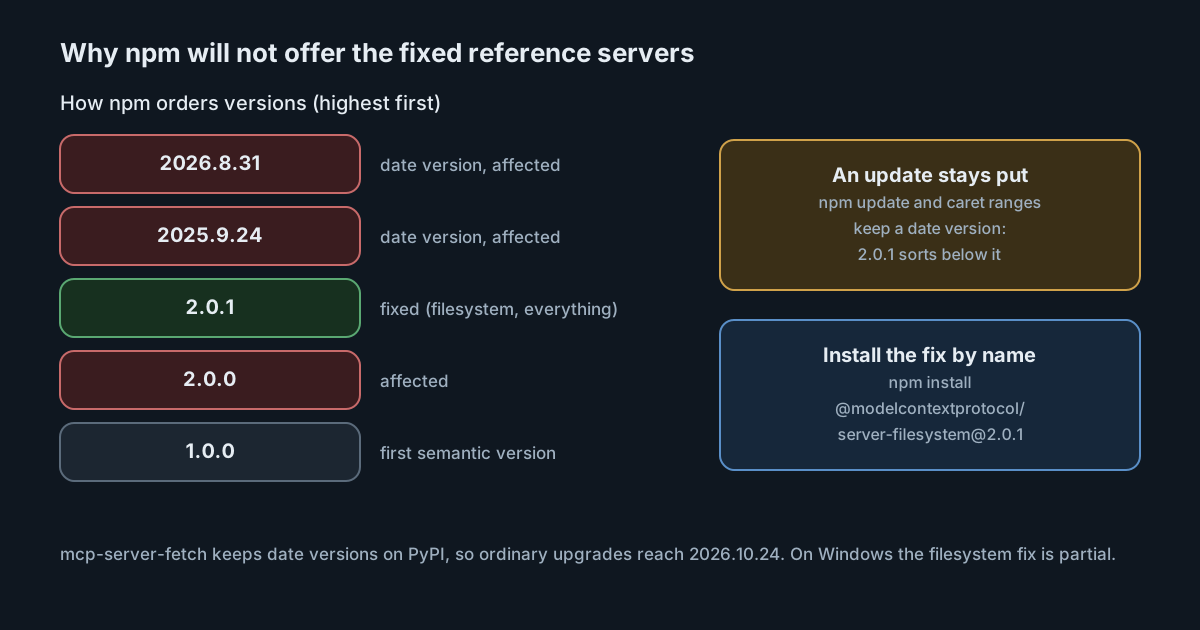
The TypeScript servers used date versions, such as 2025.x and 2026.x, until the repository moved to semantic versioning in 1.0.0 earlier this month. Semantic version ordering puts 2026.8.31 above 2.0.1, because 2026 is a larger major version than 2. The release notes spell out the consequence: package managers rank 2.0.1 below every date version, so they won't offer it as an upgrade. The filesystem advisory adds that Dependabot won't open a pull request for it either.
In practice:
- A lockfile or manifest that pins a date version stays there.
npm updateand range-based upgrades keep you on 2026.8.31 or earlier. Install the fix by name:npm install @modelcontextprotocol/server-filesystem@2.0.1, and the same forserver-everything. - Configurations that name a version. Many AI tools start MCP servers with a command such as
npx -y @modelcontextprotocol/server-filesystem@2026.8.31. Change the version in each tool's MCP configuration, on each computer. - Configurations that name no version resolve npm's
latesttag, which points to 2.0.1 at the time of writing. A cached copy may still be used until the cache is refreshed, so check the version that actually runs. - The fetch server keeps date versions on PyPI, so ordinary upgrades reach 2026.10.24.
Reference servers are not products
The repository's security policy describes these servers as reference implementations that show how to build on MCP, not as production-ready software. Fixes go into new releases only; older releases are not patched, and archived servers receive no fixes. That is a reason to treat any of them running with real data as your own code: pin a version, watch the advisories page, and know which computers run them.
That last part is the hard one. MCP servers are added per tool, in per-user configuration files, often by the developer, so a security team may not know where the filesystem server runs or which directories it was given.
A checklist for this week
- Find every MCP configuration that starts
server-filesystem,server-everythingormcp-server-fetch, on developer computers and in CI. - For the npm servers, set the version to 2.0.1 explicitly; don't rely on an update to find it.
- On Windows, review each allowed directory and remove any that others can write to.
- Stop any everything server that is reachable over HTTP and was started with secrets in its environment, and rotate those secrets if it ran while you browsed.
- Upgrade the fetch server to 2026.10.24.
For finding those configurations, SpanDock's MCP gateway can help. Set to Enforced, it reports or moves aside the MCP servers that each AI tool has configured besides SpanDock's own, and connectors you add start read-only for everyone. The MCP gateway is on the Premium and Enterprise plans, and in the 30-day trial.
Sources
- modelcontextprotocol/servers release v2.1.0
- modelcontextprotocol/servers security advisories
- GHSA-53mr-w429-c597: filesystem server write outside allowed directories via a swapped parent directory
- GHSA-mvf5-2qqv-rg3c: everything server reachable from other web origins
- npm: @modelcontextprotocol/server-filesystem