
Copilot code review's addressed rate: what the new usage metrics count
GitHub's Copilot usage metrics now report how many code review comments developers acted on. What the addressed rate includes, what it hides, and how to use it.
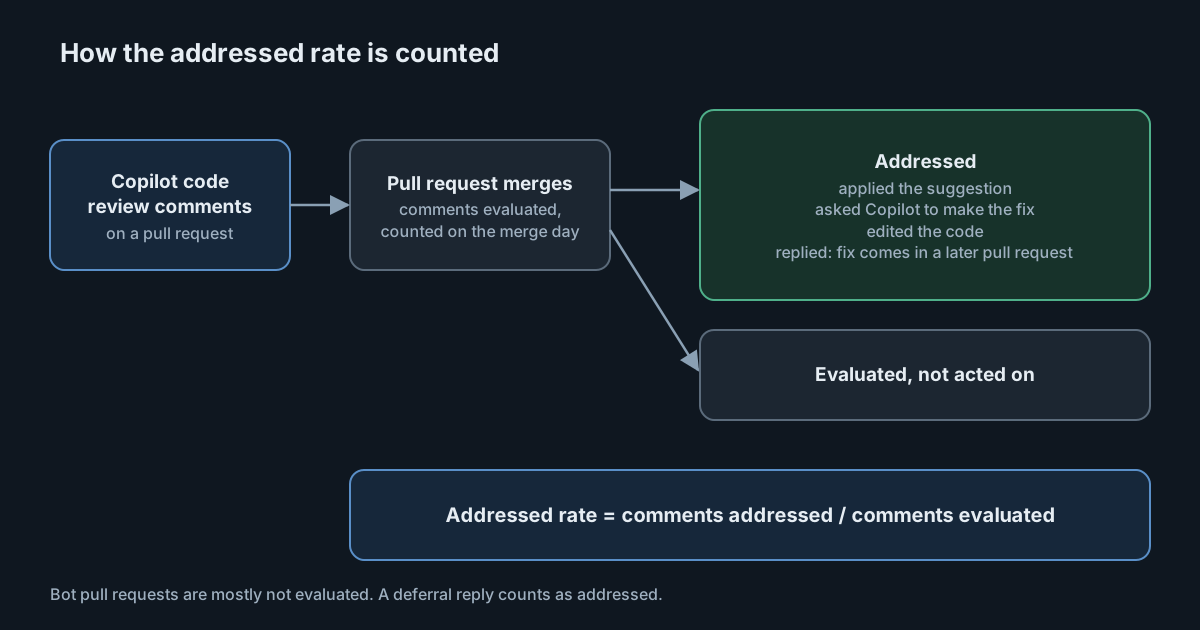
Until this week, the Copilot usage data on code review could tell you how often the review ran and how often someone clicked to apply a suggestion. It could not tell you whether developers did anything about the rest of the comments. On 5 November 2026 GitHub added that to the enterprise and organisation usage metrics, along with a figure it calls the addressed rate. It is a useful number, and it is easy to over-read.
What was added
Each row of the repository-level daily report (repos-1-day), for enterprises and for organisations, now has a copilot_code_review object. The REST documentation describes these reports as per-repository pull request metrics, with breakdowns for the Copilot coding agent and for Copilot code review. The new object holds:
total_comments_evaluated: comments Copilot code review made that GitHub checked to see whether the developer acted on them;total_comments_addressed: the evaluated comments the developer acted on;total_merged_no_human_change_request_after_review: merged pull requests that Copilot code review reviewed where no person requested changes after Copilot's first review;- breakdowns of both comment counts by severity (for example
high,mediumandlow), by review tier (lite,balancedandmax), by comment type (bug,security, orcustomfor a repository's own guidelines) and by customisation (custom instructions, skills, MCP servers or none).
The addressed rate is total_comments_addressed divided by total_comments_evaluated. GitHub says it lets you track the rate per repository.
What "addressed" covers
The definition is wider than "applied the suggestion". A comment counts as addressed when the developer applied it, asked Copilot to make the fix, edited the code themselves, or replied that the fix will come in a later pull request. That last case is worth noticing. A reply that defers the work counts the same as a fix in this pull request.
What the number can and can't tell you
The changelog states several details that change how to read a repository's rate:
- Counted at merge. Comments are evaluated when their pull request merges, so they appear on the merge day, not the day Copilot posted them. A review that spans a weekend will show up on Monday. The changelog doesn't say what happens to comments on pull requests that close without merging, so don't assume they are in the denominator.
- Bot pull requests are mostly excluded. Copilot usually doesn't evaluate comments on pull requests opened by bots, such as the Copilot cloud agent. The merged-without-change-request count does include them.
- It differs from the existing suggestion count.
pull_requests.total_copilot_applied_suggestionscounts only ready-to-apply suggestions that someone applied. The new counts cover every evaluated comment, however the developer acted. - Empty days are zeros. A repository with no code review activity that day shows zero counts and empty arrays.
Two further cautions are interpretation rather than something GitHub states. First, "addressed" measures a developer's response, not whether the comment was right. A high rate can mean good comments or a team that accepts suggestions readily, and a low rate can mean noisy comments or a team that reviews them critically. Second, the merged-without-change-request figure is defined by the absence of a change request after Copilot's first review. As quoted, the definition doesn't say that a person reviewed the pull request at all, so don't treat it as proof of human approval.
A separate change on the same day
GitHub also published a second update the same day, covering a different problem: users whose editors send no client telemetry, or whose IDE or extension versions are below the usage metrics minimums. New per-user fields (client_telemetry_present and usage_metrics_requirements) and daily counts show who they are. GitHub says such users still count as active, but their reports lack detail such as lines of code and feature and model breakdowns, and that common causes include outdated editors, disabled telemetry and proxies that block events.
Nothing in either changelog says whether the code review fields depend on client telemetry. The comment evaluation happens when a pull request merges, which suggests it is observed on GitHub's side, but that is an inference. If you build a dashboard on these fields, test it against a repository where you know the review history.
What it means for engineering and security leaders
The cost side of Copilot code review has had attention, including the October changes to billing, review depth and approvals. The new fields let you look at the other side: whether the review changes what developers do. The breakdown by tier is the interesting part. If max reviews are addressed no more often than balanced ones, ask what the extra depth is buying before you standardise on it. The same applies to customisation: the changelog says the breakdown shows whether custom instructions, skills and MCP servers make a difference.
Avoid turning the rate into a target. A team told to raise its addressed rate can do it by deferring comments with a reply, which counts, or by tuning the review to say less. Use it to find repositories where review output is being ignored, then read some of the comments.
Practical takeaways
- Pull the data per repository, by week rather than by day, since comments count on the merge day and daily numbers are small.
- Compute the rate yourself from the two counts, and keep the counts next to it. A rate based on five comments says little.
- Compare by severity first. An addressed rate for
highcomments that is lower than forlowones deserves a look at what those comments say. - Compare tiers and customisation only between repositories of similar size and activity.
- Sample the comments behind a low or high rate. Read ten from each end before drawing a conclusion.
- Check access. The fields need the Copilot usage metrics policy enabled and a role with the
View Copilot Metricspermission, such as enterprise owner, billing manager or organisation owner. - Read the telemetry-gap fields too, so you know how many users the detailed figures leave out. Don't add the two daily counts together, since a user can appear in both, and don't add counts across days to get unique users.