
NCSC's sandbox maturity levels for agentic AI, explained for engineering leads
The NCSC grades agent sandboxes on two four-level ladders, network and compute. How to use them as a scorecard now that local agent sandboxes are shipping.
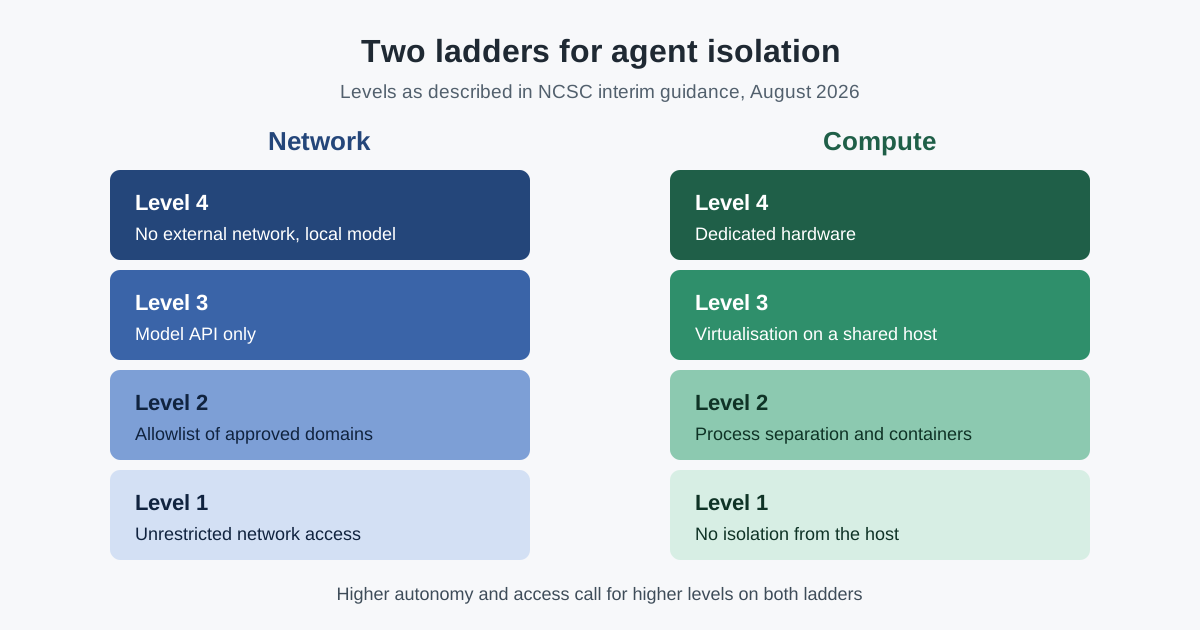
Local sandboxes for coding agents became generally available in GitHub Copilot on 7 October 2026, and VS Code 1.141 added terminal sandboxing on Windows, macOS and Linux the same day. That makes a question many teams have postponed more practical: how isolated is isolated enough? The UK National Cyber Security Centre (NCSC) offers a simple answer in its interim guidance on agentic AI: two four-level maturity ladders, one for network access and one for compute isolation. This article explains the ladders and how to turn them into an internal scorecard before agents get production credentials.
The context: interim guidance that regulators now point to
The NCSC published Managing the cyber risk of agentic AI on 20 August 2026. It is explicit about its status: it is interim practical advice, and the NCSC says it is working with partners on formal guidance that will build on it and eventually replace it. It is aimed at people who design and operate environments where agents act with significant autonomy.
The guidance has gained weight since. In its September 2026 Record, published on 30 September, the Bank of England's Financial Policy Committee said recent frontier AI test-environment incidents reinforced its call for firms to prepare for AI-related cyber and operational risks, and named the NCSC among the sources of guidance firms should engage with. That is a recommendation, not a legal requirement, but it makes the NCSC text the natural reference point for UK financial firms and their suppliers. The Record itself is discussed in what the Bank of England told firms about autonomous AI risk.
At the same time, sandboxing has moved from research to product. GitHub's general availability announcement says Copilot-initiated tools and commands run with restricted access to the filesystem, network and credentials in Copilot CLI, the Copilot app and VS Code sessions using Agent Host, and that enterprise-managed settings can require sandboxing. What that sandbox does and does not restrict is covered in Copilot local sandboxing is generally available.
The two ladders
The NCSC describes the network ladder from lowest to highest maturity:
- Unrestricted network access.
- Access restricted to an allowlist of approved domains.
- Access restricted to just the model's API.
- No external network access, with the model hosted locally inside the network sandbox.
And the compute ladder:
- No compute isolation: the agent runs on, or has remote access to, the host alongside other workloads and data.
- The agent shares a host but is constrained with kernel primitives such as process separation and properly configured OCI containers, with a residual risk of a kernel exploit breakout.
- The agent shares a host but is isolated with virtualisation.
- The agent runs on dedicated hardware, separate from other workloads.
Around the ladders, the guidance asks for three things that matter as much as the levels. Each agent should have its own identity, in a class distinct from people, with only the permissions the task needs and the shortest practical credential lifetime; a proxy can inject credentials so the agent never holds them. Agent activity should be logged, with transcripts and sandbox logs protected from change, and treated as user activity in security monitoring. And there should be a way to "pull the plug", which the NCSC says can mean more than stopping the agent's processes: cutting its network access and its connection to the model as well.
Analysis: what to make of it
Most developer machines start at level 1 on both ladders
A coding agent running in a developer's terminal, with no sandbox, sits at the bottom of both ladders: it can reach any host and it shares the machine with the person's files, keys and sessions. That is the starting point to measure against, not a failure.
Built-in sandboxes mostly move the compute rung, and only partly
Local sandboxes in coding tools use operating-system controls to restrict files and network. They help, but they are not virtualisation. The VS Code 1.141 release notes are candid that sandboxing "does not replace endpoint security or provide a standalone security boundary", and that restrictions use operating-system protections or checks inside the agent host depending on the operation and platform. A fair reading puts these sandboxes around level 2 on compute, with the details depending on configuration.
Network level 3 is harder than it sounds
Restricting an agent to the model's API alone rules out package installs, documentation lookups and most tool servers. Many teams will live at level 2, a domain allowlist, for everyday coding, and reserve levels 3 and 4 for work on sensitive code or data. The NCSC notes that where allowlists are too coarse, protocol- or service-aware proxies that allow connections by exception are an option.
The ladders are proportionate, not absolute
The NCSC frames controls as proportionate to the agent's autonomy and to the harm a failure could cause. An assistant that suggests edits needs less than an agent that can deploy. The value of the ladders is that they make the choice explicit and comparable across teams.
What it means for engineering and security leaders
A short scorecard works better than a policy document. For each class of agent use, record the current network level, the current compute level, the target levels, and the credentials it can reach. Then decide which combinations are allowed to touch production systems.
One rule of thumb follows from the guidance: the higher an agent's autonomy and access, the higher it should sit on both ladders. An agent with production credentials at network level 1 and compute level 1 is the combination to remove first. The emergency stop deserves a test, not only a document: confirm that someone can revoke an agent's credentials, cut its network access and block its model endpoint quickly.
Practical takeaways for this week
- Score each agent use case on both ladders, current and target, in one table.
- Turn on the built-in sandbox in the coding tools you already use, and require it through managed settings where the tool supports that.
- Give agents their own identities and short-lived credentials, separate from the developer's own.
- Move agents that need production access to virtualised or dedicated environments, not developer laptops.
- Keep transcripts and sandbox logs where agents cannot alter them, and feed them to security monitoring.
- Rehearse the emergency stop: credentials, network and model access.
The existing guide to coding agent sandboxes covers what Claude Code's and Codex's built-in sandboxes restrict, and NIST's work on agent security covers the wider control picture.
Where SpanDock fits
The NCSC's credential advice has a direct counterpart for MCP connectors. With the MCP gateway, on the Premium and Enterprise plans and in the 30-day trial, connector tokens and sign-ins are kept in the server's credential store and are never sent to computers, and every call through the gateway is recorded with the connector, tool, person, computer and outcome. Connectors start read-only for everyone. The privacy page describes what stays on your own machines.