
Secret scanning now blocks Anthropic keys at push: closing the AI key gap
GitHub now blocks Anthropic API keys at push by default and is previewing AI-based secret detection. What changed, what is still preview, and what to do.
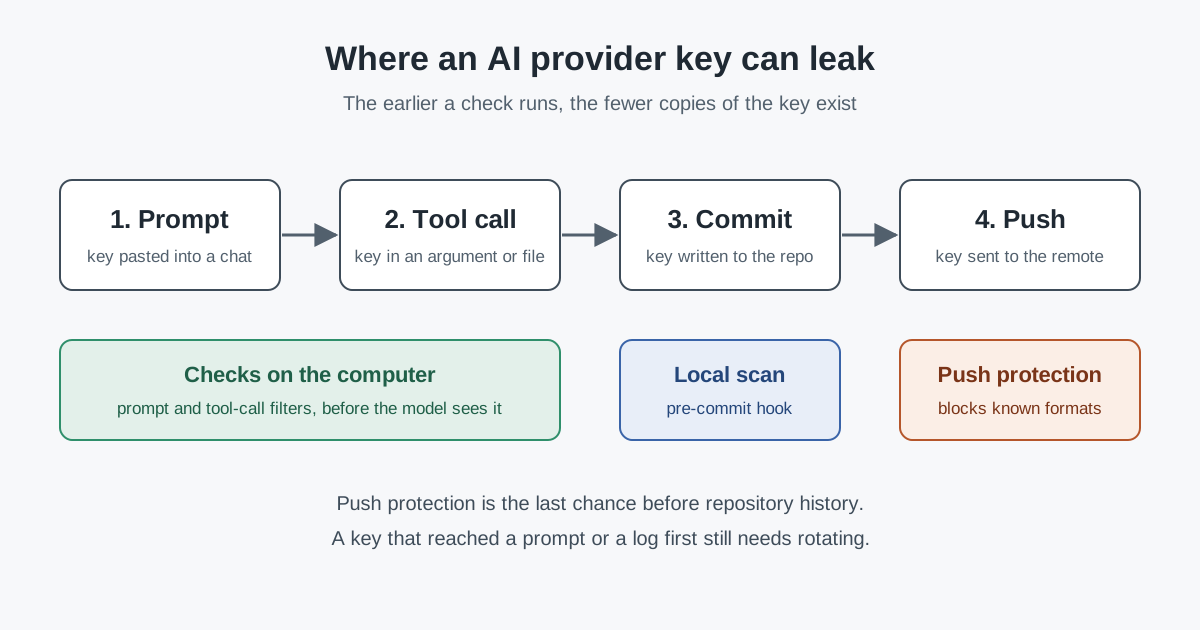
On 13 October 2026 GitHub added two Anthropic API key types to secret scanning and put them into push protection by default. A commit containing one of those keys is now refused at push on any repository with secret scanning turned on, including free public repositories. The change is small, but it lands where AI coding work often leaks credentials: someone, or an agent, writes a model provider key into a config file, a test or a notebook, and pushes it. This article covers what changed, what GitHub has announced but not yet shipped, and how to treat AI provider keys from now on.
The context: AI keys are now ordinary secrets
According to the GitHub changelog for 13 October, secret scanning now detects anthropic_service_api_key and anthropic_user_api_key, plus a Cloudsmith API key type, and Salesforce has joined the secret scanning partner programme with a Marketing Cloud OAuth token type. The two Anthropic types are the ones added to the push protection defaults.
The changelog draws distinctions worth keeping in mind. Partner secrets found in public repositories are reported to the issuer so it can revoke or rotate them. User secrets raise alerts in public or private repositories. Push protection is different again: it blocks the commit before it enters repository history, which is the only point at which a leak is avoided rather than cleaned up.
A week earlier, on 7 October, GitHub described a purpose-built model for leaked secret detection. It reads the code around a candidate string to judge whether it is a credential, including passwords with no recognisable token format. Its rollout is staged, and most of it is not generally available:
- Customers who already had AI-detected password alerts were moved to the new model automatically, at no extra charge for GitHub Secret Protection and GitHub Advanced Security customers.
- AI-detected secrets in push protection is in private preview.
- AI-based secret checks in the Copilot
/security-reviewcommand, for Copilot CLI and the Copilot app, are described as "available soon in private preview". - GitHub Enterprise Server 3.23 is planned to get the AI-detected alerts in public preview.
The two opt-in checks, in push protection and in the security review, are planned to consume GitHub AI Credits, with billing starting only once an organisation opts in and enables them.
Analysis: what to make of it
Pattern matching covers the easy half
Provider API keys usually have a fixed prefix and shape, which is why pattern detectors handle them well. Putting Anthropic keys into the default push protection set closes an obvious gap: a team could previously have push protection on and still push a working model provider key. The harder half is credentials with no format, such as database passwords and internal service secrets. That is what the context-aware model targets, and most of that capability is still in preview or only announced. Plans should treat it that way.
Formats change, and redaction rules have to follow
Another recent GitHub change shows why pattern-based controls need upkeep. The stateless installation token rollout, completed on 2 October, made new GitHub App installation tokens about 520 characters long instead of 40, still starting with ghs_. GitHub asks teams to look for "Logging and secret redaction rules that only match the legacy token pattern." The same advice applies to any home-grown scanner, log filter or prompt filter that recognises keys by length or shape. When a provider changes its format, those rules can fail without any error.
Push is late in an agent's workflow
A coding agent can handle a key long before anything is pushed. The key can appear in a prompt, be passed as a tool argument, be written to a file the agent later reads back into its context, and end up in transcripts or telemetry. Push protection sees only the last step. It is a sound backstop, not the first line of defence.
Blocking is not the same as rotating
A blocked push means the key never reached the repository. It does not mean the key is safe: if it was pasted into a chat or an agent session first, copies may already sit in transcripts and logs. The usual rule after any exposure still holds: rotate first, then clean up.
What it means for engineering and security leaders
The new default raises the baseline for every repository with secret scanning enabled. It still covers only repositories hosted on GitHub with scanning switched on, and only the formats GitHub recognises. Three questions are worth answering explicitly:
- Which AI provider keys does your organisation issue, and are their formats covered by your scanner's push protection, not just by its alerts?
- Where can those keys appear before a push: prompts, agent tool calls, environment files, notebooks, CI logs?
- Who rotates a model provider key, and how quickly, when one is exposed?
The preview features are worth tracking, but budget decisions should wait for published credit pricing. GitHub's notice says a push protection check can consume credits "even if it doesn't block a push", so cost depends on push volume rather than on leaks found.
Practical takeaways for this week
- Confirm that secret scanning and push protection are on for every repository where developers or agents work, private ones included.
- List the AI provider keys in use and check each format against your scanner's push protection defaults.
- Review log, telemetry and prompt redaction rules for patterns tied to token length or shape, starting with GitHub App installation tokens.
- Prefer short-lived, scoped credentials for agents over long-lived provider keys stored in files.
- Write a rotation runbook for model provider keys, with a named owner.
- Treat AI-based detection in push protection as a private preview, and the
/security-reviewchecks as announced but not yet available, until GitHub says otherwise; read the credit pricing before opting in.
Where SpanDock fits
Push protection checks commits; SpanDock guardrails check earlier, on each person's computer. On the Enterprise plan, and in the 30-day trial, a guardrail using the secrets detector looks for API keys, tokens, private keys, credentials in URLs and passwords in what a person types, in tool call arguments or in tool results, and can block, warn, ask for confirmation or redact. It is enforced through hooks in Claude Code, Codex and Gemini CLI and on calls through the MCP gateway, and the matching runs on the computer itself, so prompt text is not sent anywhere to be checked. The guardrails how-to walks through a first setup.