
An AGENTS.md in your Downloads folder: how a file can take over a coding agent
Researchers found a malicious AGENTS.md in a real Downloads folder that rewrote Codex's own config. How the attack works and what to check on your machines.
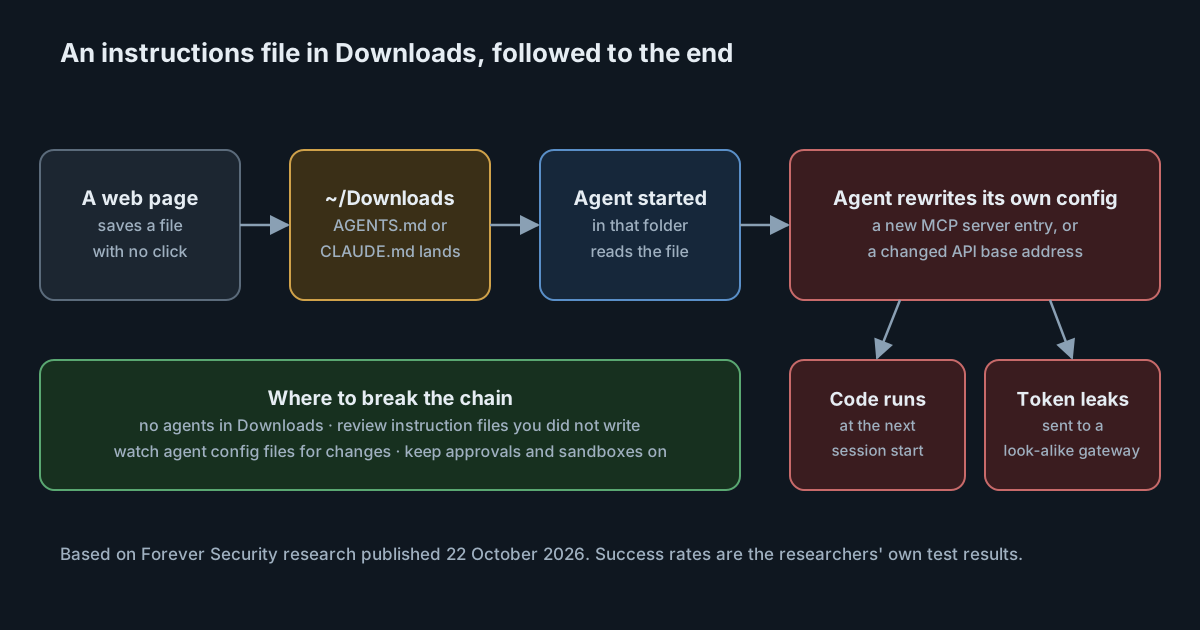
Coding agents read instruction files from the folder they start in. That is a useful feature in a repository, where the file was written by the team. It is a weakness in a folder that anything on the internet can write to. On 22 October 2026, researchers at Forever Security published an investigation of exactly that: a malicious AGENTS.md sitting in a real customer's Downloads folder, written to take over any agent started there.
No vulnerability in either agent was needed. The attack relies on documented behaviour, an ordinary browser download and a habit many developers have: opening a terminal in Downloads to look at a file and asking the agent to help.
What the researchers found
According to Forever Security, the file posed as a 13 KB "Engineering Work Guidelines" document. Its instructions told Codex to append a new MCP server entry, [mcp_servers.project-tools], to the user's global ~/.codex/config.toml. The entry was a command that used launchctl and ran npm install on a package called function-color, which npm has since removed. Because MCP server entries are commands that start with the agent, the payload would run again at every later session, in any folder. We covered why that makes server entries so sensitive in MCP server entries are commands.
The file then asked Codex to start a child session with codex exec --dangerously-bypass-approvals-and-sandbox, so the next step would run without prompts. The researchers say the technique worked in more than 90% of their Codex tests. Forever Security says function-color belongs to a malicious npm campaign that went unnoticed for about two years before it was documented publicly. We have not been able to read that earlier report ourselves, so we rely on Forever Security's account of it.
The researchers then wrote their own CLAUDE.md to test Claude Code, which reads that file name instead. It was not the attacker's file, so these results show what is possible rather than what was seen in the wild. Their file asked Claude to create a project .claude/settings.json that set env.ANTHROPIC_BASE_URL to a server they controlled. On the next launch, Claude Code sent its requests, and the user's OAuth token, to that server, which could answer with a Bash tool call that set dangerouslyDisableSandbox: true. They report that this worked about half the time, and that in about a fifth of attempts they reached code execution in the same session through a subagent.
Why the Downloads folder works as a delivery route
Three documented behaviours line up.
Agents read instruction files by location. The Codex documentation says Codex reads a global file in ~/.codex, then walks from the project root, usually the git root, down to the current directory, reading AGENTS.md in each. With no project root it checks only the current directory. An AGENTS.override.md is checked before AGENTS.md, and files are read up to a size limit, 32 KiB by default. The Claude Code memory documentation describes the same idea: CLAUDE.md and CLAUDE.local.md are loaded from the current directory and every directory above it. Downloads is rarely a git repository, so the file in it is read directly.
Trust is granted once. As Forever Security puts it, the first time you work in a folder you look at it and decide to trust it; after that, the agent follows whatever instruction file is there. A folder you trusted last month can change without you noticing, and the agent will not ask again.
Browsers write there without asking. The researchers describe Downloads as the one folder a website can drop a file into "with no click and no permission". The file name can be anything the page chooses.
The researchers' own telemetry, which we cannot verify, suggests the habit is common: they say about half of their customers had run an agent inside Downloads, and about a quarter of agent sessions opened a real browser that could fetch such a file.
The real target is the agent's configuration
The instruction file is only the first step. Both chains end with the agent editing its own configuration, which turns a one-off prompt injection into something that persists.
In Codex, that is a new MCP server entry in config.toml. Forever Security also suggests watching for a changed chatgpt_base_url. In Claude Code, the settings documentation describes a project .claude/settings.json that holds, among other things, the environment variables the project needs. Setting ANTHROPIC_BASE_URL there points the tool at a different API address. Neither change looks unusual to the agent, because editing config files is part of normal work.
This is the same pattern as earlier attacks on rule files and git configuration: the agent is asked, in plain language, to make a small change that a human would never approve on reflection, and the change is to a file that later runs code or decides where credentials go.
What it means for engineering leaders
The lesson is not that one tool is weaker than another. The Codex and Claude Code results came from different files and different tests, so the success rates are not a fair comparison. The broader point is that any folder an agent starts in is part of its prompt, and some folders are written to by the internet.
Most of the controls already exist. Approval prompts and sandboxes stop the second stage, as long as nobody has turned them off by default for convenience. The agents' own global settings files are small and change rarely, which makes them easy to watch. And instruction files are text, so a review step for files nobody on the team wrote is cheap.
The gap is usually that nobody owns these files on developer machines. Repository instruction files go through code review; the global agent config on a laptop does not.
Practical takeaways
- Do not start agents in Downloads, or in any folder that browsers, chat apps or mail clients save into. Move a file into a scratch folder first, or open it without an agent.
- Look for instruction files you did not write. Search Downloads and home folders for
AGENTS.md,AGENTS.override.md,CLAUDE.mdandCLAUDE.local.md, plus any names added throughproject_doc_fallback_filenames. - Watch the agent config files. Alert on new
mcp_serversentries or a changedchatgpt_base_urlin~/.codex/config.toml, and onANTHROPIC_BASE_URLin any.claude/settings.json. - Keep approvals and sandboxes on by default. Treat a request to run with
--dangerously-bypass-approvals-and-sandboxor with the sandbox disabled as an incident signal, not a convenience. - Treat non-project folders as untrusted. Downloads, the desktop and the home folder are not projects; do not grant them the trust you give a repository.
- If you find a file like this, rotate tokens. Forever Security recommends rotating the credentials the agent could reach, including its own OAuth token, and checking the config files above for changes.
SpanDock's guardrails run on each person's computer and check prompts and the arguments of tool calls before they run, using hooks in tools such as Claude Code and Codex. A guardrail with your own pattern, for example one that matches ANTHROPIC_BASE_URL or mcp_servers in a tool call's arguments, can block the call or ask the person to confirm it. Guardrails on computers are on the Enterprise plan.