
GitHub public monitoring can now be triaged: turning public leaks into incidents
GitHub's public monitoring for leaked secrets adds dismissals, validity checks, a REST API and webhooks. What it covers, its limits and how to wire it in.
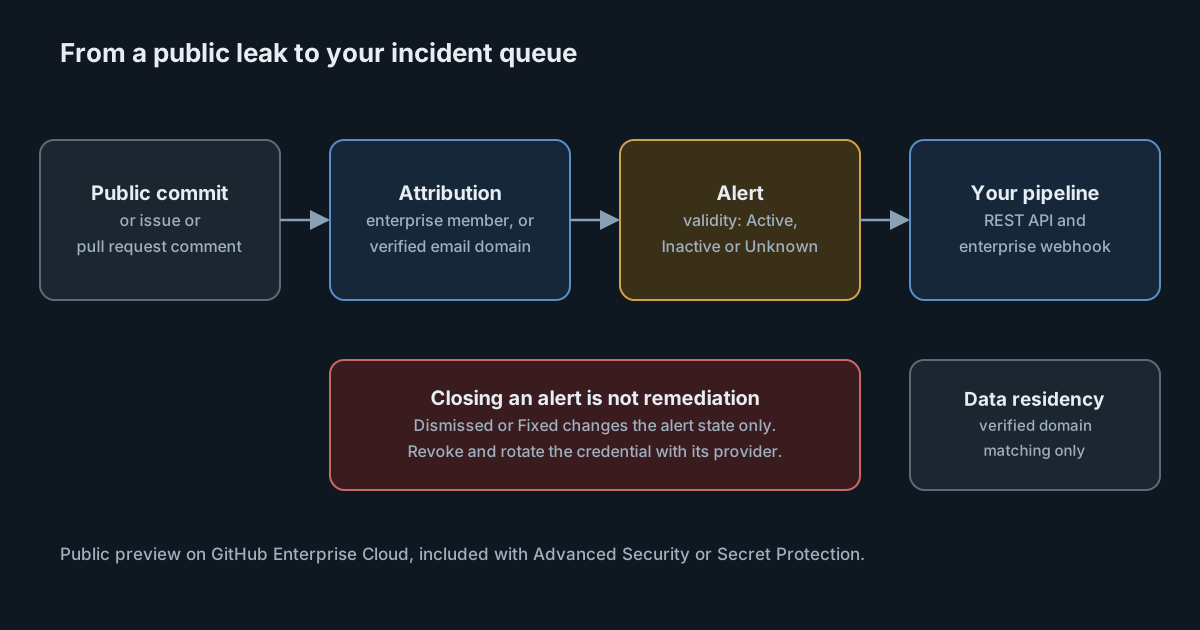
Secret scanning inside your own repositories only sees half the problem. Many leaks happen elsewhere: a developer's personal side project, a fork, a quick test repository, or a comment pasted into someone else's issue tracker. GitHub's public monitoring looks for those, and on 23 October 2026 it gained the features that make it usable as an incident source rather than a list to read: alert states, validity checks, a REST API and webhooks.
The timing matters for teams using AI coding tools. Agents write config files, paste error output into issues and create repositories as part of ordinary work, and the provider keys they handle are valuable. A leak outside the enterprise's own repositories is exactly the kind of event nobody sees until a bill or an abuse report arrives.
What public monitoring does
According to the GitHub documentation, public monitoring scans public repositories across GitHub, including non-code content such as issue and pull request comments, for secrets associated with your enterprise. It does this whether or not the enterprise owns the repository where the secret appeared. Alerts appear in the enterprise-level security overview.
A secret is tied to your enterprise in one of two ways, and both are active once the feature is on:
- Enterprise membership: the secret was leaked by a member of your enterprise.
- Verified domain matching: the secret was leaked by someone whose email address matches one of your enterprise's verified domains, even if they are not a member.
The feature is in public preview for GitHub Enterprise Cloud. The changelog says it is included with a GitHub Advanced Security or GitHub Secret Protection license "at no additional cost", and that enterprise admins and enterprise security managers can turn it on from the enterprise security dashboard.
What changed on 23 October
Alert management. Alerts can be closed as Dismissed or Fixed, with an optional comment, and reopened later. Each alert has an activity timeline of actions and state changes. The list can be filtered by repository, committer, secret type, attribution method and state.
Always-on validity checks. For supported providers, GitHub now checks on an ongoing basis whether a leaked credential still works and shows it as Active, Inactive or Unknown. This is the most useful change for triage: a live token in a public repository is an incident; an inactive one is housekeeping.
REST API and webhooks. Enterprise admins and enterprise security managers can list attributed findings with GET /enterprises/{enterprise}/secret-scanning/public-monitoring-alerts. GitHub says the response includes alert metadata, secret type, attribution and the exposed locations. At the enterprise level, the secret_scanning_public_monitoring_alert webhook event sends a notification whenever a newly detected leak is attributed to you.
One sentence in the changelog deserves to be printed on the triage runbook: closing an alert "does not revoke the exposed credential or remove it from the public repository". Marking an alert Fixed is a statement about your process, not about the key.
Data residency, and a documentation gap
A day earlier, on 22 October, GitHub extended public monitoring to GitHub Enterprise Cloud with data residency. There, attribution works only through verified domain matching. GitHub explains that data residency environments keep strict tenant isolation from github.com, so membership lists are not shared across that boundary. When a commit author's email matches a verified domain, the alert is delivered to the enterprise dashboard in its own region.
The documentation has not caught up. When we checked it on 26 October 2026, the docs page still said public monitoring "is not available for GitHub Enterprise Cloud with data residency", while both changelog posts say it is. We treat the changelog as the newer source, but data residency customers should confirm in their own enterprise settings before planning around it.
There is a practical consequence too. If you are on data residency, a leak by an enterprise member who commits with a personal email address will not be attributed to you. Verified domains, and a policy that work is committed with work addresses, carry the whole load.
What it means for engineering leaders
Public monitoring changes who finds out first. Without it, the first sign of a leaked key in a personal repository is often the provider's own scanner revoking it, or someone else using it. With it, the security team gets an alert with a validity state and a location.
It does not change who has to act. GitHub cannot revoke a third-party key, and it cannot remove content from a repository you do not own. The work after the alert is the same as for any leaked credential: revoke and rotate it with the provider, check the provider's logs for use, and ask the repository owner to remove the content where that is appropriate.
It also does not see private repositories you do not own, other code hosts, chat tools or paste sites. It is one feed among several, not a guarantee.
For teams adopting coding agents, it is worth checking how many of your provider keys are personal ones issued to individuals. Those are the keys most likely to end up in a personal repository, and the hardest to trace back to a team.
Practical takeaways
- Turn it on if you are eligible. It is included with Advanced Security or Secret Protection on Enterprise Cloud, so the cost is the triage time.
- Verify your domains. Domain matching is how leaks by non-members are attributed, and it is the only method on data residency.
- Route the webhook into your incident tooling and sort by validity, so Active alerts page someone and Inactive ones become tickets.
- Write the runbook around rotation, not alert state. A Fixed alert should mean the credential was revoked and replaced, with a comment saying when.
- Use the API for reporting. A weekly count of public leaks by secret type and attribution method shows whether training and tooling are working.
- Pair it with prevention. Push protection and pre-commit scanning stop the leak in the first place; we covered that side in secret scanning blocking AI provider keys at push.
On the prevention side, SpanDock's repository security scans the git repositories on your team's computers for leaked secrets and vulnerable dependencies under one policy set on the server, with git hooks and CI to enforce it. Secret values never leave the computer; the server gets a report with counts and fingerprints. Repository security is on the Enterprise plan.