
Copilot's industry comparison: what it measures and what you share
The Copilot impact dashboard can now rank agentic adoption against peers. What the two metrics mean, who can opt in, what is shared, and how to read a ranking.
On 22 October 2026 GitHub added an Industry comparison section to the Copilot impact dashboard. Enterprises, and organisations that aren't owned by an enterprise, can now see how their agentic adoption compares with other businesses that have opted in. It is opt-in and disabled by default, and turning it on means contributing your own aggregated metrics to the same pool.
For engineering leaders, the attraction is obvious: a number for "are we behind?" This article sets out what the comparison actually measures, what you share to see it, and why the first rankings may not mean much.
The two numbers
The impact dashboard documentation describes two comparison cards, both over a 28-day reporting period:
- Agentic adoption: the percentage of active users who are agent-first or multi-agent users. These are two of the dashboard's adoption cohorts, which group users by how they use Copilot rather than counting anyone who used it at all.
- Leverage: the pull request merge rate per user per month for agentic users, compared with the rate for non-agentic users in the same enterprise or organisation.
The cohorts come from the rest of the dashboard. Its return-on-investment section, for example, compares "Phase 0-1 Passive and Code First Users" with "Phase 2-3 Agent First Users", which suggests that agentic adoption roughly corresponds to the share of your active users in the later phases. Because it is a share of active users, it can rise when people who used Copilot lightly stop using it, as well as when people move to agents.
Each card shows your percentile ranking, your difference from the peer median and, once the cohort is large enough, your difference from the top decile.
It helps to be clear about what these are not. Adoption is a share of users in particular cohorts, not a measure of output. Leverage compares two groups inside your own company, and the people who move to agents first are rarely a random sample: they may already be the developers who merge the most. A high leverage score says that your agentic users merge more pull requests than your other users, not that agents caused the difference, and pull requests vary widely in size. The documentation itself treats the dashboard's return-on-investment figures as directional estimates rather than exact results, and the same caution applies here.
How peers are chosen
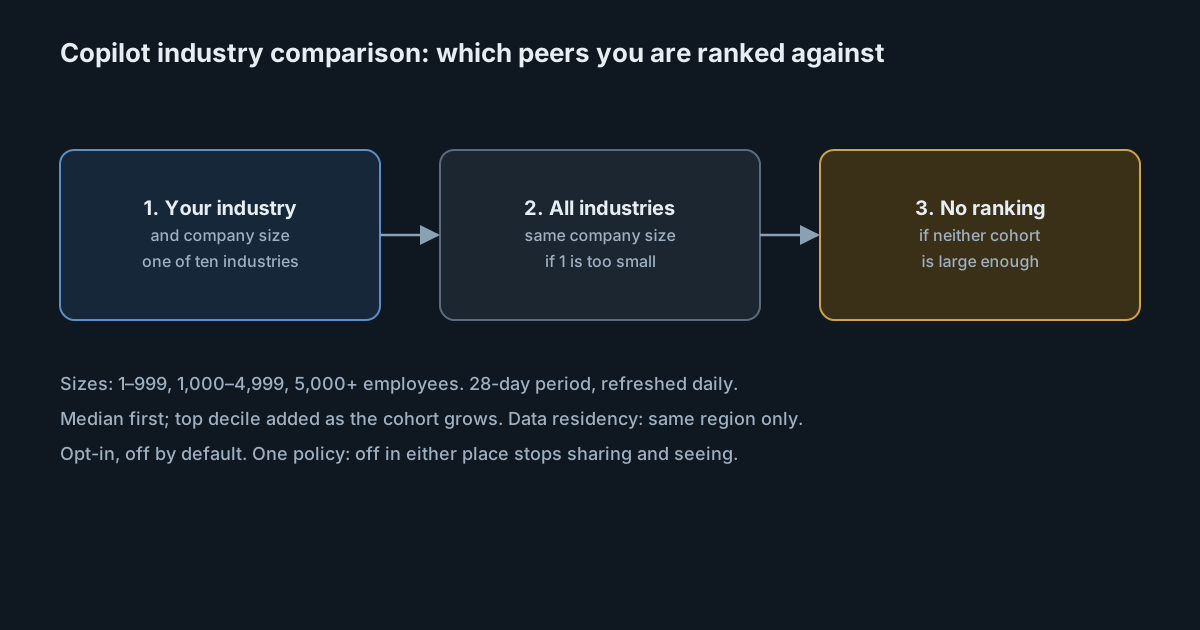
To opt in, you choose an industry, one of ten, and a company size: 1–999, 1,000–4,999 or 5,000+ employees. Both are required. GitHub then picks the comparison group in steps:
- Your industry and company size, if enough businesses in it have opted in.
- Otherwise, all industries for your company size.
- Otherwise, no ranking.
The dashboard labels the cohort it used, and you can switch between your industry and all industries. Both the changelog and the docs warn that, especially soon after launch, you might see only the median, a broader cohort than you chose, or no ranking at all. A ranking is also not shown when your own score can't be calculated: for example, when there were no active users, or when every active user is already agent-first or multi-agent, which leaves no non-agentic group to compare leverage with.
On GitHub Enterprise Cloud with data residency, you are compared only with participants in the same region, and data is never combined across regions.
Who can opt in, and what is shared
Participation is controlled by one policy, the Copilot metrics industry comparison policy. The widget and the policy are the same setting, so turning it off in either place stops both contributing data and seeing comparisons. The Copilot usage metrics policy must also be enabled.
- Who decides: enterprise owners, and owners of organisations that aren't owned by an enterprise. Organisations inside an enterprise participate through the enterprise.
- Who can't take part: enterprises used only to assign Copilot Business licenses, because leverage can't be calculated for them.
- Who sees the results: anyone who can view the impact dashboard.
- What is shared: your aggregated Copilot metrics, added to peer cohorts. GitHub says the aggregated benchmarks contain no identifying data and are deleted after 30 days.
- Leaving: opting out stops comparisons appearing immediately, and your data is excluded from the next daily update. Changing industry or size moves your data to the new cohort with the next daily update.
The comparisons appear only in the dashboard. They are not in the Copilot usage metrics API, the NDJSON exports or downloads, so you can't pull them into your own reporting.
Before you turn it on
- Decide who owns the decision. Contributing company metrics to an external benchmark is the kind of choice that legal or security teams may want to see, even when the data is aggregated. Check whether your data-sharing policies cover it.
- Pick the industry and size honestly. A cohort that flatters you is not useful for setting goals.
- Read the cohort label, not just the percentile. An "all industries" comparison or a median-only view early on is a weak signal.
- Pair it with your own baseline. Your trend over several 28-day periods, by team, says more about whether an enablement programme is working than a single percentile against unnamed peers.
- Remember the scope. The comparison covers Copilot only. Teams that also use other coding agents will look less agentic here than they are.
For that last point, SpanDock's AI enablement report shows adoption, depth of use, cost and lagging teams across all the AI coding tools your server sees, compared with the previous period. It is built from your own server's telemetry and never reads prompt text. The AI enablement report is on the Premium and Enterprise plans, and in the 30-day trial.