
Copilot's default policy for new features takes effect: check it by 26 October
GitHub is enforcing a global default for unconfigured Copilot features through 26 October. What it changes once, what it leaves alone, and what to check.
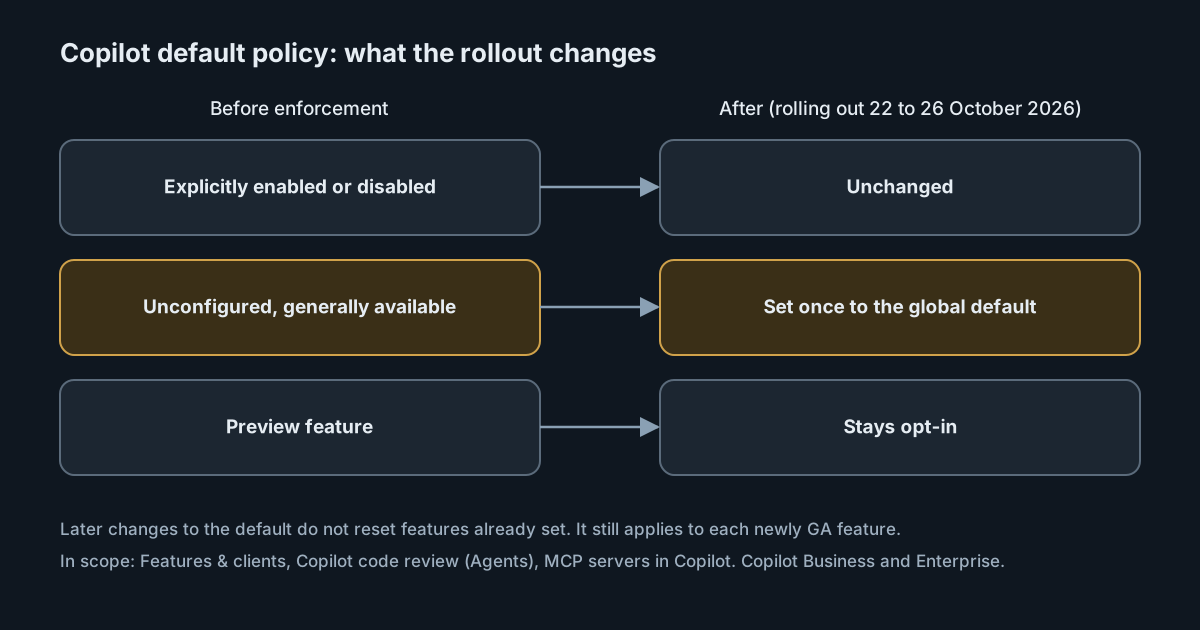
On 22 October 2026 GitHub started enforcing a global default policy for Copilot features on the Copilot Business and Copilot Enterprise plans. The rollout is gradual and runs through 26 October, so it may already have reached your enterprise, or it may arrive tomorrow. If your Copilot settings page has features still marked Unconfigured, those features are about to be set for you. This piece explains what the policy does, which parts are a one-time change, and what an administrator should look at while there is still time.
What GitHub announced, and when
GitHub introduced the policy on 24 September with a 28-day period in which administrators could configure it without it affecting anyone's access. The setting is on the AI Controls page, under Copilot, as Default policy for new features (the docs call it Default policy for new features and clients). The September post gave three options:
- Enabled: current and future eligible features are available to users by default.
- Disabled: current eligible features stay unavailable, and future ones need an administrator's approval.
- Let organizations decide: organisation administrators choose for themselves.
The 22 October post says enforcement is now rolling out, and that it "may take effect at different times for different enterprises and organizations". Administrators can still make explicit choices for individual features at any time.
What changes, once
The most important detail is in the 22 October post: eligible generally available features left Unconfigured are set according to the global default, and "this is a one-time change". Later changes to the default policy don't change feature policies that are already set.
In practice that means the value of the default on the day the rollout reaches you matters more than it looks. If it is Enabled when enforcement arrives, every unconfigured eligible feature is set to enabled. Switching the default to Disabled the following week will not switch those features back off; you would have to change each one. The reverse is also true.
Two things are left alone:
- Explicit choices. A feature you have already enabled or disabled keeps that setting.
- Preview features. They stay opt-in. If you opted into a preview that later becomes generally available, your choice is kept. Otherwise, the default applies when the feature becomes eligible.
The GitHub Docs page on default availability describes the policy's continuing role: it sets the default for newly released generally available features as well as existing ones that are unconfigured. So after the one-time change, the default keeps deciding what happens to each new feature as it reaches general availability.
What counts as a feature
According to the docs, a feature is any policy on the enterprise's Features & clients page, plus the Copilot code review policy on the Agents page and the MCP servers in Copilot policy on the MCP page. The September post lists the same three places. The 22 October post mentions only "Features & clients" and "MCP servers in Copilot", without code review; the docs and the September post are more complete, so treat code review as in scope.
The MCP policy deserves attention. If it is unconfigured and your default is Enabled, Copilot users will be able to use MCP servers, which connect the assistant to other systems and data. Decide that on purpose rather than by default.
The docs list exceptions that the policy doesn't touch: the restrictive model policies on GHE.com (restricting Copilot to data residency or FedRAMP models), and the setting that stores local sessions in the cloud for Copilot CLI and VS Code.
Enterprise and organisation levels
The policy works at two levels. At the enterprise level, it applies to features marked Unconfigured. At the organisation level, it applies to features the enterprise owner has set to Let organizations decide and that an organisation owner hasn't configured. The docs add a detail for the enterprise option Let organizations decide: an unconfigured feature is set to "Let organizations decide" if its policy supports that, and is otherwise disabled.
The docs name the enterprise states Enabled everywhere and Disabled everywhere, where the changelog posts say Enabled and Disabled, and they call the policy Default policy for new features and clients, where the posts say Default policy for new features. They describe the same choice: with either, organisations can't override the result.
Models have a separate default
The docs describe a second, separate policy, Default availability for released models, which is already active and works the same way for models marked Delegate to Default Policy. It is not the default model chosen for users' sessions. Some models are out of its scope and disabled by default whatever you choose, including pre-release models, open-weight models, and models not covered by GitHub's data retention agreement.
What to check now
- Open AI Controls → Copilot and read the current value of Default policy for new features (Default policy for new features and clients in the docs). Don't assume what it is; check.
- List what is still Unconfigured on Features & clients, the code review policy on Agents, and MCP servers in Copilot. Those are the settings the rollout will set.
- Make an explicit choice for anything you care about, especially MCP servers and any agent features that can act on repositories. An explicit setting is the only way to be sure the rollout leaves a generally available feature alone.
- Decide the default for the future. It will apply to each newly generally available feature. Enterprises with strict compliance needs can disable it for the whole enterprise, or only in particular organisations, according to the docs.
- Tell organisation owners if you choose Let organizations decide, because their own default will then govern features they haven't configured.
- Keep watching the changelog. GitHub's docs recommend following new releases and general-availability announcements so you can choose settings before a feature reaches people.
Why it matters
A default that turns features on saves administrators work, and the docs say as much: users get the latest features without an administrator acting. The cost is that new capabilities, some of which let an assistant act on code or reach other systems, can arrive in a team's tools without anyone deciding they should. Neither choice is wrong. What matters is that the choice is made on purpose and written down, and that whoever owns AI tool policy knows the setting is now active.