
Copilot in Teams turns chat threads into pull requests: the governance questions
GitHub's consolidated Teams app lets Copilot open pull requests from a conversation. How identity, context and approvals work, and what to set before rollout.
A bug report lands in a Teams channel, someone types a mention, and a few minutes later there is a pull request. GitHub's 23 October 2026 changelog describes exactly that flow: get notified, then "@github investigates the issue, fixes the bug, and creates a pull request", then the team reviews, tests and merges.
That is convenient, and it moves the start of a code change out of the editor and into a chat tool with different membership, retention and access rules. Before it spreads across a company, someone should decide how it is allowed to work.
What changed
The 23 October announcement consolidates two apps. The GitHub app in Microsoft Teams, previously called GitHub notifications, now brings notifications and Copilot together. Teams with GitHub notifications installed are asked to update it, and existing notifications keep working. The legacy GitHub app will be renamed "GitHub (deprecated)" and retired on 16 November 2026, so anyone using Copilot through it needs to install the consolidated app.
A 15 October update for Slack and Teams added work across several repositories in one conversation, so a single thread can create issues or open pull requests in different repositories. It also lets people mention @GitHub anywhere in a message rather than only at the start.
According to the documentation, the Teams integration is in public preview and is available on all paid Copilot plans. The work runs as a Copilot cloud agent session in a cloud sandbox, which posts its result back to the conversation when it is ready.
How identity works
The most important detail is who the change belongs to, and it depends on where the request is made.
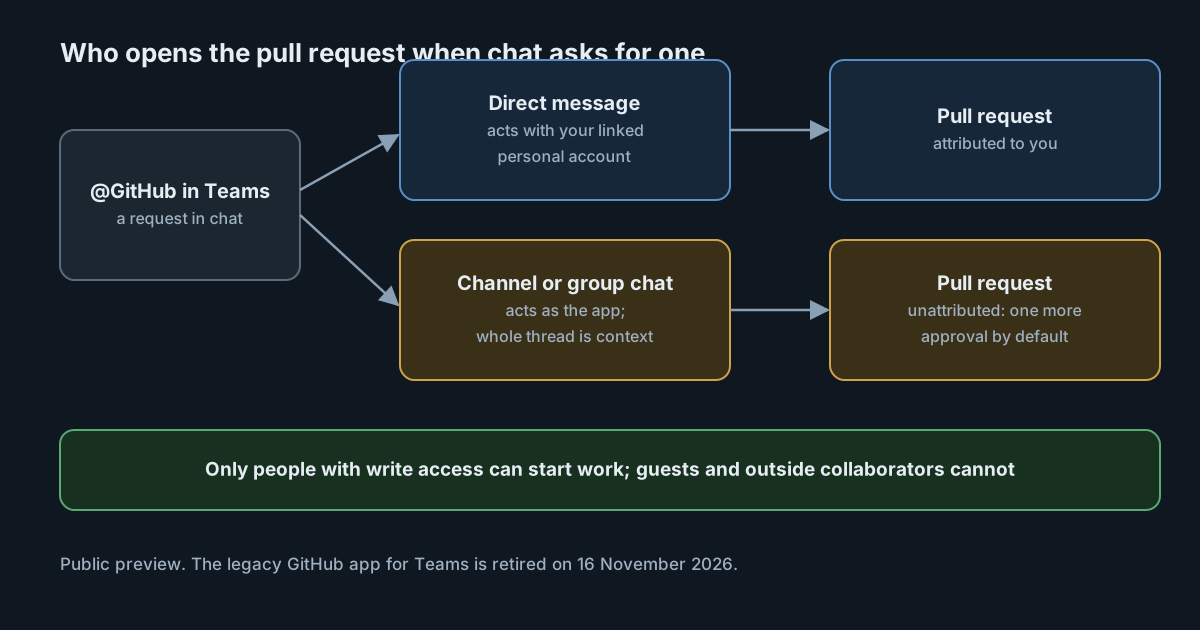
In a direct message, Copilot acts for you, using the permissions of your linked GitHub personal account. Pull requests and issues are created as you.
In a group thread or channel, Copilot creates pull requests and other artifacts under its app identity, not the account of the person who asked.
Because those channel pull requests are not attributed to a person, the documentation says that with repository rulesets "one more approval is required before merging", provided the repository already requires at least one approval. This is on by default. A repository with no required reviews gets no extra approval, so the safeguard depends on protections you already have.
Who can start and steer work
The documentation sets clear limits. Only users with write access to a repository can trigger Copilot to make changes there. Any participant in the conversation can provide input, but guest members and outside collaborators cannot start or steer a session.
That second point deserves attention. Copilot uses every message in the conversation to inform the work, and when you refine a pull request with another mention, it takes in all messages since the previous one. In a busy channel, a colleague without write access cannot start a change, but what they write can still shape it.
What happens to the conversation
The documentation is direct about context: when you mention GitHub in Teams, the cloud agent "will capture the entire thread as context", and that context is stored in the artifacts it generates. If you want to limit what is captured, it suggests a direct message to the app instead.
In practice, a pull request created from a long incident thread may carry details from that thread, including anything pasted into it. Chat threads often contain log extracts, customer names and, occasionally, credentials. They are not written with a code repository's audience in mind.
Prerequisites that give admins control
To use the cloud agent from Teams, cloud sandboxes must be enabled for the Copilot plan. The documentation notes that cloud sandbox policies share the same configuration as the Copilot cloud agent policies, and that members of an organisation or enterprise may need an owner to enable both before Copilot in Teams works. That gives administrators a single place to decide whether this is available at all.
What it means for engineering leaders
Chat-started pull requests are not a new risk category, but they change three defaults.
The requester and the author can differ. In a channel, the pull request belongs to the app. Your review process should not assume that the person whose name is on a change asked for it, and your audit questions should include the conversation that started it.
Review becomes the main control. The extra approval for unattributed pull requests only exists if reviews are already required. Repositories that rely on trust rather than required review will accept these changes with no human approval beyond the merge.
Chat hygiene becomes code hygiene. Whatever is in the thread can end up in the artifacts. Teams that paste secrets or customer data into incident channels need a habit change before they connect an agent to them.
Practical takeaways
- Decide where it is allowed. Use the cloud agent and cloud sandbox policies to enable it for the organisations that want it, rather than everywhere at once.
- Require at least one approval on repositories it can reach, so the extra approval for unattributed pull requests applies.
- Use direct messages for sensitive work, where the captured context is limited and the change is attributed to you.
- Keep secrets and customer data out of threads that might be used as context, and check generated artifacts for anything that slipped in.
- Plan the app migration. If your teams use the legacy GitHub app for Copilot, move them to the consolidated app before 16 November 2026.
- Treat it as a preview. Behaviour and limits may change, so recheck the documentation before relying on any of the details above.