
GitHub Apps on the enterprise are GA: retiring classic tokens from admin automation
Enterprise installations for GitHub Apps are generally available, with new governance and security permissions. What they can do and how to move off PATs.
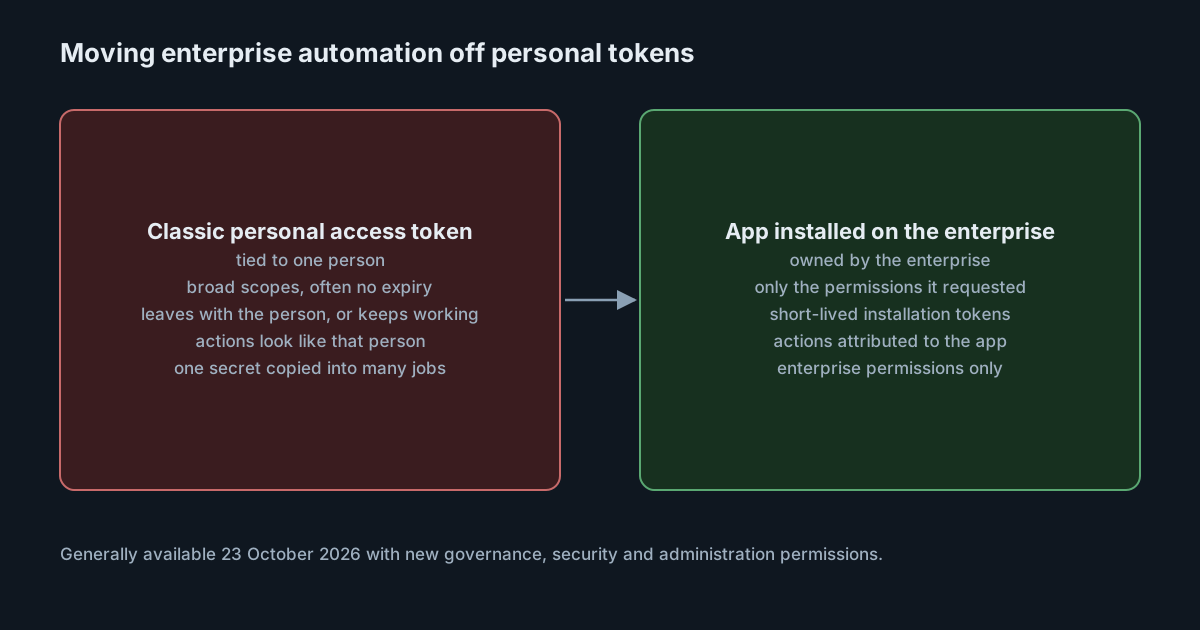
Most enterprise admin automation on GitHub still runs on a classic personal access token that belongs to one person. It creates organisations, adjusts policies and syncs settings, and it keeps working, with that person's identity on every change, long after anyone remembers which script uses it. On 23 October 2026 GitHub made enterprise installations for GitHub Apps generally available, with a set of new permissions aimed squarely at replacing those tokens.
This matters more as coding agents and platform bots take on admin tasks. Every automated actor that holds a person's token inherits that person's reach. An app that holds only the permissions it asked for is a smaller and more visible credential.
What became generally available
GitHub describes three groups of new or expanded permissions:
- Governance: managing enterprise-level repository policies and rulesets, and reading delegated bypass requests.
- Security: configuring two-factor authentication requirements, verifying domains, managing IP allowlists and controlling enterprise access restrictions.
- Administration: updating the enterprise profile and managing member privileges and repository access settings across the enterprise.
The changelog lists the specific permissions behind these, including "Enterprise organization and repository policies" for settings such as private repository forking, default repository permissions and who can create or delete repositories; "Enterprise repository rulesets" through the enterprise rules REST APIs; and "Enterprise access restrictions". It also says two gaps at the organisation level are closed: apps can now work with organisation verifiable domains and organisation IP allowlists.
The installation documentation lists what enterprise-installed apps could already do, including creating organisations, managing users, installing apps across organisations, managing enterprise billing and calling the enterprise SCIM APIs.
One discrepancy to note: when we checked on 26 October 2026, that documentation page still carried a note that enterprise-installed apps "are in public preview and subject to change", while the changelog says they are generally available. We take the changelog as the newer statement, but the limitations the documentation lists are still the best guide to what does and does not work.
How enterprise installations behave
The documentation sets out several rules that shape any migration plan.
Only enterprise owners can install. App managers cannot install apps at the enterprise level.
Enterprise permissions only. An app installed on the enterprise is granted only the enterprise permissions it requested. It gets no organisation or repository access, with the exception of the organisation installations API. To reach organisations or repositories, the app has to be installed on each organisation separately, which GitHub says can be automated through an API.
Where the app can come from. The app can be owned by your enterprise, by one of its organisations or by a third party. You cannot install a private app owned by an account outside your enterprise. An app that requests the "Enterprise organization installations" permission can only be installed on the enterprise that owns it.
Two ways to act. Once installed, the app can create an installation token for the enterprise, or sign in enterprise members and act on their behalf. Acting for a member only works for operations that member is allowed to perform.
No enterprise webhooks yet. The documentation says enterprise installations do not currently support webhooks, so an app cannot receive events for enterprise-level activity. Event-driven automation still needs organisation or repository installations.
Rate limits per installation. An enterprise installation token has the same rate limit as an Enterprise Cloud organisation, and each installation has its own budget.
What it means for engineering leaders
Replacing a classic token with an app changes three things.
Ownership moves from a person to the enterprise. The automation no longer stops when someone leaves, and it no longer quietly keeps a leaver's access alive.
Scope becomes explicit. A classic token's scopes are coarse and often broader than the job. An app declares the permissions it needs, and an enterprise owner sees them at install time.
Automated and human changes separate. When the app uses its own installation token, the actor is the app rather than a colleague, which makes it easier to tell automated changes from human ones during an investigation.
It does not remove the need for care. An app with write access to enterprise rulesets, access restrictions or IP allowlists is a powerful credential, and its private key needs the same protection as any production secret. A single "admin bot" app with every enterprise permission recreates the old problem under a new name.
Practical takeaways
- Inventory classic tokens used for enterprise and organisation automation. Note the owner, the scopes, the expiry and what each one actually calls.
- Map each job to permissions. Check the changelog's permission table and GitHub's list of permissions required for GitHub Apps; anything not covered yet stays on its current credential for now.
- Prefer several narrow apps over one broad one. Policy sync, user provisioning and billing reports have different owners and different risks.
- Plan organisation installs separately. Enterprise installations do not reach repositories, so jobs that touch code need organisation installations too.
- Keep event-driven jobs at organisation level. Until enterprise webhooks exist, those still need organisation or repository installs.
- Protect and rotate the app's private keys, and restrict who can manage the app's registration.
- Retire the tokens you replace. Revoke each classic token once its job runs on an app, rather than leaving it as a fallback.
Developer machines have the same problem on a smaller scale. We looked at the GitHub CLI's opt-in short-lived tokens in GitHub CLI's expiring tokens, which narrows the window if a laptop token leaks.