
GitHub Agent Merge: an agent that fixes your failing checks, and who controls it
Agent Merge lets Copilot fix failing Actions workflows and merge conflicts on pull requests. What it needs, what it costs, and the review rules to set.
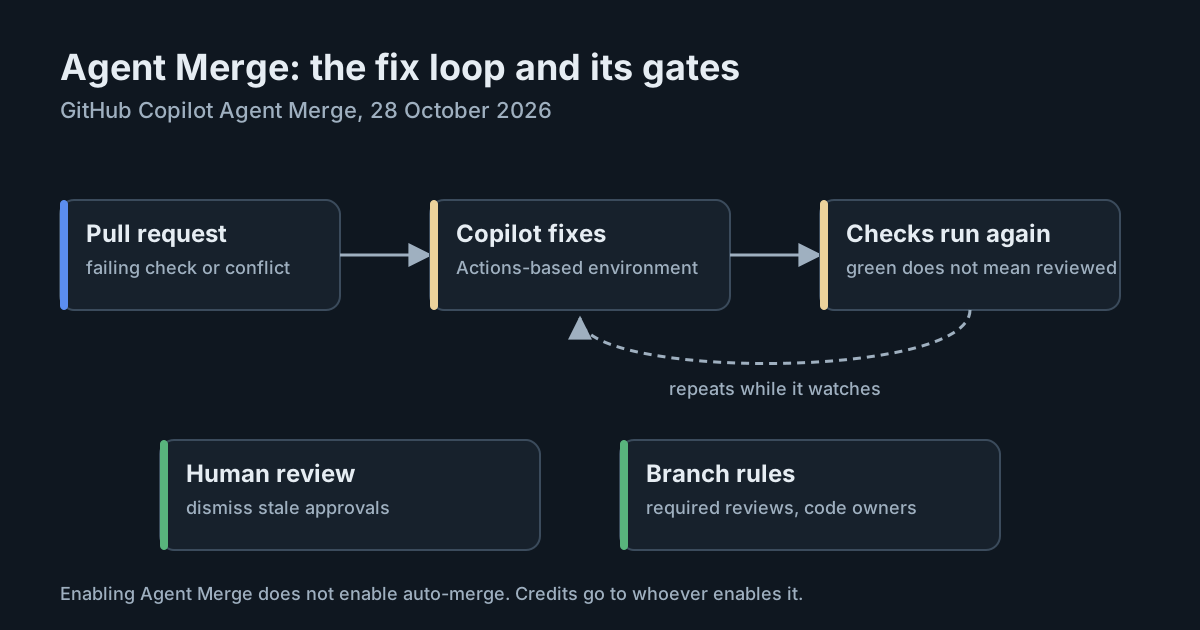
A failing check on a pull request has always been a signal for a person to look at. On 28 October 2026, GitHub made it something an agent can act on by itself. Agent Merge, already in the GitHub Copilot app and Visual Studio Code, is now built into pull requests on github.com. Click "Watch and fix" in the merge box and Copilot will try to fix failing GitHub Actions workflows, resolve merge conflicts, or both, whenever they appear.
That is useful. It also changes what a green check means, and that is worth thinking about before the feature becomes a habit across your organisation.
What Agent Merge does
According to the GitHub documentation, Agent Merge watches a pull request for the blockers you choose and starts work automatically when one appears. Each time it starts, a timeline event on the pull request explains why, such as a failed workflow or a merge conflict. Progress shows in an Agent Merge section of the merge box.
You can turn it on per pull request or by default for every pull request you create, under your profile's Copilot settings, in the Cloud section. You choose separately whether it fixes failed workflows, resolves conflicts, or both.
Some limits and requirements:
- Plan and policy. It needs a paid Copilot plan with access to Copilot in the cloud. If your Copilot access comes from an organisation or enterprise, their policies must allow Copilot in the cloud.
- Repository policy. The repository's "Enable automations" Copilot policy must be on.
- Unsupported cases. It does not work on stacked pull requests or pull requests opened from a fork.
- Stopping it. Clicking "Unassign Copilot" in the merge box turns it off. The person who enabled it, or anyone with write access to the repository, can do this.
Where the fixes run
The changelog says Copilot works "in a cloud development environment", and the docs' how-to steps use the same phrase. A later section of the same docs page is more specific: fixes run in a GitHub Actions-based development environment, "not a cloud sandbox". That environment uses the same repository customisations as other Copilot tasks on Actions: setup steps in .github/workflows/copilot-setup-steps.yml, repository custom instructions and repository agent skills.
That matters for security review. Whatever network access, tools and secrets your Copilot setup workflow provides are what the agent works with when it fixes your pull request. If you have tightened that file for the Copilot coding agent, those choices now also apply to Agent Merge. If you haven't, they apply anyway.
Auto-merge and review
The docs are careful on two points. Enabling Agent Merge does not enable auto-merge. And: "Agent Merge does not remove the need for human review." GitHub suggests combining the two, so that Copilot gets the pull request ready and keeps it ready, and GitHub merges it once all requirements are met.
The phrase to look at is "all requirements". Auto-merge merges when required reviews and status checks pass. If a repository requires no reviews, or only a review from before the agent's commits, the combination can merge code that no person has looked at since the agent changed it. Whether that can happen is decided by branch protection and rulesets, not by Agent Merge.
What changes when an agent fixes CI
A failing test either means the code is wrong or the test is. A person deciding which is exercising judgement. An agent asked to make the check pass can do it either way, and both produce a green tick. Research on coding agents has shown how readily they take the shortest path to a passing score, as in the SWE-Bench Pro Verified clean-up. Nothing GitHub has published suggests Agent Merge weakens tests, and we are not claiming it does. The point is that the review has to check for it, because the check result can no longer.
Merge conflicts carry a similar risk on a smaller scale. A resolution that compiles and passes tests can still drop one side's intent. It is the kind of change reviewers skim because it looks mechanical.
This lands on review capacity that is already stretched. Studies of agent-assisted teams find code volume rising while review sets the pace. An agent that keeps pull requests mergeable without anyone looking adds commits for reviewers to check, rather than saving them work.
Who pays
The AI credits Agent Merge uses are charged to the user who enables it on the pull request, "not necessarily the pull request's author". A senior engineer who turns it on for a colleague's pull request pays for it, and so does someone who enables it by default across many pull requests. If you are already sorting out who pays for Copilot code review, add Agent Merge to the same conversation.
What it means for engineering and security leaders
- Decide where it is allowed. The repository "Enable automations" policy is the control point. Start with repositories that have good tests and required reviews, rather than everywhere at once.
- Make branch protection do the work. Require reviews, and require them to be dismissed when new commits are pushed, so an agent's commit after approval needs a fresh look.
- Treat test changes as sensitive. Code owners for test directories and CI workflow files mean a human with context sees any agent change to them.
- Review the setup workflow. The Copilot setup steps file defines the agent's environment for these fixes. Give it the same scrutiny as any other workflow with repository write access.
Practical takeaways
- Check which repositories have "Enable automations" switched on, and whether that was deliberate.
- Turn on dismissal of stale approvals on protected branches where Agent Merge may be used.
- Add code owners for
tests/,.github/workflows/andcopilot-setup-steps.yml. - When reviewing a pull request Agent Merge has touched, read the timeline events and the agent's commits separately from the author's.
- Tell teams that credits go to whoever enables it, and watch usage after people start turning it on by default.
- Be cautious about combining it with auto-merge on repositories that don't require reviews.