
One security policy for every repository your AI tools work in
Set one repository security policy on the SpanDock server, roll it out as recommended then enforced, and add the CI step a developer can't skip.
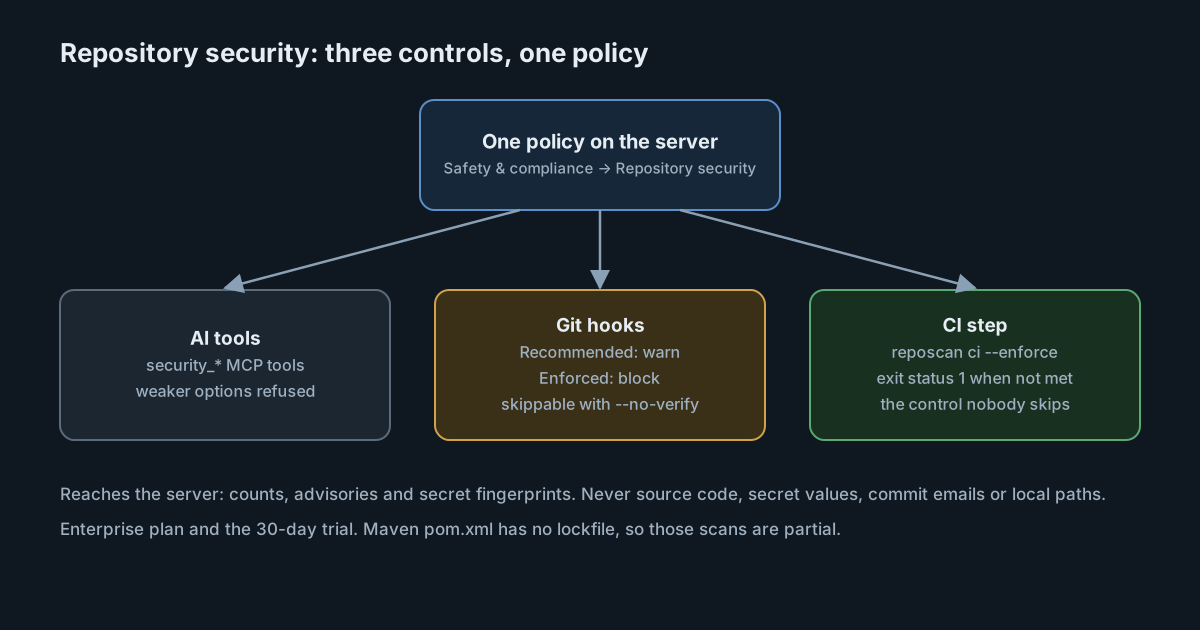
AI coding tools add dependencies and touch configuration files quickly, across many repositories on many computers. This guide sets one scanning policy on a SpanDock server for vulnerable dependencies and leaked secrets, rolls it out first as a warning and then as a block, and adds the CI step that holds even when a developer skips their local hooks. It follows Repository security.
Prerequisites
- A SpanDock server on the Enterprise plan, or in the 30-day trial. Saving a policy needs it.
- Paired computers. See Pairing clients. The scan runs on each computer, because it reads local files.
- Administrator access to the server's dashboard. Changing the policy needs an administrator and is recorded in the audit log.
- A CI system that can run the SpanDock command-line program.
What a scan finds, and what stays on the computer
A scan looks up dependencies from lockfiles (npm, Yarn, pnpm, Python, Cargo, Go, Composer, Bundler and Gradle) in the OSV database, and looks for secrets, with TruffleHog when it's installed or a built-in scanner otherwise. Each vulnerability finding has its identifiers, severity, fixed versions and an upgrade command.
What reaches the server is a report with counts, advisories and secret fingerprints. For a secret, only the detector, path and line, severity, verification state and a one-way fingerprint are kept. Source code, secret values, commit email addresses, credentials and local folder paths never leave the computer. The OSV lookup sees package names, versions and ecosystems only; you can turn it off in the policy if your package names are private, and the vulnerability check is then partial. Reports are kept for 400 days.
Steps
1. Save a policy
On the server's dashboard, open Safety & compliance → Repository security → Policy. The defaults are a reasonable start:
| Setting | Default |
|---|---|
| Require a scan before commit or push | Off |
| Maximum report age | 24 hours |
| CVE severity that blocks | High |
| Secrets that block | Any |
| Timeout | 600 seconds |
| When a scan can't finish | Open (allow with a warning) |
| Scan git history | Off |
| Permit provider verification | Off |
Three choices deserve a decision rather than the default. Require a scan before commit or push makes the pre-commit or pre-push hook check the latest scan. When a scan can't finish set to closed blocks partial or failed scans instead of warning. Permit provider verification sends a found credential to its own provider to check it, so leave it off unless you want that.
Save the policy. Every save is a new version, and a report made under an older version doesn't satisfy hooks or CI until the repository is scanned again.
2. Turn it on as Recommended
Open People & computers → Computers → Client defaults, or one computer's settings, and set Repository security to Recommended. The policy then applies, SpanDock's MCP tools are added to the computer's AI tools, and git hooks and CI only warn. Computers apply the change within a minute, and their reports appear under Repositories.
Start here for a week or two. A warning that explains itself teaches people what the policy expects before it stops their work.
3. Let the AI tools and developers scan
While the setting is on, a developer can ask their AI tool to scan the repository it is working in, through the security_* MCP tools. Those MCP tools run on the computer and are never served over the tunnel, so the server can't make a computer scan. A developer can also use a terminal:
spandock reposcan scan --path .     # scan now
spandock reposcan check --path .    # what the hooks run
Options passed by an AI tool, the command line or CI can only make a scan stricter. A weaker option is refused with the reason, and the scan doesn't run.
4. Switch to Enforced
When the reports look right, set Repository security to Enforced. SpanDock's git hooks and spandock reposcan ci then block as the policy says. With the git hooks action under Actions on repositories set to Enforce, each computer installs the required hooks in every repository that reports to SpanDock there, inside the person's home folder.
- An existing hook is kept and run first.
- A repository that uses another hook manager (husky, lefthook, pre-commit) is left alone, and the Hooks tab says why.
- Turning the setting off removes exactly the hooks SpanDock installed.
5. Add the CI step
Git hooks are a local control: a developer can skip them with git commit --no-verify. CI is the control they can't skip. Use Download policy file on the Policy tab (or spandock reposcan policy export), commit it to the repository as .spandock/repo-policy.json, and add a step:
- run: spandock reposcan ci --path . --policy .spandock/repo-policy.json --enforce --historyci scans, prints the result and exits with status 1 when an enforced policy isn't met. In CI, reports stay in the job. SpanDock keeps the policy file up to date on computers while the policy file action is on Enforce, but never commits it, so committing it is your step.
Verify
- Open Repositories on the server and check that each repository has a recent report. A report is clean only when the scan is complete with no advisories and no secret findings. A partial, failed or timed-out scan always says "not clean".
- In a test repository with a dependency you know has a high-severity advisory, run the CI command from step 5 locally and check that it exits with status 1.
- Check the Hooks tab for any repository that was left alone, and the reason.
Troubleshooting
- The hooks block, and the report is old. The latest scan is missing, older than the maximum report age, or made under an older policy version. Scan again.
- A scan is always partial. A required scanner can't run, or the repository uses Maven:
pom.xmlhas no lockfile, so those dependencies aren't looked up. The built-in secret scanner is a fallback with fewer detectors than TruffleHog and no verification. - Hooks didn't appear in a repository. It uses another hook manager, keeps hooks outside the repository, or is outside the person's home folder. The Hooks tab gives the reason.
- "Scan when a session starts" didn't stop anything. It asks the AI tools to scan, but nothing enforces it.
Repository security is one layer. It doesn't replace an application security programme, and it doesn't cover Maven dependencies without a lockfile.
Check the installation itself
The repositories are one surface; the SpanDock installation is another. The exposure check, in every plan, looks at an installation as an attacker would. spandock exposure check runs on a SpanDock machine, probe runs from another computer against a host, and discover finds installations in a private range. It never sends a credential or changes anything, and it exits with 0 when nothing is above low, 2 for a medium, high or critical finding, and 1 when it couldn't run, so a scheduler can run it. discover is still a port scan, so tell your IT or security team first.
Next steps
- Repository security for code-quality rules and the actions on repositories.
- The exposure check for everything
checkandprobelook at.