
Claude Code's Code Mode: when the agent writes JavaScript to call its tools
Claude Code 2.1.323 adds Code Mode, an experimental opt-in where Claude writes JavaScript to call tools. What changes for permissions, hooks and telemetry.
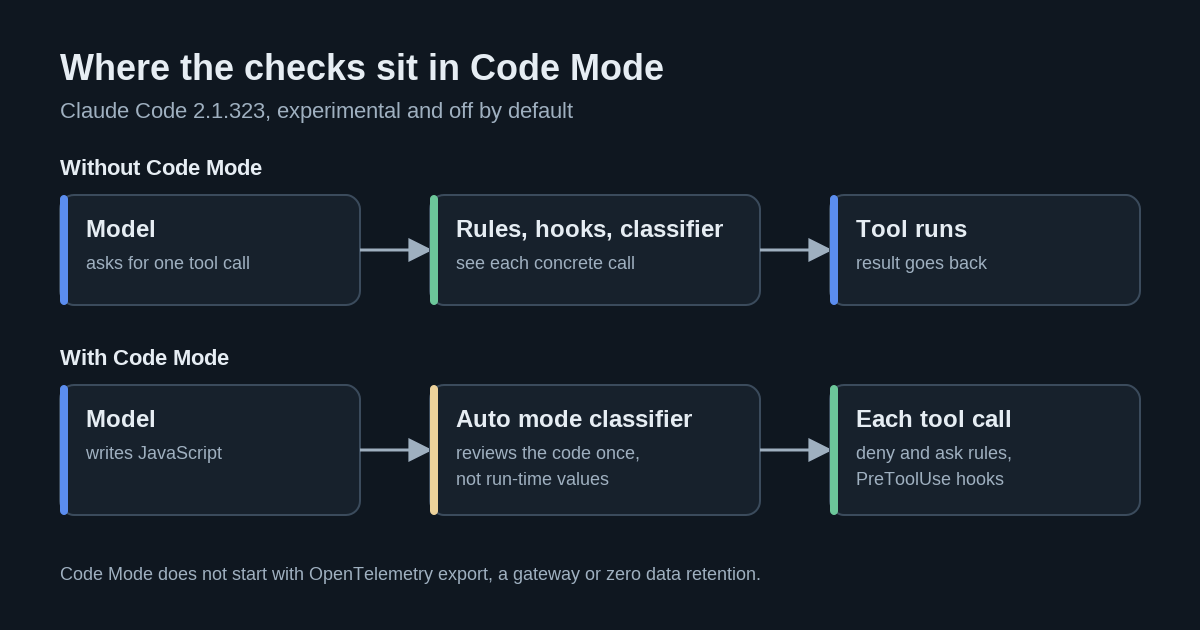
Claude Code 2.1.323, released on 12 November 2026, adds Code Mode: instead of asking for one tool call at a time, Claude writes a piece of JavaScript that makes several tool calls, chains their results and returns only what it needs to read. The feature is experimental, off by default and limited to certain accounts and setups. It is worth understanding before anyone turns it on, because it changes where some of your controls look, and it refuses to start in several configurations that governed teams commonly use.
What Code Mode does
The v2.1.323 release notes describe it as "an experimental opt-in in which Claude writes JavaScript to call its tools". The Code Mode documentation explains the difference. Normally Claude asks for a tool such as Bash, Read or Edit, reads the result, and decides what to do next. In Code Mode, Claude writes code that makes those calls, and Claude Code runs it in the session. One piece of code can run commands in parallel, feed one result into the next call, and filter output before Claude sees it.
The documentation suggests it for tasks with many related tool calls: a change repeated across many files, a search whose results need filtering, or several independent commands. The person in the session sees the tool calls, such as an edit's diff, but not the code itself unless they open the transcript viewer.
It is turned on per user with the CLAUDE_CODE_EXPERIMENTAL_CODE_MODE environment variable set to 1, and Claude Code asks for confirmation before the first session. The documentation states that Claude Code ignores this variable in a project's settings files, "so a repository you clone can't turn on Code Mode for you".
What it requires, and where it won't start
The requirements list is long, and several items matter to organisations more than to individuals:
- Claude Code v2.1.323 or later, the native build, in an interactive terminal session. It doesn't work with
-p, the Agent SDK, the VS Code panel, the Desktop app or cloud sessions. - A Claude subscription or Console account. The documentation says you can't use it through a gateway, Amazon Bedrock, Claude Platform on AWS, Google Cloud's Agent Platform or Microsoft Foundry.
- An organisation that doesn't use the HIPAA configuration or zero data retention.
- Opus 5.5, Sonnet 5.5, Haiku 5.5 or Fable 5.2.
It also won't start with some settings on, including an API key helper, agent teams, OpenTelemetry export or DISABLE_TELEMETRY. The troubleshooting table tells users to unset CLAUDE_CODE_ENABLE_TELEMETRY "if you can work without OpenTelemetry export". A custom ANTHROPIC_BASE_URL is also listed as a reason it won't start.
For a company that routes Claude Code through an internal gateway and collects its telemetry, that combination means Code Mode is simply unavailable today, and a developer who wants to try it would have to remove exactly the settings that give the organisation visibility. That is a reasonable thing for an experimental feature to require, but it is a trade-off a developer shouldn't make alone.
How permissions and hooks apply
The documentation is specific here, and it is the part security teams should read closely.
- Rules and hooks still see each call. Every tool call the code makes goes through your
denyandaskpermission rules and yourPreToolUsehooks. Existing rules for tools such asBashdon't need changing. - Auto mode reviews the code, not each call. In auto mode, the classifier reviews each piece of code before it runs. The documentation warns that it "doesn't see values computed at run time, such as a path taken from search output", and advises keeping rules or hooks for calls you must control.
- Other modes prompt per call. In the modes that ask, the code starts without a review and the person is prompted for each tool call that would normally prompt.
- The code itself can be checked. A
PreToolUsehook that matchesREPL, the tool that runs Claude's code, can read the JavaScript fromtool_input.code. The hooks reference covers how such hooks are written. - Hook failures refuse calls. If a
PreToolUsehook fails or times out on a call from Claude's code, the call is refused even whenonFailureis unset.
The documentation also repeats a warning that applies with or without Code Mode: Bash rules match command text, so a denied command can run in a form the rule doesn't match. For limits that don't depend on text, it points to sandboxing.
Long-running code has its own limits. Code that Claude waits for stops after ten minutes, including time spent at permission prompts. Code that runs in the background can run for up to two hours, but only in a session started in auto or bypassPermissions mode.
What it means for engineering and security leaders
Code Mode is a sensible idea for efficiency: fewer round trips, less output in the context window. The governance question is where the decision point moves. With ordinary tool calls, an auto mode classifier looks at each concrete command. With Code Mode, it looks at a program whose actual arguments are only known when it runs. Anthropic says this plainly, and its answer is the right one: deterministic rules and hooks still run on every call, so they become more important, not less.
Three practical consequences follow. First, if your policy relies on the auto mode classifier as the main control, Code Mode weakens that reliance; deny rules, ask rules and hooks should cover the calls that matter. Second, if you already run PreToolUse hooks for policy, check that they are fast and reliable, because a timeout now refuses a call. Third, the visibility trade-off is real: Code Mode doesn't run with OpenTelemetry export, through a gateway, or under zero data retention, so it sits outside the controls many organisations use to see and route agent traffic.
The setting to know is in managed settings. Setting CLAUDE_CODE_EXPERIMENTAL_CODE_MODE to 0 there blocks Code Mode for everyone; the documentation says administrators can't turn it on for users from managed settings. The settings documentation explains where managed settings live.
Practical takeaways
- Decide a position now. Either block Code Mode in managed settings with
"CLAUDE_CODE_EXPERIMENTAL_CODE_MODE": "0"until you have reviewed it, or name who may try it and on which projects. - Don't let developers drop telemetry or gateway settings to try it. Those are the settings that make Code Mode unavailable; removing them on a managed machine is a policy change, not a personal preference.
- Lean on deterministic controls. Keep deny and ask rules and
PreToolUsehooks for the commands you must control, rather than relying on the auto mode classifier. - If you allow it, inspect the code. A
PreToolUsehook onREPLcan log or check the JavaScript Claude wrote. - Check hook timeouts. Raise them where needed so legitimate calls from code aren't refused.
For background, see Claude Code hooks can now fail closed, what the built-in sandboxes do and don't cover, and observing AI coding tools with OpenTelemetry.