
VS Code 1.145.3: an MCP install link that could run a command
CVE-2026-114171: a crafted VS Code MCP installation link could run a command after a user approved it. The two severity readings, the fix and what to change.
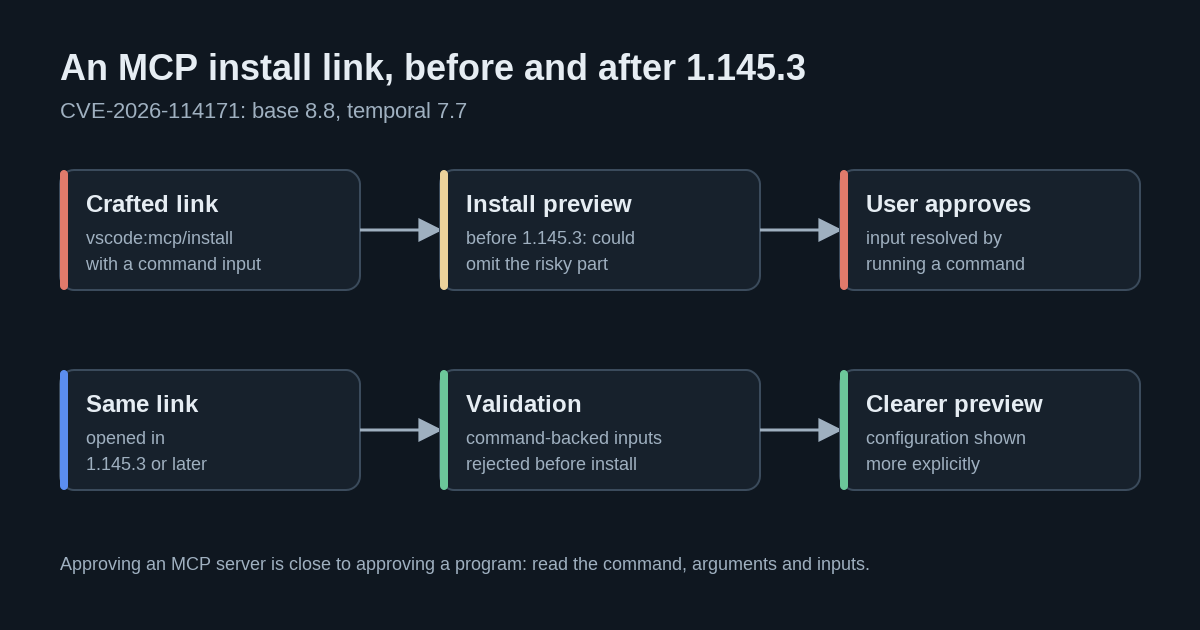
One-click MCP installation links are convenient: a documentation page or a chat message carries a link, VS Code opens, shows the server it is about to add, and the user approves. On 10 November 2026 Microsoft fixed a flaw in that flow. In VS Code 1.145.2 and earlier, a crafted MCP installation link could carry input definitions or variable values that weren't rejected, and once the server was installed, VS Code could resolve a command-backed input and run a command with the user's permissions. The fix is in VS Code 1.145.3, the same release that fixed the agent local-command bypass.
What the advisory says
The GitHub advisory GHSA-crhv-2887-p3xr describes a remote code execution issue where "a crafted MCP installation link could include unsafe input definitions or variable values that were not rejected before installation". Exploitation needs two things from the victim: opening a malicious MCP installation link and approving the installation.
The fixes, in commits 6f1f0c4 and 82e93d6, validate MCP install-link inputs, reject unsupported command-backed variables, and make the configuration being installed more explicit. All versions before 1.145.3 are affected. The advisory's workarounds are to install MCP servers only from trusted sources, not to open untrusted vscode:mcp/install links, and to review the displayed server configuration before approving.
Why an input can run a command
The MCP configuration reference explains the mechanism. In the VS Code configuration format, input variables are placeholders for values such as API keys. Each has a type: promptString asks for free text, pickString offers a list, and command "runs a command and uses its result as the input value". That is a reasonable feature when a trusted extension supplies a key. It becomes a problem when the definition arrives from a link written by someone else, and the person approving it can't see that part.
Two descriptions of one bug
The two Microsoft sources describe the same issue differently, and both are worth recording.
- The GitHub advisory calls it remote code execution, rates it High, and lists the weaknesses as improper input validation (CWE-20) and OS command injection (CWE-78).
- The Microsoft Security Update Guide entry for CVE-2026-114171 titles it a security feature bypass with a maximum severity of Important, and classifies the weakness as user interface misrepresentation of critical information (CWE-451). Its FAQ says "the installation preview could omit security-relevant details, allowing the installed server to execute code with the user's permissions".
Both use the vector CVSS:3.1/AV:N/AC:L/PR:N/UI:R/S:U/C:H/I:H/A:H/E:U/RL:O/RC:C. The Update Guide gives a base score of 8.8 and a temporal score of 7.7; 7.7 is the figure the GitHub page shows. The base score falls in the CVSS "high" band, so the GitHub label and the base score agree; the difference is only which number you file. Microsoft's exploitability assessment says the issue was neither publicly disclosed nor exploited when published, and rates exploitation "less likely".
The CWE difference is the more interesting one. The Update Guide's framing is that the approval screen didn't show the user what they were approving. That matters for how you think about the control: an approval prompt is only as good as what it displays.
What it means for engineering and security leaders
MCP server definitions are commands, as three October flaws that turned server entries into code execution showed, and this is another case. The new element is the delivery route. An install link can arrive in an issue, a README, a chat message or a web page that an agent is summarising, and it hands the user a ready-made configuration with a single approval between it and their machine.
The VS Code documentation already treats MCP installation as a trust decision. Its guide to adding MCP servers warns that local MCP servers "can run code on your machine" and asks users to review the publisher, command or endpoint, and requested access before installing. The fix makes that review more meaningful by showing more of the configuration and refusing command-backed inputs from links. It doesn't change the underlying fact that approving an MCP server is close to approving a program.
Agents add a further wrinkle. An agent that reads a page containing an install link can repeat it in its answer, and the link then reaches the developer from a tool they trust. Nothing in the advisory suggests this happened, but it is a reason not to treat links in agent output as vetted.
For organisations, the more durable control is to decide which MCP servers developers may use, rather than relying on each person's judgement at an install prompt. The configuration reference lists chat.mcp.access as the setting that manages which MCP servers can be used in VS Code.
Practical takeaways
- Update VS Code to 1.145.3 or later everywhere, including machines with automatic updates turned off.
- Treat MCP install links like executable downloads. Don't open
vscode:mcp/installlinks from issues, chats or unfamiliar pages, and tell developers why. - Read the configuration, not just the name. At the install prompt, check the command, arguments, environment and any inputs. An input of type
commanddeserves a second look. - Restrict which MCP servers can run. Review
chat.mcp.accessin your managed settings so that one approval can't add an arbitrary server. - File both scores. Record 8.8 base and 7.7 temporal, and note that one source calls it remote code execution and the other a security feature bypass, so triage isn't split by label.
If you run the SpanDock MCP gateway (Premium and Enterprise plans), you can set Every computer to Enforced on the Computers page: SpanDock adds its own MCP server to each AI tool it finds, including VS Code, and reports or moves aside the tools' other MCP servers, so connectors come from the list your administrators approved.
Sources
- GitHub advisory GHSA-crhv-2887-p3xr: Remote Code Execution via Malicious MCP Installation Links (microsoft/vscode, 10 November 2026)
- Microsoft Security Update Guide: CVE-2026-114171, Visual Studio Code Security Feature Bypass Vulnerability
- VS Code documentation: MCP configuration reference
- VS Code documentation: Add and use MCP servers in VS Code