
Gemini CLI 0.70.0 tightens its policy engine: four changes to check your rules against
Gemini CLI 0.70.0 changes how policy patterns match, keeps prompts for expanded shell commands and skips writable system MCP servers. What to re-test.
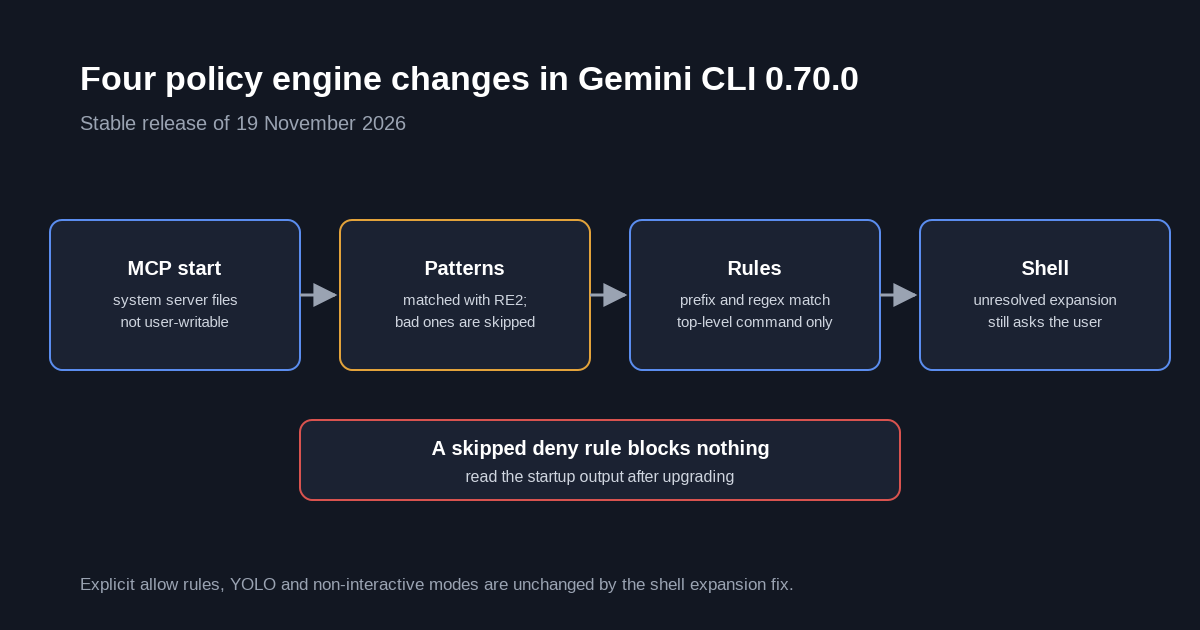
Gemini CLI's policy engine decides whether a tool call runs, is refused, or waits for the user. Version 0.70.0, the stable release of 19 November 2026, changes four things about how it reaches that decision. Each closes a gap between what an administrator wrote and what actually ran. Two of them can also change the effect of rules you already have, so this is a release to test rather than just install.
The four changes
The release notes group them under "Policy Engine Hardening" and "MCP & IDE Security Isolation". The pull requests behind them give the detail.
1. Writable system MCP servers are skipped
Administrators can define MCP servers in system-wide settings and allowlist them, and the policy engine can then approve those servers' tools automatically. Pull request 30283 describes the gap: an earlier change checked the ownership of the settings files, but not the programs or scripts the settings point at. If an allowlisted wrapper script such as /opt/mcp.sh, or its folder, was writable by an ordinary user, that user could edit it to start a different server "under the allowlisted server identity", inheriting automatic tool approval.
From 0.70.0, system-configured local MCP servers whose executable, script argument, symlink target or parent folder is owned or writable by non-administrators are skipped at startup with a security warning. The check unwraps env invocations and common interpreters, and it stops user or workspace settings from re-adding a skipped server under the same name. Remote servers configured by URL are not affected, and nor are user-level or workspace-level servers without a system counterpart.
2. Policy patterns now use RE2
Pull request 30282 moves argsPattern, commandRegex and commandPrefix matching from JavaScript regular expressions to RE2, through the re2js library, so matching time grows linearly with the length of the arguments. That removes a class of slow-pattern denial of service. Compiled patterns are also limited to 2,000 instructions.
The catch is in the policy engine reference: RE2 doesn't support lookahead, lookbehind, backreferences or \uXXXX escapes, and \s matches ASCII whitespace only. A pattern that doesn't compile, or is too large, makes Gemini CLI "skip that rule" and report the error at startup. Other rules in the file still load. For an allow rule, skipping means fewer things are allowed. For a deny rule, skipping means something you meant to block is no longer blocked.
3. Prefix and regex rules match only the top-level command
Tool arguments are serialised to a stable JSON string before matching, with each top-level argument marked by a \x00 character. Pull request 30355 says patterns generated from commandPrefix and commandRegex previously lacked that marker, so they could match a "command": key inside nested structures or string values. It also wraps commandRegex in a group: its example is ls|pwd, where an ungrouped alternative was not tied to the command value. Both now match only the top-level command argument.
4. Expanded shell commands keep their prompt
Gemini CLI upgrades a default "ask the user" decision to "allow" for shell commands it classifies as read-only. Pull request 30338 explains the flaw: the classification used the command's text before bash expanded it. With brace or parameter expansion, substitutions, ANSI-C quoting, arithmetic or unquoted globs, bash runs "a different argument list than the one that was classified". Those commands now keep the confirmation prompt. Explicit allow rules, rules with commandPrefix or argsPattern, and the plan, YOLO and non-interactive modes are unchanged.
What is new, and what isn't
None of these changes came with a published security advisory; the project presents them as hardening in a regular release. The underlying lessons are familiar ones. Checking a configuration file is not the same as checking what it runs. A pattern is only as safe as the engine that evaluates it. And a command classified from its text before the shell rewrites it is not the command that runs. What stands out is that Gemini CLI now applies these lessons to the parts of an agent that decide on approval, where a small mismatch has outsized effect.
The trade-off is compatibility. The RE2 change is the one most likely to bite, because a rule that silently stops loading looks the same as a rule that never matched. The notes on breaking behaviour are in the pull requests, not in the release summary.
What it means for engineering and security leaders
If you manage Gemini CLI centrally, treat 0.70.0 as a policy migration. Collect the TOML policy files and system settings you deploy, upgrade a test machine, and read the startup output for regex_compilation errors and security warnings about skipped MCP servers. Then confirm the file permissions of every program your system settings launch: root (or SYSTEM and Administrators on Windows) ownership, not writable by others, including the folders above them.
It is also worth asking the same questions of other coding agents your teams run. Who can write to the programs your MCP allowlists approve? Which deny rules depend on regex features? Does the tool classify shell commands before or after expansion?
Where SpanDock fits
For teams that want a second check outside each tool's own policy engine, SpanDock's guardrails on computers install a hook in Gemini CLI, Claude Code and Codex that checks the prompt and every tool call before it runs, against detectors or your own regular expression, and can block, warn, ask for confirmation or redact. If someone removes the hook from their settings, SpanDock puts it back within a minute. Guardrails on computers are on the Enterprise plan.
Practical takeaways
- Upgrade a test machine to 0.70.0 first and read the startup output for skipped rules and skipped MCP servers.
- Rewrite deny rules that use lookahead, lookbehind or backreferences; under RE2 they are skipped, not enforced.
- Check ownership and permissions of every executable and script your system MCP settings launch, and their parent folders.
- Anchor hand-written
argsPatternrules with\x00when you mean a top-level argument, as the reference now shows. - Re-test read-only shell auto-approvals with commands that use globs or expansions; expect more prompts.
- Keep policy files in version control, so a rule that stops loading after an upgrade is easy to trace.
Sources
- Gemini CLI release v0.70.0 (19 November 2026)
- Gemini CLI pull request 30283: skip system MCP servers with insecure command permissions
- Gemini CLI pull request 30282: use re2js for linear-time policy argsPattern evaluation
- Gemini CLI pull request 30338: keep ASK_USER for shell commands with unresolved expansion
- Gemini CLI pull request 30355: match commandPrefix and commandRegex rules against the top-level command argument
- Gemini CLI docs: Policy engine reference