
Copilot's plugin-only setting: customisations must come from plugins you allow
A new Copilot managed setting blocks user and project skills, hooks, agents and MCP servers outside plugins. What it covers, what it doesn't, how to roll out.
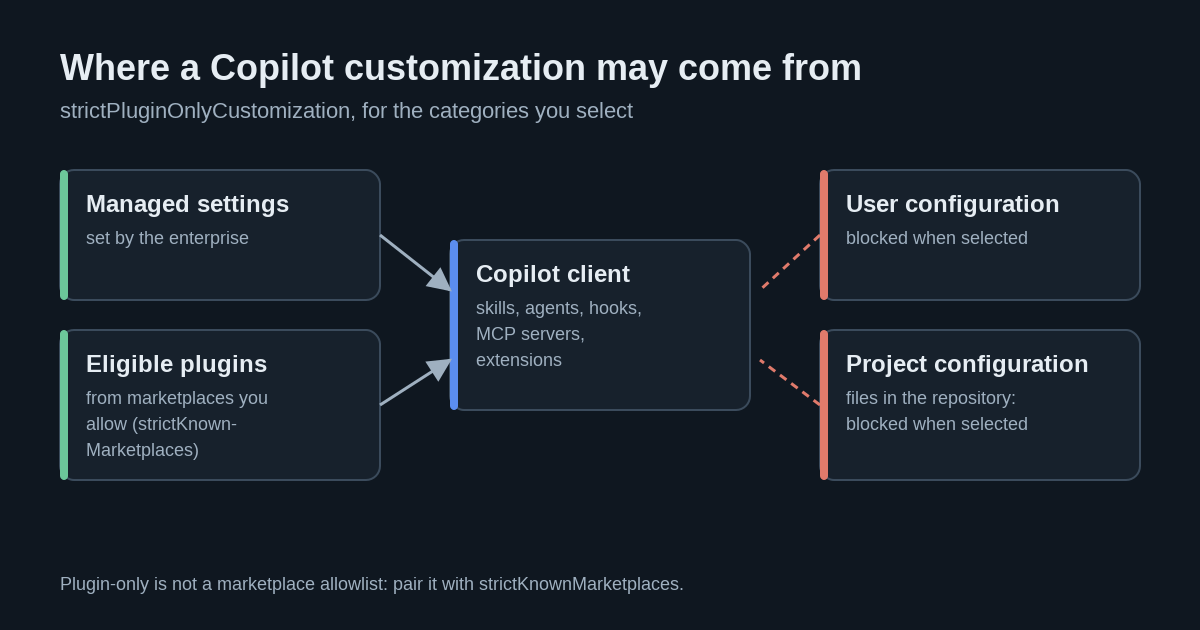
Until now, an enterprise that wanted control over Copilot's MCP servers, hooks or custom agents had two blunt choices: allow people and repositories to add their own, or switch the capability off. On 16 November 2026 GitHub added a third. A new managed setting, strictPluginOnlyCustomization, lets an enterprise administrator require that selected kinds of customisation come only from plugins or managed settings, not from a person's own configuration or a repository's files. That makes plugins the one path for those customisations, which you can then govern with the marketplace controls that already exist.
What GitHub shipped
According to the changelog, the setting "blocks standalone customizations from user and project sources". Eligible plugins and managed settings remain allowed, subject to your other policies.
It covers five categories, and you can restrict all of them or pick some:
- skills;
- custom agents;
- hooks;
- MCP servers;
- executable Copilot extensions, which here means executable canvas providers, not VS Code Marketplace extensions.
GitHub's own example is to restrict MCP servers and extensions while leaving skills, agents and hooks open.
It is available on GitHub Enterprise Cloud, for members whose Copilot Business or Copilot Enterprise license is issued by the enterprise or one of its organisations. It is set in the enterprise's managed settings, alongside the existing plugin and marketplace keys.
What "plugin-only" does not mean
The changelog is careful on one point that is easy to miss: "Plugin-only does not mean enterprise-managed plugins only, and it isn't a marketplace allowlist."
On its own, the setting only moves customisations into plugins. A plugin from any marketplace a person can reach still counts as eligible. To make the restriction meaningful, pair it with the controls described in GitHub's guide to managing marketplaces and plugins:
strictKnownMarketplacesrestricts installation to the marketplaces you list and, in the guide's words, "also disables the built-in marketplaces";extraKnownMarketplacesadds your own marketplace, such as a repository in your organisation;enabledPluginsrequires or blocks individual plugins.
Those three keys became generally available at the end of October; Copilot plugin controls are GA explains how they interact. The new setting is the piece that closes the remaining route around them: before it, a developer or a repository could add an MCP server or hook directly, without any plugin at all.
A gap in the documentation, for now
On 17 November, the day after the announcement, the managed settings reference did not yet list strictPluginOnlyCustomization, and its table of which clients honour each key did not include it. The reference does say that some keys need a minimum client version, and that coverage of policies and managed settings "currently varies" between cloud environments. Until the reference catches up, don't assume every Copilot client enforces the new key in the same way. Test it in each one your developers use.
Why the project source matters most
User configuration is a person's own choice. Project configuration is different: it arrives with the repository. A cloned repository, or a pull request that edits a configuration file, can bring an MCP server, a hook that runs a command, or an agent definition with it.
That is the pattern behind several recent problems. In GitInject, instruction files in a pull request steered an automated reviewer. In Aider's case, a configuration file in the repository could run commands. Neither is fixed by this setting, but both show why configuration that travels with code deserves the same review as code.
Restricting MCP servers, hooks and extensions to plugins gives you one place to look. A plugin comes from a marketplace you chose, has a name and version, and can be required or blocked by key. A loose configuration file in a repository has none of that.
The trade-offs
Friction for legitimate projects. Teams that keep a project-specific MCP server or hook in their repository will see it stop working for the restricted categories. They need a plugin instead, published to a marketplace you allow. Plan for that work before you switch the setting on.
Skills are the hardest call. Skills are text instructions, and many teams keep them in the repository on purpose, next to the code they describe. Restricting skills to plugins is safer but slows down the people writing them. GitHub's own example leaves them open; that seems a sensible starting point.
It moves trust, it doesn't remove it. A plugin can still contain a bad MCP server. The control is only as good as the review of what goes into your marketplace and who can merge there.
What it means for engineering and security leaders
This is the first Copilot control that lets you say where a customisation may come from, not only which named items are allowed or blocked. That is the more durable kind of rule: new MCP servers appear every week, and a denylist of names never keeps up, while a rule about sources does.
It also gives platform teams a clear job. If plugins are the only route, someone has to run the marketplace: review submissions, version them, and respond when a server inside one gets an advisory.
Practical takeaways
- Inventory first. Find which repositories carry MCP server definitions, hooks and custom agents today, and which teams rely on them.
- Stand up your own marketplace in a protected repository, with required review, and add it with
extraKnownMarketplaces. - Package what teams need as plugins and publish them there before restricting anything.
- Restrict MCP servers and extensions first. They run code or reach other systems. Leave skills, agents and hooks for a second phase unless your risk calls for more.
- Pair it with
strictKnownMarketplaces. Without it, plugin-only still admits plugins from marketplaces you didn't choose. - Test per client. Check the behaviour in each Copilot client you support, since the reference doesn't yet list the key's client support.
The same idea applies outside Copilot. SpanDock's MCP gateway, on the Premium and Enterprise plans, gives every computer's AI tools one governed MCP server; set to Enforced, it also reports, or moves aside, the tools' other MCP servers, for the tools it configures, which include VS Code with Copilot as well as Claude Code, Codex, Gemini CLI and Cursor.