
Claude's IP allowlist: limiting where a leaked API key works
The Claude Console can now refuse API calls from outside your networks, in beta. What it covers, what it misses, and how to roll it out without locking out CI.
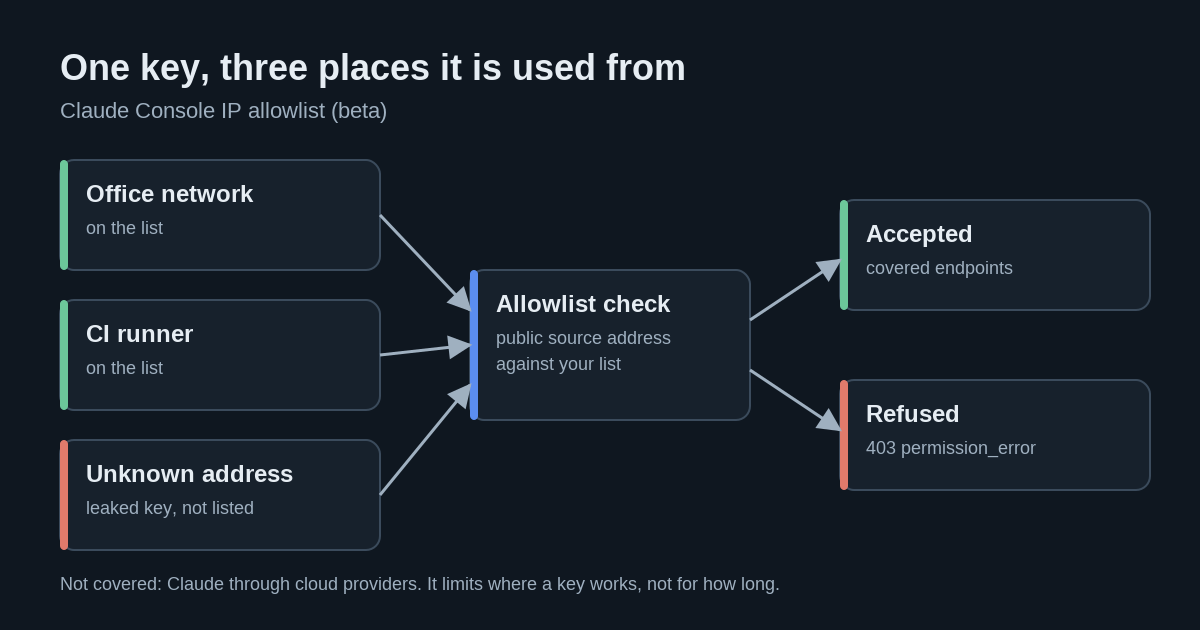
A leaked AI provider key is expensive in a very direct way: whoever holds it can spend your money and, depending on what the key can reach, read your data. On 5 November 2026 Anthropic added a control that changes the cost of a leak. Claude Console organisations can now set an IP allowlist, in beta, so that covered API requests from anywhere else are refused. It doesn't make a key safe to lose. It does mean a key copied out of a log or a laptop no longer works from an attacker's machine, and that is worth having. The details of what is covered, and what isn't, decide how much.
What Anthropic shipped
The release notes describe it in one line: requests to covered services from addresses not on your list are refused, "which limits where a leaked API key can be used". You add IPv4 and IPv6 addresses or CIDR ranges, up to 1,000 per organisation.
The IP allowlisting documentation fills in the rest. An organisation admin or owner sets one list for the whole organisation. For each covered request, Anthropic compares the request's public address with the list and denies it if it isn't there. A refused API call gets a 403 permission_error with the message "Your IP address isn't in this organization's allowed range."
What it covers
For Claude Platform (Console) organisations, the allowlist applies to:
- the Claude Console itself;
- the Messages, Message Batches, Token Counting, Models, Files and Skills endpoints, with an API key or a Workload Identity Federation token;
- the Claude Managed Agents endpoints for agents, sessions, environments, vaults and memory stores;
- the Admin API and the Compliance API, with a key that covers only this organisation.
Claude Enterprise organisations get a separate allowlist of their own, which covers the Claude apps, including Claude Code when people sign in with their Claude account.
What it doesn't
The limitations section is short and important:
- It does not apply to Claude through Amazon Bedrock, Claude Platform on AWS, Claude Models on Google Cloud or Claude in Microsoft Foundry. Keys and credentials for those platforms are governed by those platforms.
- For Managed Agents, it covers requests to the endpoints, "not the agents themselves", and doesn't apply to any networking inside the Managed Agents runtime.
- On Claude Enterprise, Claude Design, Claude in Slack and Claude Academy aren't covered, and a task already running in a chat can continue for up to 24 hours after its user is blocked.
What an allowlist does and doesn't fix
The documentation is unusually frank about the limits of its own feature: "An allowlist limits where a key works, but not for how long." It recommends short key expiry, or moving to Workload Identity Federation to stop using static keys, as safer than an allowlist alone.
That is the right way to think about it. An allowlist is one layer, and it is strongest against one specific threat: a key that leaks to someone outside your network. That threat is real. Google's research on stolen AI keys, covered in LLMjacking, described stolen keys being validated and then resold through gateways that proxy access for paying subscribers. For covered endpoints, an allowlist stops that kind of reuse, because the reseller's servers aren't on your list.
It does much less against a threat that starts inside. A compromised CI job, a poisoned dependency running on a listed build server, or malware on a laptop behind the office VPN all make requests from addresses you trust. The docs also warn about shared proxies: if you list a proxy's address, "an attacker with a leaked key or a stolen sign-in could potentially use it through the proxy".
Where keys live decides whether this is practical
For a key used by a few servers with fixed egress addresses, an allowlist is simple: list the addresses, watch for 403s, done.
For keys on developer laptops, it is harder. The docs point out that home and mobile addresses "can often change without notice", and that laptops off the VPN are blocked until they connect through a listed network. If every developer's Claude Code session uses a personal API key from wherever they happen to be, an allowlist means either listing many changing addresses or forcing all traffic through a VPN or a central egress point.
This is a good argument for changing where keys live, not only for setting an allowlist. When provider keys sit on a small number of servers and developer tools reach the provider through them, the allowlist stays short and the keys never sit on laptops where they can be copied.
Rolling it out without an outage
The docs give a careful order, and it is worth following:
- List every network first. Data centres, CI systems, offices, VPNs, proxies, and the workers of any self-hosted sandboxes, with their public IPv4 and IPv6 addresses. Private ranges such as
10.0.0.0/8don't belong on the list. - Keep a way back in. The settings page offers a checkbox that lets admins reach the allowlist page from any address. Anthropic recommends selecting it to avoid lockout, and notes the downside: someone who compromises an admin's session could change the list from anywhere. The Compliance API's Activity Feed records allowlist changes, so you can audit them.
- Save, then watch. Changes can take up to 15 minutes to apply. Look for 403
permission_errorresponses, including from jobs that run only daily or weekly. - Mind the entry limits. A range can be no broader than
/8for IPv4 or/32for IPv6.
The feature is in beta, under your existing agreement with Anthropic, and the docs say settings and behaviour can change during the beta.
What it means for engineering and security leaders
An allowlist is cheap to set up for server-side use, and it converts some key leaks from incidents into non-events. Turn it on where your keys are used from known places.
The harder conversation is about laptops. If your developers hold personal API keys, the allowlist exposes a design choice you were already making: keys in many places, used from anywhere. The better fix is fewer keys in fewer places, short expiry, and identity-based credentials where the provider supports them.
Practical takeaways
- Inventory where Claude API keys are used: servers, CI, notebooks, laptops, and third-party tools that hold one on your behalf.
- Turn on the allowlist for organisations whose keys are used only from fixed addresses. Start with the admin escape hatch selected.
- Set short key expiry and look at Workload Identity Federation for workloads that support it.
- Don't forget other platforms. If you also use Claude through a cloud provider, the Console allowlist doesn't protect those credentials.
- Audit allowlist changes through the Compliance API's Activity Feed, if you use it.
- Treat a leaked key as leaked anyway. Rotate it; the allowlist reduces the damage, not the need.
One way to keep provider keys off laptops is to route AI tools through a proxy you control. With SpanDock's model proxy, which is in every plan, calls use the server's provider keys, which stay on the server in the operating system's credential store; tools on developer computers authenticate only with a local proxy key that SpanDock sets up for them.