
Self-hosted Claude Managed Agents: what you take on when you run the service
Anthropic now lets you run the Managed Agents service on your own infrastructure. What moves in-house, what still leaves, and the defaults to check.
Running agents on a vendor's platform is convenient until a security review asks where the session history is stored, or which provider sees the prompts. On 12 November 2026 Anthropic answered part of that question with self-hosted Claude Managed Agents: the whole Managed Agents service, not only the sandboxes, running on your own infrastructure, with agents, sessions and session history stored there. The model calls can go to Anthropic or to a provider you choose. It is a real option for regulated teams, and it comes with a long list of things that become yours to run and secure.
What Anthropic released
The release notes describe the launch in two sentences and add that access is by request: "To request access, contact your Anthropic account team." It is not a public download.
The self-hosted overview places it on a scale of three options:
| Option | Sandboxes | Service | Model |
|---|---|---|---|
| Cloud sandboxes (default) | Anthropic | Anthropic | Anthropic |
| Self-hosted sandboxes | You | Anthropic | Anthropic |
| Self-hosted Managed Agents | You | You | Anthropic, or a provider you choose |
The documentation suggests choosing it for one of two reasons: you must store agents, sessions and session history yourself, or model calls must go to Amazon Bedrock, Claude Models on Google Cloud, Microsoft Foundry or your own model gateway. If you only need tools to run on your infrastructure, it recommends self-hosted sandboxes instead.
The pieces
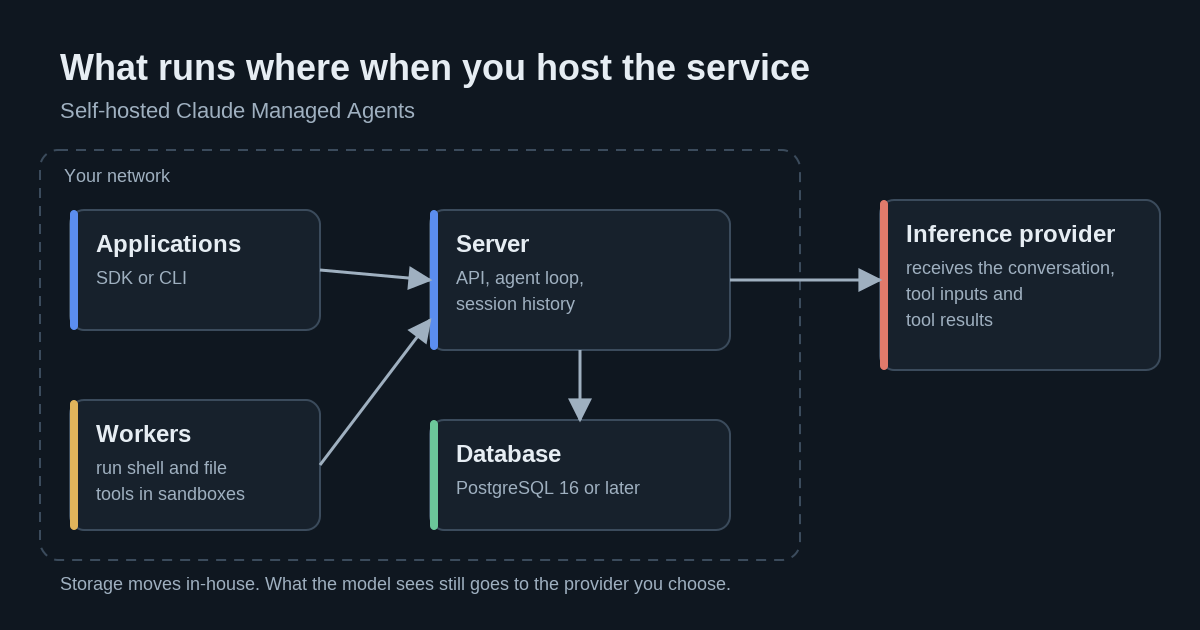
A deployment has a server (cma-server) that serves the API, runs the agent loop and stores data; a PostgreSQL 16 or later database; workers that run the agent's shell and file tools in your sandboxes; a web console on your server, signed into through your identity provider; and an admin CLI. Without a database, the server keeps its data in memory and "a restart erases it", which is fine for a trial and wrong for anything else.
The server software is licensed under its own agreement, the Software License Agreement for the Claude Managed Agents Server. It is not open source.
What stays inside, and what still leaves
The overview is precise about data flow. For each model call, the server sends "the conversation so far, including tool inputs and tool results" to your inference provider. A call to the Claude API also carries the IDs of the session, agent and environment.
So self-hosting moves storage, not inference. Session history, agent definitions and memory stores live in your database. But everything the agent has read, including file contents and command output that came back as tool results, still goes to whichever provider answers the model call. If the concern is that a provider sees your source code, self-hosting the service alone doesn't remove it; choosing the provider does.
The inference provider page lists five values: anthropic (the default), bedrock, vertex, foundry, and gateway for a model gateway you run. Under any value except anthropic, the server needs no Claude API key and ignores the usual Anthropic environment variables.
Defaults worth knowing before you start
The differences page is the most useful document for an operator, because several behaviours differ from the hosted service without an error.
Shell isolation is your job. The overview says the agent's bash tool "is a real shell with the worker process's permissions and network access", and that the worker doesn't isolate it. The supplied Docker Compose stack and Helm chart start each session's worker in its own container or pod. If you start a worker yourself, run it in a disposable container or VM that holds nothing you need to protect.
One trust level per deployment. The overview says that where the hosted service suggests a separate workspace and environment per trust boundary, a self-hosted setup needs a separate deployment for each trust level.
MCP and Git are closed by default. The server connects only to MCP hosts listed under mcp.allowed_hostnames, which is empty by default and matches hosts exactly, with no wildcards. Git repositories need their hosts listed, and agents can push only to the branches you list under git.allowed_push_refs. Two caveats from the docs: the server doesn't refuse force pushes, so protect branches on your Git host; and the server's log says ok even for a push your host refused.
Web tools are off until you turn them on, and an agent whose toolset doesn't mention them runs without them, with no error.
A fallback model can answer. Under the anthropic provider, the server asks for the Claude API's server-side fallback by default: when a safety classifier declines a request, "another Claude model, possibly a less capable one, can then answer it", and no event reports the change. To turn it off, set inference.model_fallback: false. Teams that evaluate agents on one specific model should decide this deliberately.
Some inputs are silently dropped. An image or document sent by URL is accepted, but the model never sees it. MCP tool results larger than 100 KiB are cut by default, and the rest is lost.
Some features don't exist. There are no cloud environments, no Files API, no webhooks, no scheduled deployments, and no OAuth-refreshed MCP credentials; tokens must be stored as static bearer credentials and replaced before they expire. The server doesn't serve the Messages API either.
Credentials
There are three: a server API key for your applications, an inference credential that only the server holds, and an environment key for each environment's workers. The design keeps the inference credential off workers and applications, which is the right shape. The static MCP bearer tokens are the weak point: they need a rotation process, because the server can't refresh them for you.
What it means for engineering and security leaders
Self-hosting is a trade: you gain control over storage and the choice of provider, and you take on patching, database operations, isolation and monitoring. The overview says so directly: what the hosted security model assigns to Anthropic, including securing the server, hosting memory stores and "detecting unusual usage", becomes your responsibility. You also install each release yourself.
The defaults are mostly conservative, which is good: closed MCP and Git allowlists, web tools off. The silent behaviours are the risk. A fallback model, a dropped image or a truncated tool result won't page anyone; they show up later as an agent that did something odd. Build checks for them into your evaluation before production.
Practical takeaways
- Decide what problem you are solving. If it is tool execution on your network, self-hosted sandboxes may be enough. If it is storage or provider choice, this is the option.
- Pick the provider deliberately. Tool results go wherever model calls go.
- Run the database from day one and back it up; the in-memory mode loses everything on restart.
- Keep workers in disposable containers, one deployment per trust level.
- Populate
mcp.allowed_hostnamesandgit.allowed_push_refsnarrowly, and protect those branches on your Git host. - Decide on
inference.model_fallbackand record the choice. - Plan rotation for static MCP tokens before the first one expires.
- Read the differences page in full before you move any existing hosted application across; nothing is copied from the hosted service.