
Secret scanning now reads GitHub Actions logs: what the preview catches and misses
GitHub secret scanning can now scan Actions workflow logs in public preview. What it detects, what it skips, and how to fit it into CI that runs AI agents.
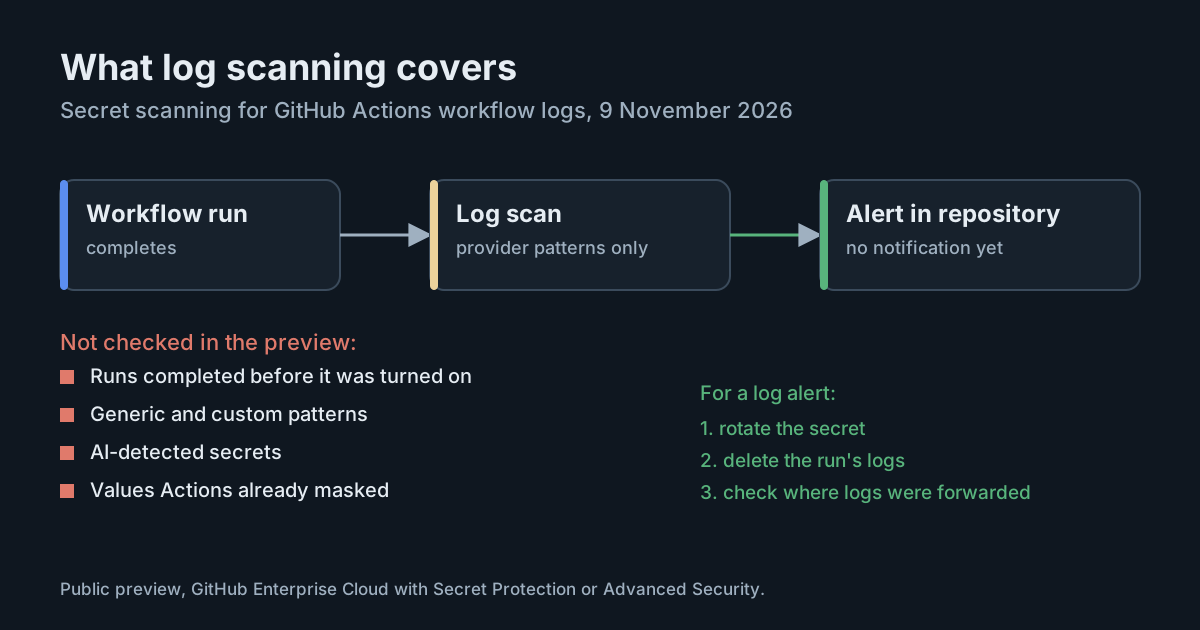
Secret scanning for GitHub Actions workflow logs is now in public preview. Until 9 November 2026, GitHub's secret scanning covered code, issues, pull requests, discussions and wikis, but not the logs a workflow prints while it runs. Build logs are where a token turns up when a script echoes the wrong variable, a tool prints its configuration on failure, or an AI agent running in CI pastes a command's output into its own trace. The preview closes part of that gap, and its limits matter as much as its coverage.
What GitHub shipped
According to the changelog entry, when a workflow run completes, GitHub scans its logs for provider patterns. Findings appear in the repository's secret scanning alert list next to alerts from code and other content, with a link back to the log. Validity checks run for supported secret types, and the alerts stay available even after the logs are deleted.
The preview is for enterprises on GitHub Enterprise Cloud with GitHub Secret Protection or GitHub Advanced Security, including those with data residency on GHE.com. It is off by default. Enterprise owners turn it on in the enterprise settings under Policies → Advanced Security, and it applies only to repositories that already have secret scanning enabled under those licenses.
The secret scanning documentation adds detail on what an alert contains. A single alert can reference several locations if the same secret appeared in several runs or jobs. For each location, it links to the workflow file where the secret originated and the log line where it was printed, but it does not show an inline preview of the log content.
What it does not catch
The list of exclusions is short and important:
- Only new runs. Logs from runs that completed before the feature was turned on are not backfilled. If a token leaked into last month's logs, this preview will not find it.
- Only provider patterns. Generic patterns, custom patterns and AI-detected secrets are not applied to logs. A database password, an internal service token or a private key without a provider format will pass unnoticed.
- Not masked values. Values that Actions already masks in the log are skipped. That is sensible, since a masked value never appears in plain text, but it means the scanner is a backstop for masking failures, not a second check of everything.
- No notifications during the preview. Alerts from logs don't send notifications, so someone has to look at the alert list.
The last point is easy to miss. A security team that relies on notifications or a webhook for new secret scanning alerts will not hear about log findings until it checks the list directly.
Why logs leak in the first place
GitHub's secure use reference is frank about why masking is not enough: "Because there are multiple ways a secret value can be transformed, automatic redaction is not guaranteed." Redaction largely relies on finding an exact match for the secret's value, and it is done by the runner, so a secret is only redacted if it was used in that job and the runner can see it.
The same page lists the usual ways a value escapes:
- a secret stored as structured data, such as a JSON or YAML blob, which breaks exact matching;
- a value derived from a secret, such as a signed JWT made from a private key, that was never registered as a secret itself;
- a command or tool that writes errors to standard output or standard error, including the arguments it was given.
AI agents in CI add another path. An agent that runs a failing command, reads the error and summarises it is doing exactly what it should, and the summary can include whatever the command printed. The more an agent is allowed to run and the more freely it logs its reasoning and tool output, the more text ends up in the job log. Masking still works on exact values, but an agent that reformats, splits or quotes part of a token can defeat an exact match.
Read the preview as detection, not prevention
A log alert arrives after the run has completed. By then the log has been readable by anyone who can view the repository's workflow runs. The scanner shortens the time to discovery; it does not stop the exposure.
That is why GitHub's own guidance for an unredacted secret in a log is the same as for any leak: delete the log and rotate the secret. The workflow run logs documentation explains how to delete a run's logs. Deleting the log removes the copy on GitHub; it does not undo anything an attacker or a third-party log forwarder already collected, so rotation is the step that matters.
There is also a coverage question for teams that copy logs elsewhere. If CI logs are shipped to a log platform, an artefact store or an observability tool, this feature scans only the copy on GitHub.
What it means for engineering and security leaders
The preview is worth turning on for any enterprise that qualifies. It catches the most common case (a provider key printed by mistake), and its alerts survive log deletion, which helps with incident records.
It should not change the controls that keep secrets out of logs to begin with. The useful framing is three layers: give each job as few secrets as it needs, make sure what it does have is masked and not transformed, and use log scanning to catch what slips through. For CI jobs that run AI agents, the first layer carries the most weight, because an agent with access to a secret can always find a way to print some form of it.
The exclusions also point to where to spend effort. Custom and generic patterns are not applied to logs, so internal credentials need other protection. Old logs are not scanned, so a one-off review of existing logs for high-value repositories may be worth doing. And because there are no notifications yet, someone needs to own the alert list.
Practical takeaways
- Turn it on at the enterprise level if you have Secret Protection or Advanced Security on GitHub Enterprise Cloud, then confirm secret scanning is enabled on the repositories that matter.
- Schedule a review of the alert list for log findings until notifications are available, for example in the weekly security triage.
- Write a runbook entry: for a log alert, rotate the secret first, then delete the run's logs, then check whether the log was forwarded anywhere.
- Audit secret shapes: split JSON or YAML secrets into individual values and register derived values (tokens made from keys) as secrets so the runner can mask them.
- Limit what CI agents can see and print: give agent jobs only the secrets they need, and avoid dumping full tool output or environment details into logs.
- Do a one-off sweep of old logs in your most sensitive repositories, since the preview does not backfill.
For the wider picture of keeping provider keys out of repositories, see our earlier article on AI provider keys and push protection, and on public monitoring for leaked secrets.