
Copilot team plugin defaults: a new layer between repositories and enterprise policy
Organisation teams can now turn on Copilot plugins by default for members. Who can do it, what policy still overrides, and what to check first.
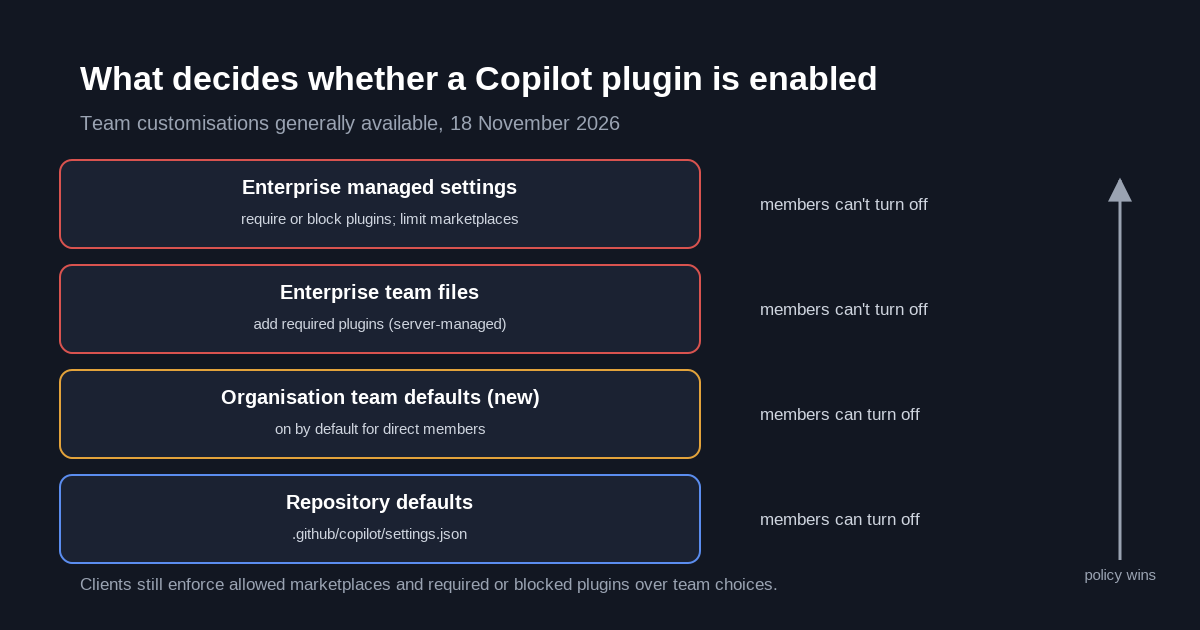
On 18 November 2026 GitHub made team customisations for Copilot generally available. Maintainers of an organisation team can now pick Copilot plugins that are turned on by default for the team's members, in VS Code, the GitHub Copilot app and Copilot CLI. It fills a real gap between a single repository's defaults and enterprise-wide policy. It also gives a new group of people, team maintainers, a say in what code runs inside their colleagues' assistants, so it is worth setting the limits before teams start using it.
What a plugin is, briefly
GitHub's plugins documentation describes a plugin as a package of customisations: custom agents, skills, hooks that respond to agent actions, MCP server configurations and, on some surfaces, language server configurations. Plugins come from marketplaces, each defined by a marketplace.json, and a plugin is named PLUGIN-NAME@MARKETPLACE-NAME. The documentation separates three states: available (its marketplace has been added), installed and enabled. Adding a marketplace "does not install or enable" anything.
Hooks and MCP server configurations can start programs on the developer's computer. A plugin is therefore closer to a dependency than to a preference.
What changed on 18 November
The changelog entry sets out how team defaults work:
- Who: team maintainers and organisation owners, from the team's Customize Copilot tab on github.com.
- Where plugins come from: the marketplaces built into Copilot, the enterprise's marketplaces, and "any marketplaces the team adds". A team can add a marketplace from a GitHub repository that contains one.
- Who gets them: the team's direct members. Members of child teams don't inherit them.
- How firm they are: defaults, not requirements. Members can turn a team plugin off in their Copilot client "where policy permits".
- What still wins: enterprise and organisation policies take precedence. Copilot clients continue to enforce allowed marketplaces and required or blocked plugins, and team defaults "don't override those controls".
- Plans: Copilot Business and Copilot Enterprise.
How it fits the existing layers
Until now the plugins documentation described three sources. Enterprise managed settings require or block plugins. Enterprise team files, on server-managed deployments, add required plugins through enabledPlugins on top of the enterprise baseline, and members can't turn those off. Repository defaults in .github/copilot/settings.json enable plugins for everyone working in a repository, and members can turn them off.
Organisation team defaults sit between those: optional like repository defaults, but attached to people rather than to a codebase. Note that two different kinds of team now appear in this area. Enterprise teams, through managed files, can require plugins. Organisation teams, through the new tab, can only suggest them by default. When we checked on 23 November, the plugins documentation's table of configuration sources didn't yet list organisation team defaults, so the changelog is the reference for now.
Analysis: convenience, and a new decision-maker
The feature solves a real problem. Platform and enablement teams often want a group to share the same agents, skills and MCP setup across many repositories, and repository defaults don't follow people from one project to the next. Team defaults do, and they stay optional for each member.
The governance question is who decides. Team maintainer is often a light role, handed to whoever set the team up. With this release, that person can enable, by default, a bundle that may include hooks and MCP servers for everyone in the team. Whether they can also bring in a new source of plugins depends on your enterprise settings, not on the team feature.
The enterprise-managed settings guide describes the controls. extraKnownMarketplaces makes approved marketplaces available; strictKnownMarketplaces restricts installation to listed sources and also disables the built-in marketplaces; enabledPlugins requires or blocks individual plugins. The changelog says clients enforce these over team choices. If your enterprise sets no marketplace restriction, nothing in the changelog suggests a team's added marketplace would be refused; the guide notes only that members need read access to a marketplace's repository. The guide's own warning applies here too: an approved marketplace "is a distribution control, not a guarantee that its plugins are safe."
There is also a quieter effect. A team default reaches every direct member who doesn't actively turn it off. In reach, that is close to a requirement, but it doesn't go through the managed-settings change that a requirement would.
What it means for engineering and security leaders
Decide the marketplace policy before teams discover the tab. If plugins should come only from a reviewed internal marketplace, set strictKnownMarketplaces and publish that marketplace with extraKnownMarketplaces. Then team defaults become a way to choose from an approved catalogue, which is what the changelog's phrase "approved Agent Plugins" suggests.
Treat a team default like a shared dependency. Someone should own it, and changes to its version or contents should be reviewed in the same way as a change to a shared build script.
Practical takeaways
- List who maintains your organisation's teams. They can now set Copilot plugin defaults for members.
- Restrict marketplaces with
strictKnownMarketplacesif plugins should come only from sources you have reviewed. - Block plugins you never want with
enabledPluginsset tofalsein managed settings; team defaults can't override it. - Use enterprise team files for real requirements and organisation team defaults for suggestions, and say which is which.
- Remember child teams don't inherit, so a parent team's default won't reach members of its sub-teams.
- Review what each plugin bundles. Look for hooks and MCP server configurations in particular.
If your developers use more than one assistant, SpanDock's skills take a different route to the same goal for skills: an administrator turns a skill on once and every computer gets it, kept up to date and removed when it is turned off. Skills that run scripts are marked, and computers don't install them unless their settings allow scripts. Skills are in beta; publishing your own is on the Premium and Enterprise plans.