
AI coding tool auto-updates: Lumia's UpdateMITM and unverified signatures
Lumia found that several AI coding tools install updates without checking a signature, so whoever can intercept TLS can swap the binary. What to change.
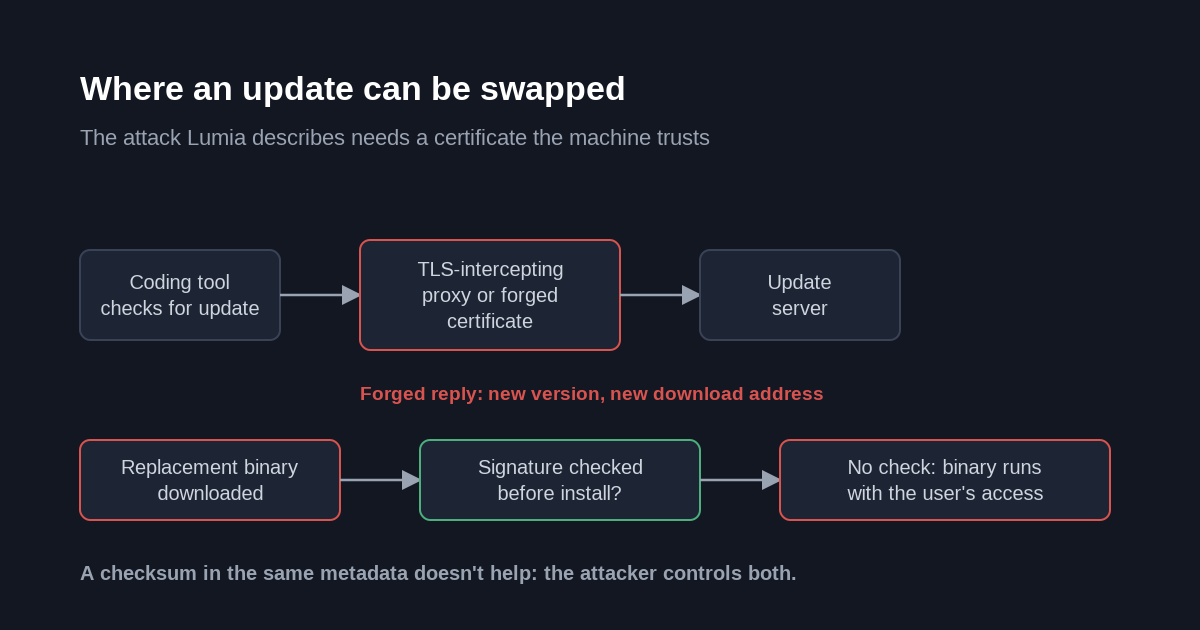
Lumia Security Labs has published research showing that several popular AI coding tools download and run updates without verifying a code signature. Anyone who can intercept the tool's TLS traffic can answer the version check with a forged "update available" message and serve a different binary, which the tool then runs. The precondition is significant, but Lumia argues that ordinary enterprise infrastructure often provides it. For teams that let coding tools update themselves on developer machines, it is a reason to look at how those updates arrive.
What Lumia tested
The Lumia write-up, dated 17 November 2026, asked three questions: are AI application updates signed, is the signature enforced, and what level of interception is needed to serve something else? Its summary table reports:
| Product | Lumia's finding | Interceptable |
|---|---|---|
| Cursor | Executable signed but not verified | Yes |
| Antigravity | Neither signed nor verified | Yes |
| VS Code | Not signed, but checksummed in the update metadata | Yes |
| Claude Desktop | Signed, signature not checked | Yes |
| Claude Code | Signed, signature not checked | Yes |
| Codex and ChatGPT | Updated through the Microsoft Store | No |
The attack runs in four steps: intercept TLS between the tool and its update server, answer the version check with a forged update and a new download address, serve the replacement binary, and let the tool install and run it. A checksum in the same metadata doesn't help, Lumia notes, because the attacker who controls the metadata can change the checksum too.
The Claude Code detail
Lumia reports that newer Claude Code versions (later than 2.1.207) sign the update metadata, which should prevent tampering. But it says the check is gated by a feature flag that isn't signed, so an attacker already in the middle can turn the check off.
Anthropic's Claude Code setup documentation describes a signed release manifest: each release publishes SHA256 checksums in a manifest.json signed with an Anthropic GPG key, for releases from 2.1.89 onwards. Windows binaries carry an Authenticode signature; Linux binaries aren't individually code-signed. That documentation describes what you can verify yourself when you download a release. It doesn't say what the background updater enforces, which is the gap Lumia describes. The two are not in direct conflict, but they answer different questions.
OpenAI's apps, and a second path
Lumia found ChatGPT and Codex on Windows resistant because updates go through the Microsoft Store and the app checks the Store app ID. It then describes a different path: the Codex CLI inside the desktop app fetches a plugin list on start, and a forged entry could make it download and register a plugin carrying a malicious skill. That is an indirect prompt injection route rather than direct code execution, and it again depends on intercepting the traffic first.
The hard part, and why enterprises may already have it
Intercepting TLS normally requires a certificate the victim's machine trusts. Lumia acknowledges this is "a major hurdle", and notes that "none of the vendors treat this attack as a vulnerability" for that reason. Its disclosure timeline shows Cursor closing the report as out of scope two days after it was filed in June; reports also went to Microsoft and Anthropic.
Lumia then describes two ways corporate networks lower the hurdle:
- TLS inspection products. Data loss prevention and secure access service edge tools install their own root certificate on managed machines so they can inspect HTTPS. Someone with access to the product's admin console could force inspection of an update domain, or find it already inspected.
- Internal certificate authorities. In Active Directory Certificate Services, a server-authentication template that ordinary users can enrol in, with a subject name the requester supplies, lets an insider issue a certificate for the update host.
It also cites the eMudhra certificate authority compromise as a reminder that public trust can fail too.
Analysis
This is enterprise security, not AI security. Lumia makes this point itself: the risk "isn't just indirect prompt injections or rogue tool use; it's actually lateral movement and remote code execution." Coding tools sit on machines with source code, cloud credentials and signing keys. A compromised update channel is a direct route to all of them.
The preconditions narrow who can do this. The attacker needs to be in the network path and to hold, or be able to issue, a trusted certificate. That points to insiders, compromised administrators of inspection tools and badly configured internal PKI, not opportunistic attackers on the internet. It is a reason to fix the conditions, not to panic.
Vendor responses are reported by one side. The table and timeline come from Lumia, which sells network security products. Vendors may describe their update checks differently, and some may have changed since testing. Lumia says it saw improvements in Claude Code and Cursor after disclosure, but not enough to stop the attack.
Turning off auto-update has its own cost. Coding tools ship security fixes often. Disabling updates without a managed replacement trades one risk for another: machines that stay on vulnerable versions.
What it means for engineering and security leaders
Treat AI coding tools like any other software you deploy: from a channel you control, with signatures verified somewhere you trust. For many organisations that means a package manager or device management tool, not each tool's built-in updater.
Claude Code's documentation already supports this. Homebrew and WinGet installations don't auto-update, the signed apt, dnf and apk repositories are verified by the package manager, DISABLE_UPDATES stops Claude Code updating itself so you can distribute versions through your own channel, and the release channel and a minimum version can be enforced across the organisation through managed settings. The VS Code FAQ documents "update.mode": "none" and points organisations to enterprise update policies; on Linux, the system package manager handles VS Code updates.
The second job is reviewing the infrastructure that makes interception possible: who can change TLS inspection rules, and which certificate templates users can enrol in with their own subject names.
Practical takeaways
- List the AI coding tools on developer machines and how each one updates: built-in updater, package manager, store or device management.
- Move updates to a managed channel where you can, and verify signatures there. Don't disable updates without a replacement.
- Use the tools' own controls. For Claude Code,
DISABLE_UPDATESblocks all update paths, whileDISABLE_AUTOUPDATERstops only the background check. For VS Code, setupdate.modethrough enterprise policy. - Restrict admin access to TLS inspection tools, and audit changes to which domains they inspect.
- Audit internal certificate templates for server authentication with user enrolment and requester-supplied subject names.
- Ask your vendors whether their updaters verify binary signatures before running them, and how signing is enforced.
If you run SpanDock, process inventory shows which AI tools run on each computer, including ones that send no telemetry, which helps with the first step on this list. It reports program names and paths, not versions or how a tool was installed. Process inventory is on the Enterprise plan.