
Copilot security review now runs secret scanning: what it checks and costs
In public preview, Copilot's security review can run GitHub's secret detectors on code changes. It is off by default, skips history and uses AI credits.
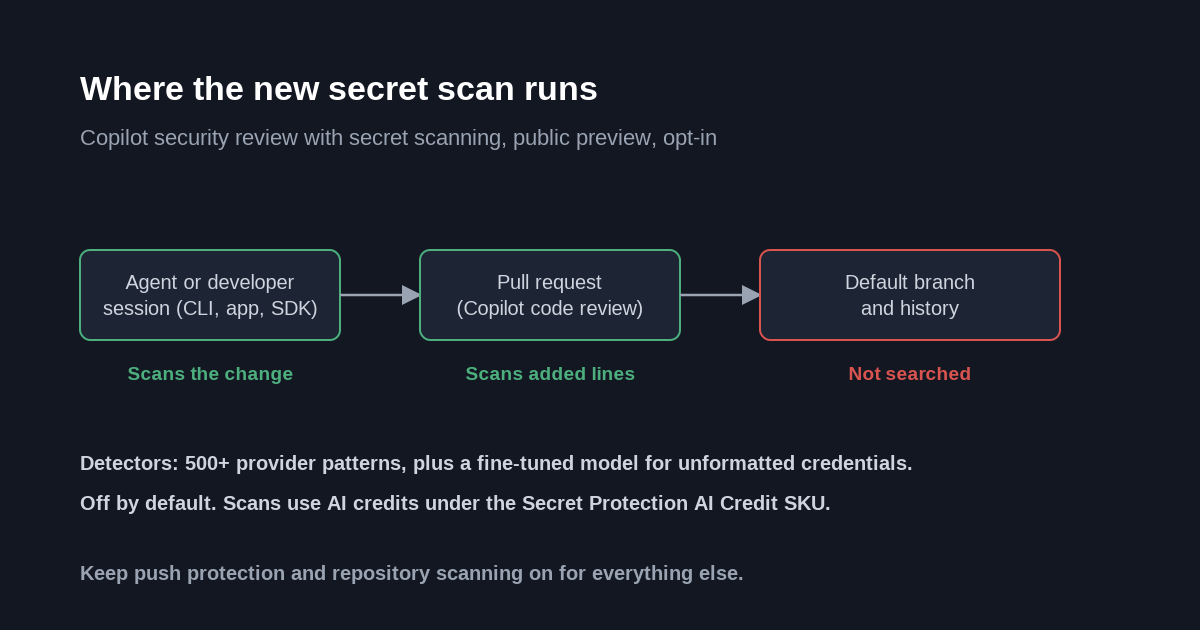
GitHub has added its secret scanning detectors to Copilot's security review, so a developer or a coding agent can check a change for credentials before it is merged. The feature, announced on 17 November 2026, is in public preview in Copilot CLI, the Copilot app, Copilot SDK integrations and Copilot code review. It is useful for agent workflows, where code can be written and committed quickly, but it is off by default, it checks only the current changes, and scans are billed in AI credits.
What changed
Copilot's security review already looked for exposed secrets with a language model. According to the GitHub changelog, once you opt in it also runs two of GitHub's own detection methods alongside that review:
- Provider patterns, covering more than 500 secret types built with over 150 partners in the secret scanning partner programme. GitHub's list of supported patterns documents what these detect.
- A fine-tuned detection model for credentials without a recognisable format, such as passwords in connection strings, which reads the surrounding code to decide.
The changelog is clear about scope: "The review checks your changes for secrets. It doesn't search repository history."
Where it runs and how to turn it on
Each tool has its own switch:
| Tool | Turn it on | Run it |
|---|---|---|
| Copilot CLI | /settings aiSecretDetection on in an interactive session | Delegate to the security-review agent, or run /security-review |
| Copilot app | Settings, Experimental, AI secret detection | Delegate to security-review, or run /security-review |
| Copilot SDK | Set the SECURITY_REVIEW_FINE_TUNED_MODEL feature flag to true when creating a session | Delegate from the session agent, or start the security-review agent through the SDK |
| Copilot code review | Repository settings, Copilot, Code review, Secret scanning under Security | Request a Copilot review, or use automatic reviews |
The Copilot CLI command reference describes /security-review as a focused review of active local changes and adds that it "is not a full repository security audit".
Availability and billing
The changelog says anyone who can use Copilot security review or Copilot code review in these tools can use secret scanning, with "no additional plan" required. It also says scans "consume AI credits under the Secret Protection AI Credit SKU". So there is no new subscription, but there is a metered cost.
Analysis
It moves detection to where agents work. Push protection and repository scanning catch secrets once they reach GitHub. An agent can be asked to run a security review before it returns its work, and the SDK path lets teams build that into their own agents. Catching a hard-coded key in the session is cheaper than rotating it after a push.
It doesn't replace what already exists. The scan covers changes, not history, and it runs only when someone or something asks for it. Push protection, repository-wide secret scanning and scanning of places like Actions workflow logs still cover what this does not.
Opt-in per tool makes coverage uneven. There are four different switches, in a CLI setting, an experimental app setting, an SDK flag and a repository setting. The changelog describes no organisation-wide switch for the CLI and app. In practice, coverage will depend on individual habits unless code review is turned on per repository and agents are instructed to run the review.
Model-based detection is a preview feature. The fine-tuned model finds secrets that patterns miss, which is valuable, and it may also flag things that aren't secrets. Expect to tune how findings are handled before making them blocking.
Detection after the fact is still after the fact. If a coding agent wrote a credential into a file, that credential may already have passed through the agent's context. Removing it from the change before merge is good. It doesn't undo where the text has already been, and a found secret should still be rotated.
What it means for engineering and security leaders
For teams that already use Copilot code review, turning on secret scanning in repository settings is the simplest step and gives a consistent check on every reviewed pull request. For teams building agents with the SDK, a security review before the agent returns its changes is a sensible default to add.
Budget owners should note the billing line. "No additional plan" is not the same as free; scans draw AI credits, and automatic reviews on busy repositories can add up.
Practical takeaways
- Turn on secret scanning in Copilot code review for repositories where Copilot already reviews pull requests.
- Add a security review step to agent instructions or SDK workflows, so agents check their own changes before returning them.
- Keep push protection and repository scanning on. This feature checks changes only and never searches history.
- Rotate any secret it finds, even when it is caught before merge.
- Track AI credit use under the Secret Protection AI Credit SKU for a few weeks before turning on automatic reviews everywhere.
- Decide how to treat model-detected findings during the preview: warn first, block later.
If you run SpanDock, repository security scans the git repositories on your team's computers for leaked secrets and vulnerable dependencies under one policy set on the server, and git hooks and CI enforce it; source code and secret values never leave the computer. It can also scan git history when the policy says so. Repository security is on the Enterprise plan. For secrets typed into prompts or tool calls, see our article on guardrails that keep secrets out of prompts.