
Device code phishing against coding agents: what one approval can reach
Microsoft showed how a phished GitHub device-code approval could steer a Copilot CLI session, seed memory and read private repos. The controls that limit it.
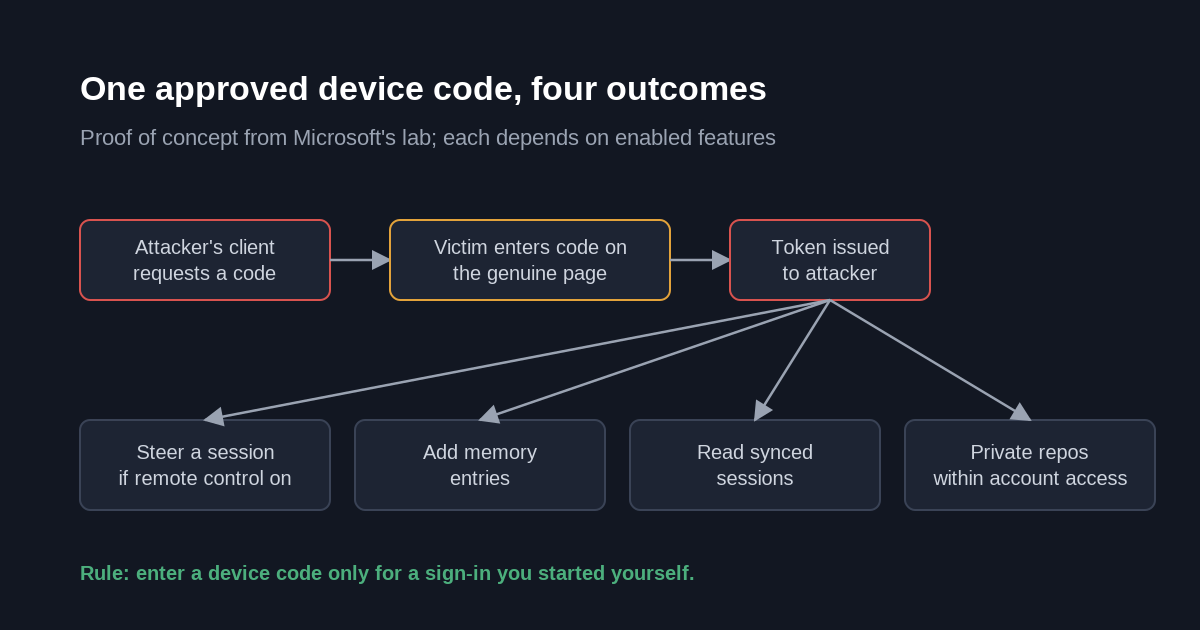
Microsoft security researchers have shown what a single phished device-code approval can do when the account behind it uses an AI coding agent. In a lab simulation with GitHub Copilot CLI, the approval was enough to steer an active session that had remote control on, add misleading entries to the agent's memory, read cloud-synced sessions and access private repositories. Nothing in the attack is a software flaw. It is ordinary sign-in and agent features, used by the wrong person, and that is why the controls are mostly about configuration and habit.
How device code phishing works
The OAuth device flow lets tools without a full browser sign in. GitHub's device flow documentation describes it as a way to authorise users "for a headless application, such as a CLI tool". The tool asks GitHub for a short user code, the person enters it on GitHub's verification page, and the tool receives a token. The example response in GitHub's documentation shows a code valid for 900 seconds.
In device code phishing, the attacker starts the request and sends the code to the victim, perhaps framed as an IT request or a license check. The victim signs in on the genuine site and approves. The attacker's client then completes sign-in. As the Microsoft write-up, published on 17 November 2026, puts it: "The legitimate verification page is part of the story, not evidence that the request was safe."
Microsoft notes that this technique has already been used at scale against mailboxes, citing the EvilTokens campaign it helped disrupt in September 2026. The new question was what the same approval reaches when the account runs a coding agent.
The four outcomes in the lab
Microsoft used Copilot CLI as an example, and stresses that any public client supporting the device flow can be abused in the same way, with the attacker choosing the requested scopes. The four outcomes, each dependent on the account's permissions and enabled features, were:
- Steering a live session. If the user had turned on remote control for an active session and organisation policy allowed it, the attacker could interact with that session and have the agent run a command, still subject to the session's approval prompts and local permissions. Microsoft is explicit that this is not unauthenticated remote code execution and doesn't apply when remote control is off, the session isn't running or the machine is offline. The Copilot CLI command reference documents
/remote onand/remote offfor this. - Seeding memory. The researchers added misleading entries through the agent's
/memorycommand. If later interactions use them, the effect outlasts the stolen sign-in. - Reading synced sessions. Where cloud session storage was enabled, they could read earlier sessions, which can hold code, file paths and design discussions.
- Reaching private repositories. The request included the
repo,read:user,read:org,gistandcodespacescopes. Repository access then followed the account's own permissions.
Microsoft says these are proof-of-concept results that it has not observed in the wild.
Analysis: why agents raise the stakes
Device codes are a normal path, not an edge case. GitHub's Copilot CLI authentication guide says the browser flow is the default on a local desktop, and that SSH, Codespaces, dev containers and CI default to the device code flow. Developers who work on remote machines enter device codes routinely, which makes an unexpected code request look familiar.
The token's reach is set by the account, not the tool. A phished token for a developer with broad repository access is valuable whatever client name it carries. Agents add new places that token reaches: session history, memory and, where enabled, a live session on a machine.
Memory and session history are new persistence points. A stolen password is fixed by a reset. A misleading memory entry or an exposed session transcript is not. Microsoft notes that turning memory off doesn't delete entries already stored, so incident response has to include reviewing them. Our earlier article on Copilot Memory's admin settings covers where those controls sit.
Signing out isn't revoking. GitHub's guide notes that /logout "removes the locally stored token but does not revoke it on GitHub". Revocation happens under the account's authorised OAuth apps.
Where Entra sign-in fits
On the same day, GitHub added Microsoft Entra sign-in to Copilot CLI as a public preview, for version 1.0.113 and later on Windows and macOS. For enterprises using Enterprise Managed Users through OIDC, it gives silent single sign-on with the person's Entra identity. It is an alternative sign-in path for those organisations; the changelog doesn't present it as a defence against device code phishing, and it is limited to OIDC-based EMU setups for GitHub access. Teams on other setups still rely on the device and browser flows.
What it means for engineering and security leaders
This is an identity problem first. The phishing step targets a person, and the impact depends on what that person's account can reach. Least-privilege repository access, short review cycles for OAuth authorisations and tight session policies do more than any single detection.
It is also an agent configuration problem. Remote control, cloud session storage and memory are useful features with security cost. Each should be a deliberate organisation-level choice, with the least permissive setting that supports how your teams work.
Practical takeaways
- Tell developers the rule plainly: enter a device code only for a sign-in you started yourself, even when the page is on github.com.
- Review Copilot CLI policies for cloud session storage and remote control, and choose the least permissive settings your workflows need.
- Review memory if Copilot Memory is enabled, and include stored entries in incident response.
- Audit authorised OAuth apps for developers with broad access, and revoke what is unexpected. Remember that
/logoutdoesn't revoke. - Limit repository access by role so a single phished account reaches less.
- Watch for unexpected token creation for coding-agent clients, correlated with phishing reports, in whatever security tooling you use.
Sources
- The risks of device code authentication for AI coding agents (Microsoft Security Blog, 17 November 2026)
- Authenticating GitHub Copilot CLI (GitHub Docs)
- Authorizing OAuth apps: device flow (GitHub Docs)
- GitHub Copilot CLI command reference (GitHub Docs)
- GitHub Copilot CLI adds Microsoft Entra sign-in as a preview (GitHub Changelog, 17 November 2026)