
Copilot Memory is generally available: the settings administrators should check
Copilot Memory is GA and dreaming is in preview. Repository facts default to all repositories, so review access, retention, exports and the audit log now.
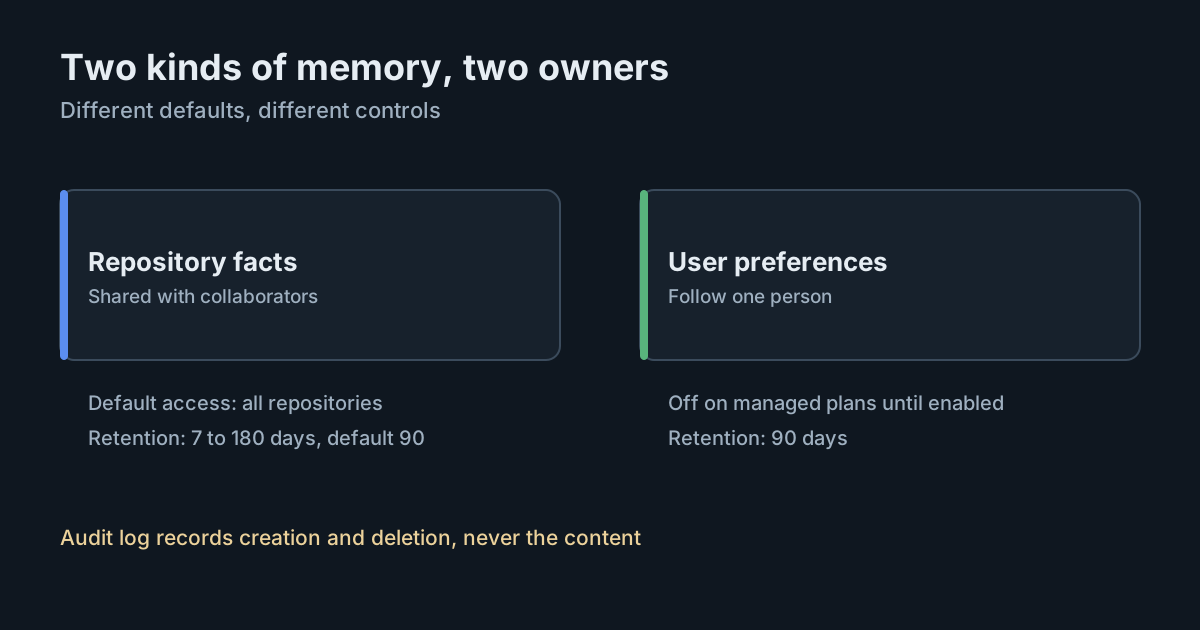
On 28 October 2026, GitHub made Copilot Memory generally available on paid Copilot plans and put a related feature, Copilot dreaming, into public preview. Memory lets Copilot keep facts about a repository and a person's preferences between sessions and across clients, so agents stop relearning the same test command every time. For administrators, it also means a new store of information that Copilot writes by itself, shares between collaborators and keeps for months. The defaults are worth a careful look, because one of them is more open than many teams would expect.
What became available
The changelog groups three capabilities under the name "GitHub intelligence": Memory, which is generally available; dreaming, which is in public preview; and cross-repository code search for Copilot. Memory works across the Copilot app, Copilot CLI, the cloud agent, code review and other surfaces. GitHub says that among Copilot CLI sessions reviewed during the preview where memory was used, 93% showed better adherence to developer preferences. That is GitHub's own measure from its own review, with no method published alongside it.
Dreaming is opt-in. It reviews past sessions and adds, updates or removes memories, and it proposes changes to checked-in skills and custom instruction files through pull requests for people to review. Its runs consume AI credits. Treat it as a preview feature: GitHub's documentation says it is subject to change.
Two kinds of memory, two owners
The documentation describes two types, stored and governed separately:
- Repository-level facts describe a codebase: conventions, build and test commands, architectural decisions. They belong to one repository, are shared with anyone who has read access and can use Copilot Memory, and are created by users with write access. They are not pooled across an organisation's repositories, and forks don't copy them.
- User-level preferences describe how one person likes to work and follow them between repositories. On Copilot Business and Enterprise, they are owned by the organisation or enterprise that grants the license, and administrators can view, export and delete them.
Copilot creates memories itself as it works, and decides which type each one is. People can't write a memory directly in the settings, though they can ask Copilot to remember something, and the CLI can import prepared memories in bulk.
The defaults that matter
The administrator guide sets out the defaults:
- User-level preferences are off on Business and Enterprise plans until an administrator enables the Copilot Memory policy. On Pro, Pro+ and Max they are on, with a personal opt-out.
- Repository-level facts are controlled separately, through a "Repository access" setting that defaults to All repositories for an organisation. Turning off user-level preferences does not turn off repository facts.
- Retention is 90 days from creation or from the last time Copilot reinforced a memory. Owners can set repository facts to anything from 7 to 180 days; user preferences always use 90. Where an organisation and its enterprise disagree, the shorter period wins.
- Dreaming is off by default, and allowing it at enterprise or organisation level does not turn it on for individuals, who must also enable it.
Two details stand out. First, repository facts can be captured from pull requests that were closed without merging. Copilot is told to check facts against current code, but the documentation says this "does not guarantee that it will recognize every outdated fact". Second, disabling memory for a repository stops new facts and stops existing ones being used, but does not delete them.
What Copilot refuses to store
The documentation lists some protections. Memories are checked for secrets such as tokens and keys, and rejected if one is found. Memories containing recognised model-control tokens can be rejected as a defence against prompt injection. Copilot is instructed not to store sensitive personal or confidential information, though an instruction is not a guarantee.
What it means for engineering and security leaders
- A new place for durable instructions. Repository facts influence every collaborator's sessions. A wrong or planted fact, perhaps from a closed pull request, keeps shaping agent behaviour until it expires or someone deletes it. That is a cousin of the AGENTS.md hijack problem, with the added twist that nobody wrote the file by hand.
- Personal data with an owner. User preferences can quote what a person said. On managed plans they belong to the organisation, which can export them. Your privacy notice to employees should say so.
- Rules belong in instructions, not memory. GitHub's own guidance is that a memory "should not be relied on as a rule that will always be followed". Security requirements belong in custom instructions and enforced controls.
- Audit logs record events, not content. Creation and deletion appear in the audit log; the memory's text does not, and neither do retrieval, voting or expiry.
Practical takeaways
- Decide deliberately between All, Selected and No repositories for repository facts, rather than inheriting the default. Exclude repositories with sensitive code or regulated data until you have reviewed the feature.
- Set a retention period for repository facts that matches how fast your codebases change. Shorter periods limit how long a stale or planted fact survives.
- Make someone responsible for reviewing repository facts in Settings → Copilot → Memory on important repositories, and delete what is wrong.
- Search the audit log for
action:copilot.memory_createdto see who triggered new repository memories. - Treat dreaming as a preview: if you pilot it, pick one organisation and review the pull requests it opens like any other change.
- Check this alongside GitHub's default policy for new features, which decides whether new Copilot capabilities arrive switched on.
SpanDock has a comparable feature with a different design. Its project memory builds a short summary of recent work on a repository on your own server, from work items, activity counts and notes, and never reads raw prompt text. Secrets are removed before and after the model sees the inputs, each build is kept as a version, and notes are recorded in the audit log. Project memory is on the Premium and Enterprise plans.