
Unified Claude for Enterprise turns on by default on 16 November: what to review
Chat and Cowork merge for Claude Enterprise, with agentic work in a managed cloud sandbox. What to check before it switches on by default.
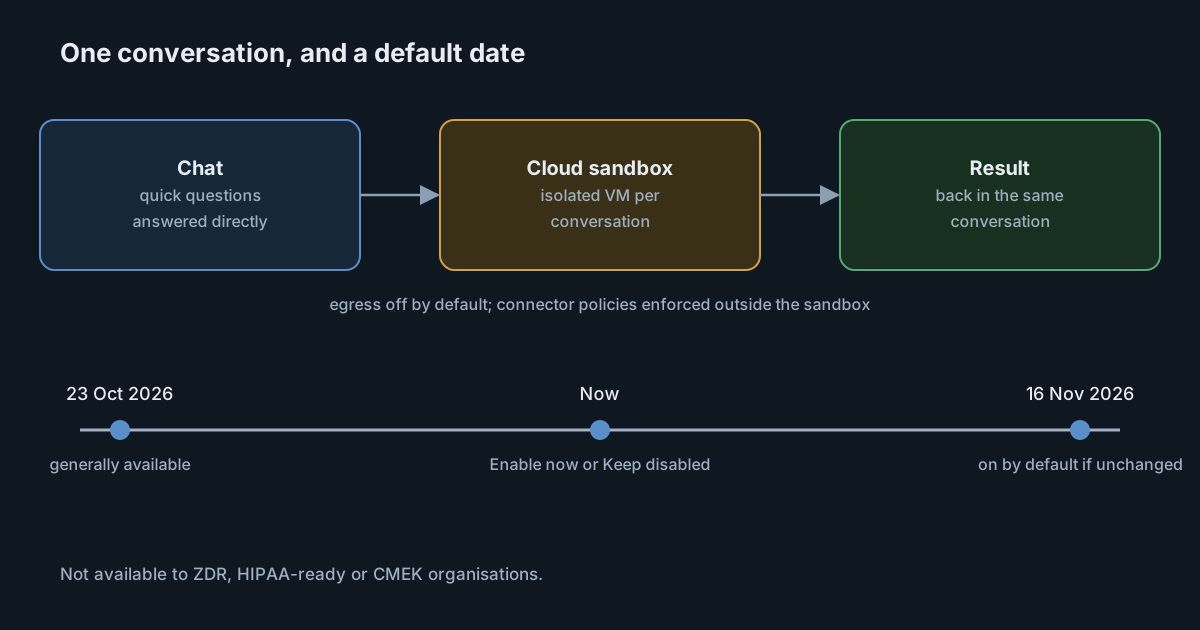
On 23 October 2026 Anthropic made its unified Claude experience generally available for Claude Enterprise. Chat and Cowork, where people hand Claude whole projects, become one conversation: it starts as a chat, and when a task needs to run code or work with files, Claude continues in a cloud virtual machine that Anthropic manages. For existing organisations the setting is off for now. According to the admin guide, it turns on by default on 16 November 2026 unless an owner chooses otherwise. That leaves about two weeks to review it.
What changes for members
Today, people choose between chat and Cowork before they start. In the unified experience they don't. A quick question still gets a quick answer, and a request such as "analyse these spreadsheets and draft a report" moves the same conversation into a cloud session, then back to chat with the result.
The admin guide describes how that session runs:
- Each conversation that needs one gets its own isolated virtual machine.
- After a few minutes idle, the machine stops and its disk is saved as an encrypted snapshot. The sandbox environment expires 30 days after it was created.
- Work moves across devices: start on the desktop app, pick it up on the web or a phone.
- Local access stays optional. Through the desktop app, people can link their computers so Claude can work with local folders, local MCP servers and applications, governed by the organisation's remote control and device policies.
Anthropic's announcement adds that network egress from the sandbox is off by default for Enterprise, and that connector credentials are kept outside the sandbox.
The date, and what "default" means
The setting is called Chat and Cowork unified, under Organization settings, Capabilities. The guide is specific about the automatic change:
- If an owner never touched the setting, it turns on on 16 November. Owners see a notice with Enable now and Keep disabled.
- If the setting was already turned on or off, that choice stays.
- It needs two other capabilities: Chat, and Cloud code execution and file creation. If either is off, nothing turns on.
The second point is the one to act on. An organisation that wants to pilot first should choose Keep disabled explicitly now, and then grant the capability to a pilot group through a custom role. Doing nothing means the decision is made for you on the date.
Roles need a check too. Once the organisation setting is on, everyone with the User, Admin, Owner or Primary Owner role gets the experience, and new custom roles start with all capabilities. The guide recommends moving anyone who shouldn't have it to a custom role with the capability off before turning it on.
The settings that decide the risk
The guide lists the controls that apply. The ones that matter most for a security review:
| Setting | What it governs |
|---|---|
| Allow network egress | Which internet destinations code in the sandbox can reach: off, package managers only, a list of domains, or all. Off by default for Enterprise. |
| Connector policies | Blocked, needs approval and per-role rules, enforced by Anthropic outside the sandbox on every connector call. |
| "Skip all approvals" and "Automatically approve" modes | Whether people can let Claude act, including tools, file edits and browsing, without approving each action. |
| Remote control | Whether web, mobile and scheduled tasks can use a member's linked computer. |
| Require Trusted Devices | Whether each new device must be verified before it can reach Claude on a member's computer. |
| Scheduled tasks | Whether remotely executed scheduled tasks are allowed at all. |
Single sign-on, SCIM provisioning and tenant restrictions carry over unchanged, and the Compliance API covers conversations in the new experience with existing keys. The guide also notes that the model allowlist applies to both chat and agentic work, and introduces an Efficient mode that limits the experience to Sonnet and Haiku models.
Retention has gaps worth reading
The data retention section is the part most likely to surprise a compliance team. Deleting a conversation, including under a custom retention period, also deletes the cloud sessions Claude started from it. But the guide lists what custom retention does not cover:
- Cowork cloud sessions a member starts directly, which are kept until the member deletes them.
- Scheduled tasks and their runs, which keep running after the conversation that created them is deleted. The guide's advice is to turn off Scheduled tasks to stop them.
- Cowork history stored on a member's computer.
- Memory of members who have left the organisation.
Memory also moves to a new system, and the old memory may be deleted 14 days later. If your retention policy assumes that deleting a conversation removes everything it produced, these items need their own rule.
Who can't use it yet
Organisations with zero data retention, the HIPAA-ready configuration or customer-managed encryption keys can't turn it on, and stay on separate chat and Cowork. The guide says HIPAA support is expected after general availability and CMEK support is planned for a later release; neither is available now. One small difference between the sources: the announcement refers to "zero data retention for Claude Code", while the admin guide says organisations that use zero data retention. If ZDR applies to you in any form, confirm with Anthropic which configuration is excluded.
What it means for engineering and security leaders
- The approved tool is changing shape. An organisation that approved chat has, by default, also approved agentic work in a cloud VM. The guide notes that most teams review two things they already know, chat and Cowork in the cloud, but the review should happen before the date, not after.
- Usage reports change too. Usage for members with access moves to a new Chat and Cowork unified line in analytics and the Cost and Usage API. Scripts that sum chat and Cowork need the new product value, or the totals will appear to fall.
- Local access is the boundary to watch. Linked computers, local MCP servers and remote control bring the cloud session back onto employee machines. Those settings deserve the closest look.
Practical takeaways
- Decide before 16 November: Enable now, or Keep disabled and pilot through a role.
- Audit roles so only the intended people get the capability when the organisation setting is on.
- Confirm network egress is off or limited to a list, and that connector policies are set to the approval levels you expect.
- Decide whether to allow "Skip all approvals", "Automatically approve", remote control and scheduled tasks.
- Add rules for what custom retention doesn't cover, especially scheduled tasks and directly started cloud sessions.
- Update usage and cost scripts to include
chat_cowork_unified.
For background on how sandboxes for agents differ, see Sandboxing coding agents and NCSC's sandbox maturity levels.