
The FSB's sound practices for AI: what they ask of teams running agents
The Financial Stability Board's final report on responsible AI adoption names coding assistants and sets out agent inventories, identifiers and kill switches.
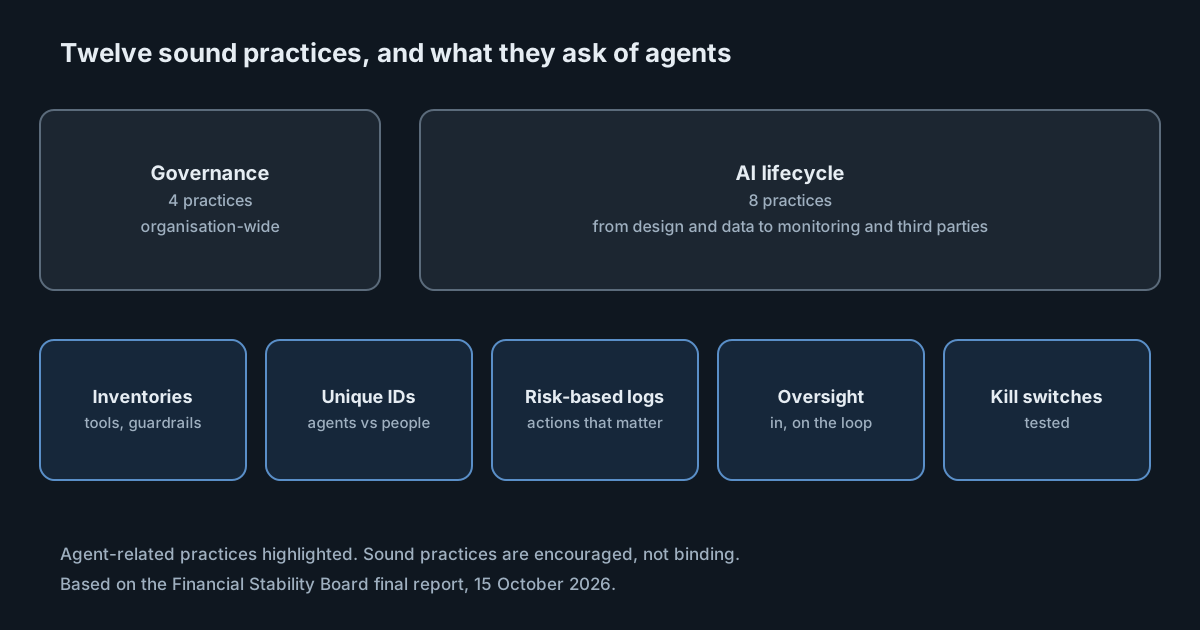
Financial regulators have mostly discussed AI in terms of models that make decisions about customers: credit scoring, fraud detection, chatbots. The Financial Stability Board's final report on sound practices for responsible AI adoption, published on 15 October 2026, still covers those. But it also names software development as one of the places AI is delivering productivity gains, and it gives agentic AI its own treatment. For engineering teams at banks, insurers and their suppliers, that makes it a document worth reading closely.
The FSB coordinates financial regulation internationally. Its sound practices are not binding rules; the report says financial institutions are "encouraged" to follow them, and boards and senior management are "strongly encouraged" to reference them. In practice, documents like this shape what national supervisors ask about.
What the report contains
The report sets out 12 sound practices in two groups: four on organisation-wide governance, and eight across the AI lifecycle, from design and data through testing, deployment, monitoring and third-party arrangements. It also discusses workforce effects, including the risk of deskilling, and the concentration risk of relying on a small number of third-party providers.
On software development, it is specific. "Coding assistants support code generation, debugging, code reviews, root cause analysis and maintaining documentation," it says, and some banks report that early results have translated into significant cost savings. That puts coding tools inside the scope of the governance it describes, not beside it.
The agentic risks it lists
The report lists risks particular to agents, among them:
- unauthorised actions, where an agent does something it was not permitted to do;
- erroneous actions, where it does the wrong thing within its permissions;
- data security, including access to data it should not reach;
- disruption to connected systems;
- inadequate human oversight;
- memory poisoning, where an attacker introduces data into an agent's knowledge base to influence its behaviour over time;
- the added complexity of sub-agents and orchestration.
It is also candid about its limits. It says approaches to agentic AI and multi-agent systems "remain nascent" and may warrant more work, and that its coverage is not exhaustive.
What it asks for
Four themes are directly relevant to teams running coding agents.
Inventories. The report observes that some banks keep central AI inventories, while banks with more limited adoption have been observed to rely on spreadsheets. For agents, it describes inventories that record each agent's identifier, the tools it can access, its components and its guardrails. It also describes "certification", where an agent is reviewed and approved for use within defined boundaries.
Identifiers and traceability. It describes assigning "individual unique identifiers to each AI agent", so that agents can be told apart from human users, and recording what triggered an agent, which tools it used, the steps it took and the permissions it held.
Risk-based logging. Rather than recording everything, it says institutions take "a risk-based approach to the amount of information they log", focusing on actions, decisions and steps that can affect their risk profile, without retaining unmanageable volumes of data.
Oversight and intervention. It distinguishes several forms of oversight: human-in-the-loop, where a person approves every decision; AI-in-the-loop, where AI supports human oversight; human-on-the-loop, where people intervene periodically or when needed; and human-in-command, high-level oversight that decides how far AI is used at all. It adds contestability, and kill switches, described as mechanisms "enabling human intervention to halt or constrain AI operations". It goes further than most guidance by calling for "implementing and testing risk-based 'kill-switch' mechanisms to pause, limit, override or remove an agent's access to systems, tools, databases or decision-making functions", including testing how agents behave when they can't complete a task safely or when a connected system fails. It also asks for risk-based triggers for when an agent must seek human approval.
What it means for engineering leaders
Most of this maps onto work engineering teams can do with tools they already have, but few have done it for coding agents. Ask three questions.
First, could you produce an inventory of the AI coding tools and agents in use across your organisation, including the ones nobody registered? A spreadsheet of approved tools is a start; the report's own observations suggest supervisors know the difference between a list of what was approved and a view of what actually runs.
Second, can you tell an agent's actions from a person's? Many coding agents act with the developer's own credentials, so commits, API calls and tickets look the same whichever wrote them. The report's identifiers point the other way.
Third, have you ever tested stopping an agent? A kill switch that has never been used is an assumption. The report's emphasis on testing it, including when connected systems fail, is the part most likely to be new to engineering teams.
Practical takeaways
- Build an inventory of AI coding tools and agents that covers what runs, not only what was approved, and record each agent's tools, permissions and guardrails.
- Give agents their own identities and credentials where your tools allow it, so their actions can be attributed separately from people's.
- Decide what to log by risk: actions that change code, infrastructure, data or access first.
- Write down which actions need human approval, and make the triggers specific.
- Define how to pause, restrict or revoke each agent's access, and test it.
- Map your coding tools to the report's oversight forms, so you can say which applies where.
The SpanDock process inventory, on the Enterprise plan and off by default, shows which AI tools run on your team's computers, including ones that send no telemetry. Each computer reports its running processes to your server every few minutes, and snapshots stay on that server.