
Copilot connectors: the four policy settings that decide whether they load
GitHub-verified MCP servers let people connect Slack, Sentry or Linear to Copilot once. Four policy settings decide whether that works in your company.
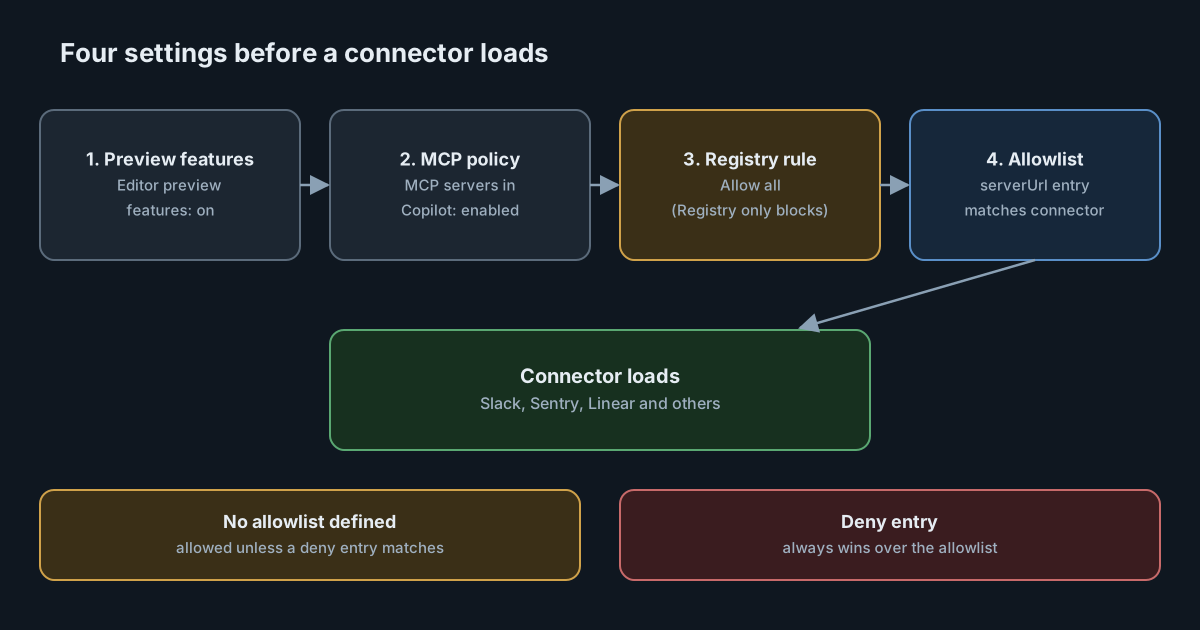
Until this week, giving Copilot access to a Slack thread or a Sentry error meant finding an MCP server, setting up its sign-in and repeating that in every tool. On 28 October 2026 GitHub started rolling out GitHub-verified MCP servers, which it calls connectors, in public preview. A person picks a service, signs in once and can use it across Copilot's surfaces. For administrators the interesting part is not the convenience. It is that four existing policy settings now decide whether any of it works, and one of them behaves differently from what many teams will expect.
What GitHub shipped
According to the changelog entry, 26 services are available at launch, including Slack, Figma, Notion, Sentry, Linear, Atlassian Rovo, Cloudflare and Work IQ. A service connected in one place works in the GitHub Copilot app, Copilot CLI, VS Code, Copilot in the cloud and GitHub Mobile. GitHub says there is "no server to find, nothing to install locally, and no credentials to manage", and that Copilot keeps the person signed in in the background.
The connectors documentation adds two details worth noting. First, Copilot can use a connected service's tools "when they are relevant to your request, even if you do not mention the service by name." Second, connectors work locally and in Copilot sessions on a cloud sandbox, but "are not yet supported in sessions that run on GitHub Actions", such as when an issue is assigned to Copilot.
Connectors are in public preview on all Copilot plans and, in GitHub's words, "subject to change".
The four settings that decide
When a company provides the Copilot subscription, the docs list four settings that must allow connectors.
Editor preview features
Because connectors are a preview, the Editor preview features policy must be on for the organisation or enterprise. Many enterprises keep this off on purpose, so they can review preview features one at a time. Turning it on for connectors also turns on whatever else sits behind that policy, so check the list before you change it.
MCP servers in Copilot
The MCP servers in Copilot policy must be enabled. If MCP is off, connectors are off too. This is the expected behaviour: a connector is an MCP server, just one that GitHub hosts and configures.
Restrict MCP access to registry servers
This is the one to read carefully. On clients that enforce it, setting Restrict MCP access to registry servers to Registry only blocks connectors. To use them, the policy has to be Allow all. Teams that moved to a private MCP registry as their control will find that connectors don't load, and that the documented fix is to relax that control and move to an allowlist instead. The allowlist guide recommends the same thing more generally, to "maintain a single source of truth".
The MCP allowlist
If the enterprise's managed settings define allowedMcpServers, each connector's URL must match an entry. A matching deniedMcpServers entry blocks a connector even if the allowlist permits it. If there is no allowlist at all, connectors are allowed unless a deny entry matches them.
That last rule matters. An enterprise that never wrote an allowlist, and that has MCP and preview features switched on, has connectors available to everyone today.
How the allowlist handles connectors
Connectors are remote MCP servers, so they are matched with serverUrl entries. GitHub publishes a URL for each one, all under the same path. A wildcard entry for https://api.github.com/copilot-connectors/api/v1/connectors/*/mcp allows every connector, "including connectors added in the future". Individual entries, such as the one ending in githubcopilotslackmcp/mcp, allow one service at a time.
Three behaviours follow from the documentation:
- The wildcard is a forward commitment. It admits services GitHub has not added yet. If your review process approves services one by one, list them individually.
- Deny always wins. A wildcard allow combined with specific deny entries gives you "everything except these". A wildcard deny blocks all connectors.
- The allowlist has a known gap. The guide says allow and deny lists "don't apply to MCP servers defined in repository custom agent profiles". That gap is not specific to connectors, but it is the same file you are now editing, so it is a good moment to look at it again.
Most enterprises keep managed-settings.json in a .github-private repository, and some deploy it to machines with device management. If you already use either, connector entries go in the same place. We covered how to make clients refuse a stale copy of that file in Copilot managed settings can now fail closed.
What changes in the trust model
Connecting a service still means a person signs in to that service and approves access. GitHub hosts the server and keeps the session alive. That moves two things.
Where the credential lives. Previously, an MCP sign-in usually sat in a config file or keychain on a laptop. With connectors, GitHub holds the connection. That is likely an improvement for laptop hygiene, but it puts the token with a third party whose retention and revocation you should understand. The docs we read do not describe token storage in detail, so ask before you approve sensitive services.
What the service's own administrator controls. The docs note that "a Slack administrator may need to enable MCP connections before you can connect Slack to Copilot." So there are two gates: GitHub's policies and the service's own setting. Both teams need to agree.
The automatic tool selection is also worth flagging. If Copilot can call a connected service's tools without being asked by name, content read from that service, a Slack message or an issue comment, becomes input to a session that may also have write tools. That is the familiar prompt-injection shape described in our article on MCP server cards, and it argues for starting connectors on read-heavy services.
What it means for engineering leaders
Connectors lower the effort of wiring business tools into AI coding sessions to almost nothing. That will increase how many services people connect. The control point is now a JSON allowlist plus a handful of policies, not the effort of setup.
The policy combination is also uneven across surfaces. GitHub notes that each setting applies "on clients that enforce this policy" or "on clients that support MCP managed settings". Check GitHub's supported surfaces list for your clients before assuming one change covers them all.
Practical takeaways
- Find out whether you have an allowlist. If you don't, connectors are allowed wherever MCP and preview features are on. Decide whether that is acceptable before people start connecting.
- Choose between the wildcard and named entries. The wildcard is simpler and admits future services. Named entries fit a one-by-one review.
- Plan the registry change. If you rely on Registry only, connectors won't work. Moving to Allow all plus an allowlist is the documented path, but it removes a control, so do it as one reviewed change.
- Agree with service owners. Slack and similar services have their own MCP switch. Decide together which ones to enable.
- Start with read-heavy services. Logs, docs and issue trackers are lower risk than services where Copilot can post or change things.
- Don't expect connectors in Actions sessions yet. Work assigned to Copilot through GitHub Actions will not see them.
If you run your own connectors for AI tools, the SpanDock MCP gateway takes a different approach: connector credentials stay on your server, every connector starts read-only for everyone, and each call passes your rules and is recorded. It is on the Premium and Enterprise plans. See also guardrails for the checks that apply to gateway calls on Enterprise.