
Shared Copilot automations: who they act as, who pays and who can change them
GitHub's shared automations run Copilot cloud agent for a whole repository. What the identity, billing and edit rules mean before your team turns them on.
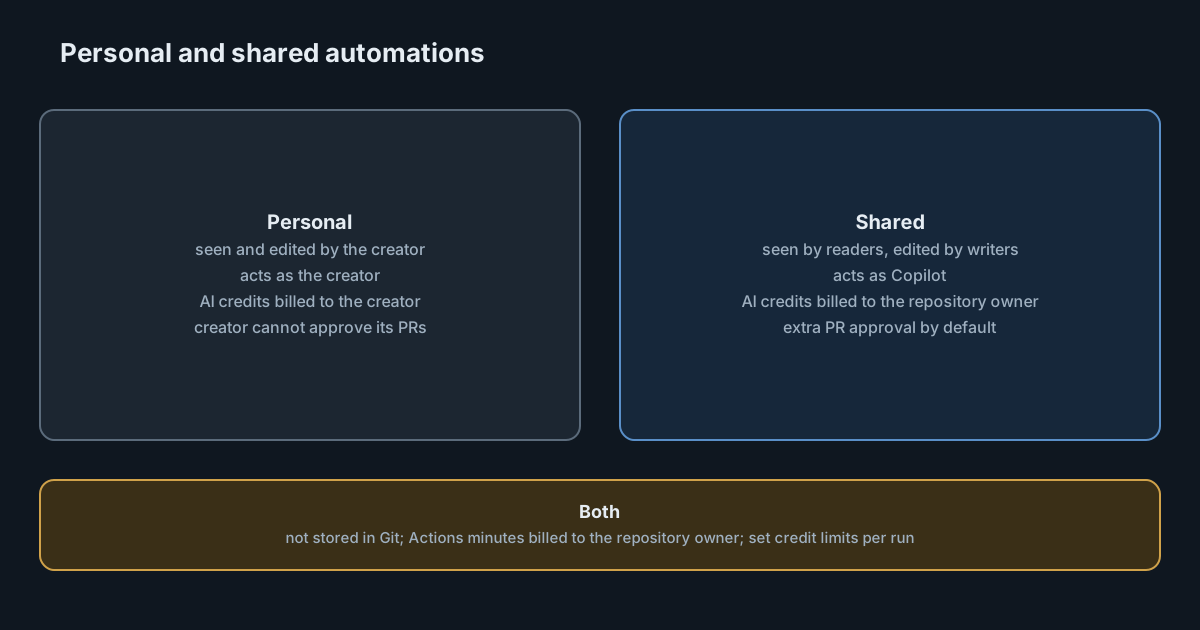
An automation that one engineer set up and pays for is a personal tool. The same automation, visible to the team, billed to the organisation and still running after its author leaves, is shared infrastructure. On 28 October 2026 GitHub began rolling out shared Copilot automations, which make that second kind possible. The feature is small in the interface, a choice of Shared under Type, but it changes who acts, who pays and who can change the prompt.
What automations are
Copilot automations run Copilot cloud agent without a person starting each task. The GitHub documentation describes the parts: a name, a type, a prompt, triggers, the tools Copilot may use, and optionally a model, a reasoning level and limits on AI credits. Triggers include a schedule (hourly, daily or weekly), an issue being created, a pull request being opened, and new commits pushed to a pull request. Any automation can also be started through the API, with extra context passed into the prompt.
Automations are only available in private or internal repositories, need Copilot cloud agent enabled, and are on the Pro, Pro+, Max, Business and Enterprise plans. Anyone with write access to a repository can create one.
What "shared" changes
Until now, automations were personal. The changelog entry and the documentation set out the differences.
Visibility and editing
A personal automation is visible and editable only by its creator, although its runs are visible to everyone with read access. A shared automation is visible to everyone with read access, and anyone with write access can edit it. The changelog says change history "lets your team see how the tools, triggers, and prompt have evolved".
The documentation is explicit about one limit: automations "are not committed to Git, so they are not versioned alongside your code or managed through pull requests." So anyone with write access can change a shared automation's prompt or tools, and that change does not go through code review. GitHub points teams who want review to GitHub Agentic Workflows, which store the automation as code.
Identity
A personal automation acts as the person who created it. Its pull requests are theirs, so they cannot approve them, which keeps normal review in place. A shared automation acts as Copilot. GitHub adds a safeguard: if a repository requires at least one approval, pull requests created by a shared automation need an additional approval by default. Administrators can turn that extra requirement off in rulesets, but not in branch protection rules.
Billing
Each run starts a Copilot cloud agent session that uses AI credits and GitHub Actions minutes. For a personal automation, the creator pays the AI credits. For a shared one, the organisation that owns the repository pays, or the owner's subscription if a personal account owns it. Actions minutes are billed to the repository owner in both cases. In an organisation, shared automations only run if an administrator enables the policy "Allow use of Copilot cloud agent billed to the organization".
Lifetime
Because a shared automation belongs to the repository, it keeps running if its creator leaves the team or loses access. The type cannot be changed after creation, so converting a personal automation means recreating it.
Where the risk sits
None of these choices is unreasonable. Together they create a pattern security and finance teams should recognise: a scheduled job, editable by many people outside code review, running with tools you chose, billed centrally, with no owner who leaves.
Tools define the blast radius. The documentation is clear that GitHub tools act only in the one repository, but "tools from MCP servers aren't limited to that repository: they can access whatever the server's configuration and credentials allow". An automation that inherits a broad MCP server inherits its reach. We wrote about why MCP configuration deserves the same review as code in MCP server entries are commands.
Inputs from untrusted users. By default, automations ignore events triggered by users without write access, to reduce prompt injection, for example from an external contributor opening an issue. Teams can opt in to those events. That switch deserves a named approver.
Inherited configuration. Automations use the repository's cloud agent setup: custom instructions, agent skills, firewall rules, and secrets and variables. A change to any of those changes every automation in the repository.
Credits keep flowing. A personal automation that misbehaves costs its creator, who usually notices. A shared one costs the organisation, which may not.
What it means for engineering leaders
Shared automations move agent work from "something an engineer runs" to "something the repository does". That is the right model for workflows a team depends on, and the departure-proof lifetime fixes a real problem. It also means the controls you apply to CI, such as ownership, review of changes and budgets, now apply to prompts.
The extra approval on automation pull requests is a sensible default. Turning it off in a ruleset should be a deliberate, recorded decision, not a convenience.
Practical takeaways
- Decide who may enable the billing policy. Without "Allow use of Copilot cloud agent billed to the organization", shared automations don't run in organisation repositories. Treat enabling it as a budget decision.
- Set AI credit limits on every shared automation. The docs offer per-run (minimum 30 AI credits), daily, weekly and monthly limits. Daily, weekly and monthly limits don't stop a run in progress, so use a per-run limit to cap each run.
- Pick tools narrowly. Grant only what the task needs, and check each MCP server's reach before selecting its tools.
- Keep the default on untrusted events. Leave automations ignoring events from users without write access unless there is a specific, reviewed reason.
- Keep the extra approval. Leave the additional pull request approval for automation-created pull requests in place.
- Use change history as your review log. Because edits don't go through pull requests, schedule a regular look at each shared automation's history, or move critical workflows to agentic workflows stored as code.
- Name an owner anyway. The automation survives its creator. Someone should still be accountable for its prompt and cost.
For more on the security model of agents that run without a person present, see our guide to sandboxing coding agents.