
Copilot plugin controls are GA: required, blocked and repository defaults
Enterprises can now require or block Copilot plugins and limit marketplaces, while repositories set defaults. How the three layers interact and where to start.
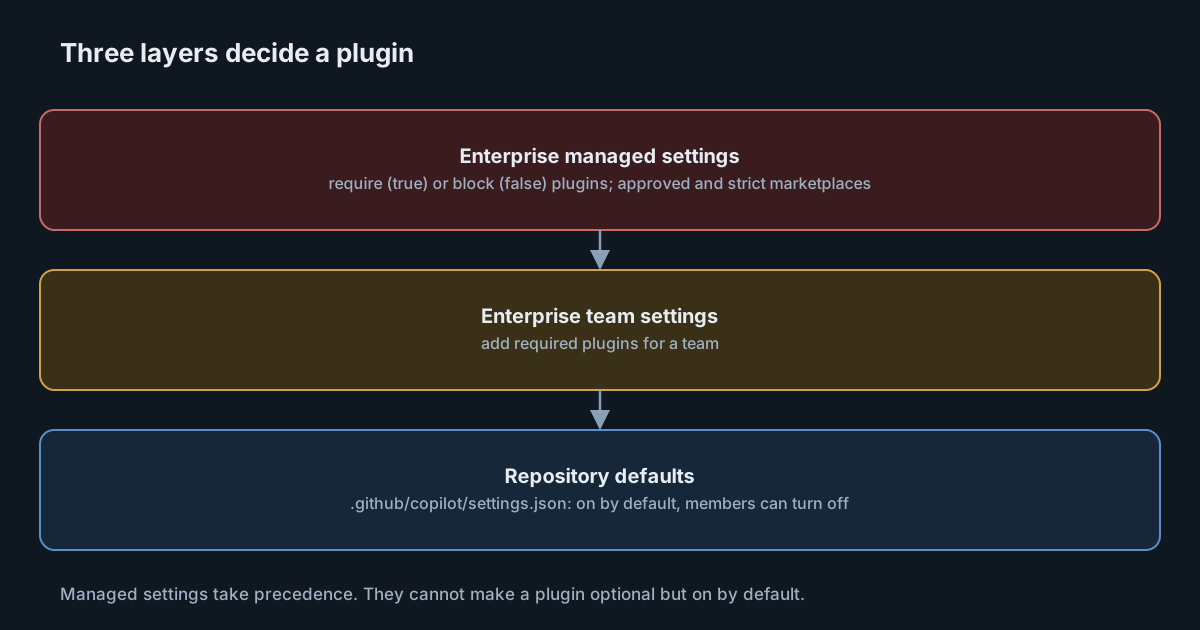
A Copilot plugin can bundle an agent, skills, hooks, extensions and MCP server configurations into one install. That makes plugins the most powerful thing a developer can add to their assistant, and the hardest to review one piece at a time. On 28 October 2026 GitHub made two controls generally available: repository plugin defaults and enterprise-managed plugin controls. This article explains how they layer, what they can and can't do, and a sensible order to adopt them.
What a plugin is
The GitHub documentation on plugins describes a plugin as a package of related customisations. It can contain custom agents, skills (folders with a SKILL.md), hooks that respond to agent actions, surface-specific extensions, MCP server configurations and, on supported surfaces, Language Server Protocol configurations. Plugins are available in VS Code, Copilot CLI, the GitHub Copilot app and Copilot in the cloud.
Plugins come from marketplaces, each defined by a marketplace.json. The built-in marketplace in VS Code, Copilot CLI and the Copilot app is awesome-copilot. A plugin is identified as PLUGIN-NAME@MARKETPLACE-NAME, where the marketplace name comes from the name field in marketplace.json, not from the repository name.
The docs separate three states: available (its marketplace has been added), installed (added to a surface) and enabled (its components load in sessions). Adding a marketplace "does not install or enable" anything.
What became generally available
The changelog entry covers VS Code, Copilot CLI and the GitHub Copilot app.
- Repository defaults. Maintainers can define a plugin marketplace and default plugins, so contributors don't repeat setup in each project. Trusted repositories can install and enable those defaults. Contributors can turn them off "where policy permits".
- Enterprise controls. Administrators can supply approved marketplaces, require plugins and block plugins through managed settings. Required plugins are installed and enabled automatically, and users can't disable them. Managed settings "take precedence over repository and personal choices."
Repository defaults are available to individual Copilot users and to Business and Enterprise users. Managed controls need GitHub Enterprise Cloud and Copilot Business or Enterprise licenses issued by the enterprise or one of its organisations.
How the layers interact
The plugins documentation sets out three configuration sources.
Enterprise managed settings
These require or block a plugin across supported surfaces. A member can't turn a required plugin off: "Managed policy always wins." The managed settings guide uses two keys:
extraKnownMarketplacesadds marketplaces, each with a name and a source such as a GitHub repository. Members need read access to each marketplace repository.enabledPluginsmaps a plugin identifier totrue(required) orfalse(blocked).
A third key, strictKnownMarketplaces, restricts installation to the listed sources and, according to the guide, "also disables the built-in marketplaces."
Enterprise team settings
Enterprise teams can add required plugins through enabledPlugins entries in team files, layered on the enterprise baseline. These are managed policy too, so members can't turn them off.
Repository defaults
Repository defaults live in .github/copilot/settings.json and enable a plugin for everyone working in that repository. They are defaults, not mandates. They can't enable a plugin that managed policy blocks, and can't use a marketplace that policy disallows.
The asymmetry to remember
Managed settings only require or block. In the docs' words, they "cannot enable an optional plugin by default." If you want a plugin on by default but optional, that has to come from repository defaults. If you want it on and locked, it has to come from managed settings. There is no enterprise-wide "recommended" setting.
Why this matters for security
A plugin is not one customisation. It can carry hooks that run on agent events, an MCP configuration that starts a program or connects to a remote server, and skills that may include scripts. Installing one is closer to adding a dependency with install scripts than to adding a prompt.
That cuts both ways for the new controls.
Required plugins are a strong distribution tool. If your platform team maintains a plugin with your review skill, your approved MCP servers and a hook that records sessions, requiring it puts the same setup on every supported client. Nobody can quietly turn it off.
Required plugins are also a strong blast radius. A change to a required plugin reaches every member at once. The marketplace repository that hosts it becomes a high-value target, and its write access deserves the same care as a release pipeline.
Strict marketplaces close the side door. Blocking named plugins is a denylist. strictKnownMarketplaces turns it into an allowlist of sources, at the cost of losing the built-in marketplace unless you mirror what you need.
We wrote about the security rules emerging for skills in particular in Skills over MCP is an official extension. The same thinking applies to plugins, which can contain skills and more.
Measuring use
The managed settings guide points to the usage metrics API, which reports Copilot CLI customisation activity. GitHub is careful about its limits: the totals_by_plugin array counts skill invocations associated with a plugin, "not all plugin activity or the number of users who installed it", each array shows at most five entries, and an absent entry "does not mean zero usage". Treat these figures as a signal, not an inventory.
What it means for engineering leaders
The plugin layer is becoming the main way Copilot is configured. If you already manage MCP allowlists and policies through managed settings, plugins belong in the same file and the same change process. We covered making clients refuse a stale copy of that file in Copilot managed settings can now fail closed.
Coverage is per surface. The changelog lists VS Code, Copilot CLI and the Copilot app for these controls, and the docs warn that some plugin components only work on particular surfaces. Other AI coding tools your teams use are not covered by Copilot's managed settings at all.
Practical takeaways
- Inventory first. Find out which marketplaces and plugins people already use before you block anything.
- Host your own marketplace in a protected repository. Give it a stable, kebab-case name, as GitHub recommends, and restrict who can merge.
- Require sparingly. Required plugins should be the ones that carry policy, such as approved MCP servers or a review skill. Everything else can be a repository default.
- Decide on strict marketplaces deliberately.
strictKnownMarketplacesis the strongest control and removes the built-in marketplace. Mirror what you need first. - Review plugin updates like dependencies. Hooks, extensions and MCP configurations can run code. Read the diff before it reaches every laptop.
- Don't treat metrics as adoption. Use the usage API for trends, not as a count of installs.
If you want the same skills on every computer across several AI tools, not only Copilot, SpanDock skills let an administrator turn a skill on once and install it where Claude Code, Codex, Gemini CLI, Cursor, GitHub Copilot and OpenCode look for skills. Skills are in beta, starter skills are in every plan, and publishing your own is on the Premium and Enterprise plans.