
Claude Code 2.1.325: sandboxed shell commands now ask first by default
Claude Code no longer auto-approves sandboxed Bash commands by default. What changed in 2.1.325, who notices, and how to set it in managed settings.
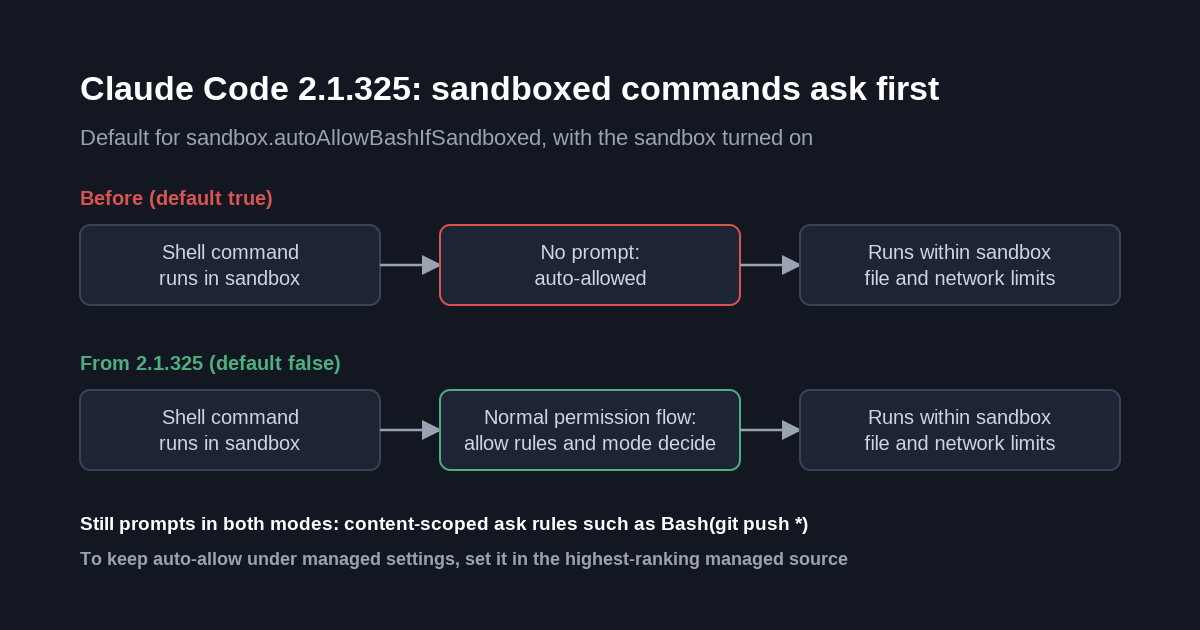
Claude Code's sandbox and its permission prompts used to be bundled together. Turn the sandbox on, and by default every shell command that ran inside it was approved without asking. Claude Code 2.1.325, released on 13 November 2026, separates the two. Sandboxed Bash commands now "follow the normal permission flow by default", and teams that want the old behaviour have to set sandbox.autoAllowBashIfSandboxed: true themselves. For developers this means more prompts after an update. For administrators who enforce the sandbox through managed settings, it is a default that changed under their policy, and it is worth deciding on deliberately.
What the sandbox is, and what auto-allow did
The sandboxing documentation describes the sandbox as a boundary the operating system enforces around the shell commands Claude runs: which files they can write and which network hosts they can reach. It covers Bash, PowerShell and Monitor commands and the processes they start. It does not cover Claude's file tools, MCP servers or hooks, which run outside it.
On top of that boundary there are two modes. In auto-allow mode, Claude Code approves a command without a prompt whenever it runs inside the sandbox. In regular permissions mode, every command goes through the normal permission flow even when sandboxed, so allow rules and the permission mode decide whether the developer sees a prompt. The filesystem and network restrictions are the same in both; only the approval step differs.
The settings reference now lists the default for sandbox.autoAllowBashIfSandboxed as false, with the note "Before v2.1.324, the default was true".
What changed in 2.1.325
Two lines in the changelog cover the change:
- Sandboxed Bash commands follow the normal permission flow by default; setting
sandbox.autoAllowBashIfSandboxed: truekeeps them running without prompts. - Where managed settings turn the sandbox on, keeping commands prompt-free needs
sandbox.autoAllowBashIfSandboxed: true"in your highest-ranking managed source".
The sources disagree slightly on the version. The settings reference says the old default applied before v2.1.324, while the changelog lists the change under 2.1.325 and has no 2.1.324 entry. Either way, anyone on 2.1.325 or later has the new default.
The same release tightens several related behaviours. Read-only git commands now ask first in a repository that isn't the project's or one the developer trusted. Scheduled tasks and /loop ask before running a skill that declares allowed-tools or hooks. The sandbox refuses writes to .claude settings, skills, agents, commands and hooks in added directories, as it already did in the launch folder. And the helper programs the sandbox starts for its own use now run without Claude Code's sign-in tokens and API keys in their environment. Read together, the release moves several decisions from implicit to explicit.
Why auto-allow was a trade-off
Auto-allow is convenient, and the sandbox makes it much safer than approving everything. But the documentation is candid about what it means. Even outside "accept edits" mode, sandboxed Bash commands that modify files within the sandbox boundaries "execute without prompting", including in Manual mode where the file edit tools would prompt. In a troubleshooting note, it also warns not to rely on any sandbox restriction to stop a malicious command, because in auto-allow mode "that command can run without a permission prompt".
Some checks survive auto-allow: a Bash deny rule still blocks, rm or rmdir aimed at a critical path still prompts, and content-scoped ask rules such as Bash(git push *) still force a prompt. A bare Bash ask rule, however, is skipped for sandboxed commands, and a few command shapes, such as one that starts with a variable assignment, always go through the normal flow. Policies written on the assumption that "ask for every shell command" covered everything may have behaved differently from what their authors expected.
Making regular permissions the default turns the sandbox back into one layer among several, rather than an implicit approval. That fits the way the sandbox is described elsewhere: a containment boundary for when something goes wrong, not a judgement that a command is fine.
What it means for engineering and security leaders
Managed fleets need an explicit decision. The managed settings documentation explains that, by default, Claude Code uses only the highest-ranked managed source that delivers a policy key and ignores the rest. The order is remote settings (server-managed, or from a Claude apps gateway), then MDM or OS-level policy, then managed settings files. If your organisation sets the sandbox in an MDM profile but also delivers any key through server-managed settings, a new autoAllowBashIfSandboxed line added to the MDM profile may never be read. That is why the changelog says "highest-ranking managed source".
Expect a wave of prompts, then pressure to switch it back. Developers who had a quiet, sandboxed workflow will see approval requests for builds and test runs after updating. The quick fix, setting auto-allow to true in user settings, is reasonable for many teams. But it should be a decision someone owns, not a side effect of an update.
Unattended runs change too. Scheduled tasks that relied on sandboxed commands running without approval, or on a skill with hooks, may now wait for someone. The changelog also notes that "Always allow" in the Desktop, IDE and SDK hosts now saves a rule only when that rule would actually allow the command again, so a scheduled task that relied on one "can now wait for you".
The boundary itself is unchanged. Nothing here widens or narrows what a sandboxed command can reach. Network allow lists, filesystem write paths, excludedCommands and the unsandboxed retry behave as before. Review those settings on their own merits.
Practical takeaways
- Pick a mode per population. For example: regular permissions for repositories with outside contributors, auto-allow for trusted internal work. Then set
sandbox.autoAllowBashIfSandboxedexplicitly rather than relying on a default that has just changed. - Put it in the right managed source. Check
/statuson a managed machine to see which source supplies policy, and add the key there. If you deliver policy from more than one place, read themanagedSourcesBehaviorsection before assuming keys merge. - Keep content-scoped ask rules such as
Bash(git push *)for the commands that matter most. They prompt in both modes; a bareBashask rule does not apply to sandboxed commands under auto-allow. - Check scheduled and unattended work after the update, and add
Skill(name)topermissions.allowonly for skills you actually want to run without a person present. - Pin and roll out deliberately. If you use
requiredMinimumVersion, move it to 2.1.325 only once the managed setting reflects your choice, so developers don't get the new default before the policy that goes with it.
For the wider picture of what built-in sandboxes do and don't contain, see sandboxing coding agents. For earlier permission fixes in the same tool, see Claude Code's October permission bypass fixes.