
GitHub usage reports add a user ID column on 1 December: fix your cost scripts
From 1 December 2026 GitHub's detailed, AI and premium request usage reports gain a user_id column. What moves, what it fixes and how to prepare your scripts.
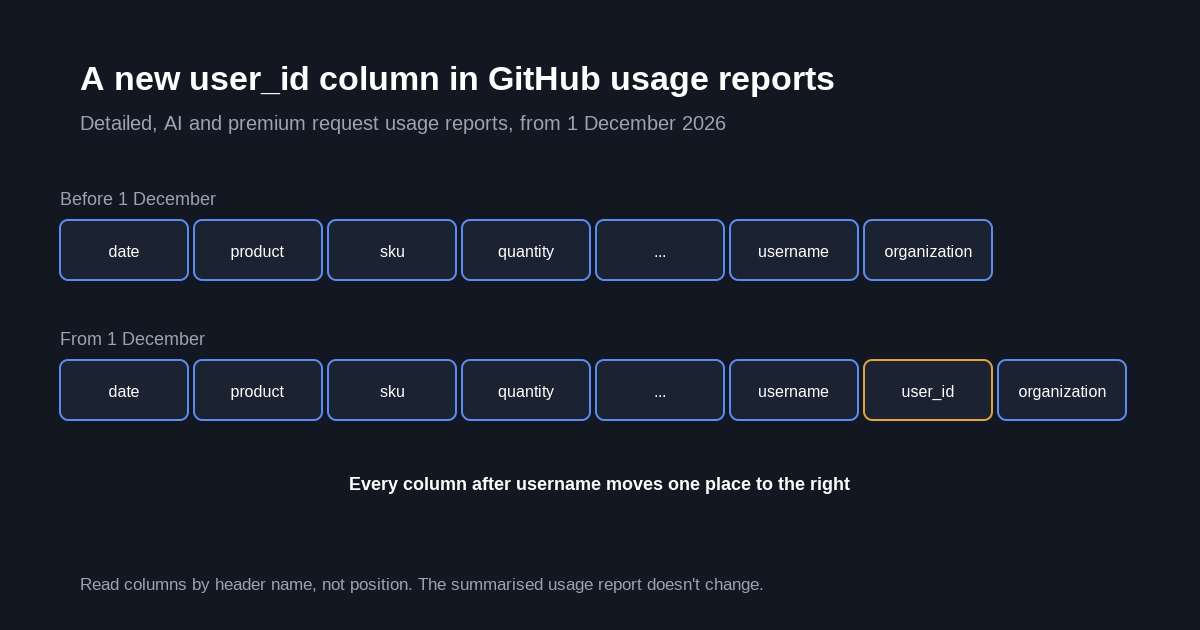
From 1 December 2026, GitHub's usage reports that have a username column will also have a user_id column right after it, and every later column moves one place to the right. GitHub announced the change on 23 November. It is a small change with a real deadline: any script that reads these reports by column position will start reading the wrong numbers next week. For teams that charge AI coding costs back to people or departments, it also fixes some long-standing gaps.
What changes
According to the changelog:
- The new column appears in the detailed usage report, the AI usage report and the premium request usage report, "including exports you create with the GitHub REST API". The summarised usage report doesn't change.
- It applies to all GitHub Enterprise Cloud account types and to standalone organisations on GitHub Team.
user_idholds the ID of the account that generated the usage, bot accounts included, and is empty for usage not tied to an account.
GitHub's instruction is direct: "If your scripts or tools read these reports by column position, update them to read columns by header name before December 1."
What the new column fixes
Usernames have been the only way to attribute a row to a person, and usernames are not stable. The changelog lists three things the ID makes possible:
- Deleted accounts. Their usage currently shows with an empty username. From December, usage from different deleted accounts appears on separate rows rather than combined into one row with no name.
- Renamed accounts. A person's usage can be followed across a username change.
- Audit log joins. Report rows can be matched to audit log events. GitHub's audit log reference lists
user_idandactor_idamong the fields included in most events.
One side effect to expect: because rows that used to be combined are now split and each row is rounded separately, GitHub says totals you add up yourself "may differ slightly in the last decimal places". The amounts are calculated the same way. If a reconciliation check compares your summed report with an invoice to the cent, give it a small tolerance.
Where the documentation and the announcement differ
The announcement and GitHub's reference documentation don't describe the reports in quite the same way, and it is worth knowing before you go looking for every affected file.
The billing reports reference lists three report types: the summarised and detailed usage reports on the metered usage page, and the AI usage report. It doesn't list a separate premium request usage report, although the REST API reference does have premium request usage endpoints for organisations and users. The reference also says the detailed report is available only through the web interface and "cannot be obtained via the REST API /usage endpoint", while the changelog mentions exports created with the REST API. As of 24 November the field table doesn't list user_id yet, which is expected for a change that starts on 1 December.
Our reading is that any CSV you download, and any API response with per-user rows, should be treated as possibly affected. Check each one after 1 December rather than relying on the list.
Why this matters for AI cost reporting
The AI usage report is where AI coding cost becomes a per-person number. The reference describes it as a per-user breakdown of AI credits, summed by date, model and username, with the token counts behind each row split into input, output, cache_read and cache_write. Organisations build chargeback, budget alerts and adoption reports on top of it. A one-column shift in that file doesn't fail loudly. A script that expected quantity and gets a different number keeps running, and a dashboard keeps drawing.
The change also arrives as per-person budgets become practical at scale. On 16 November GitHub raised the limit to 40,000 budgets per Enterprise Cloud account, up from 10,000, for teams that set budgets for individual users or across many cost centres. Budgets per person and reports per person need a stable way to identify the person, which is what the ID gives you.
We looked at related reporting gaps in Copilot's usage metrics and client names: attribution in AI cost data tends to be weakest exactly where finance needs it most.
What it means for engineering and platform leaders
This is a maintenance task, not a strategy question, but it touches finance. The people who own the scripts are often not the people who read the numbers, so the risk is a silent error discovered weeks later in a chargeback dispute. A short check this week costs less.
Bot accounts get an ID too, according to the changelog, so usage from automation that runs under a bot account can be told apart from people's usage by ID as well as by name. Rows with an empty ID are usage that isn't tied to any account, and need a rule of their own in your reports.
It is also a good moment to change the key you join on. Usernames are display names that people can change; IDs aren't. Moving joins with your identity provider, HR data or audit logs to the ID makes reports survive renames and departures.
Practical takeaways
- Find every consumer of the detailed, AI and premium request usage reports: scripts, spreadsheets, BI imports and scheduled jobs.
- Read by header name, not position, and fail loudly if an expected header is missing.
- Add
user_idto your data model and join on it rather than onusernamewhere you can. - Decide where rows with an empty
user_idgo, such as a shared cost centre, so they aren't silently dropped. - Allow a small rounding tolerance in reconciliation checks against invoices.
- Compare a report from late November with one from early December to confirm your pipeline handles both layouts.
Sources
- GitHub Changelog: Usage reports will include a user ID column starting December 1 (23 November 2026)
- GitHub Docs: Billing reports reference
- GitHub Docs: REST API endpoints for billing usage
- GitHub Docs: Audit log events for your enterprise
- GitHub Changelog: Budget limit increased to 40,000 budgets per account (16 November 2026)