
AWS Pricing MCP Server: a tool marked read-only that could write files
CVE-2026-126816: an AWS Pricing MCP Server tool was annotated read-only but could write outside its folder. What to check, and why hints aren't policy.
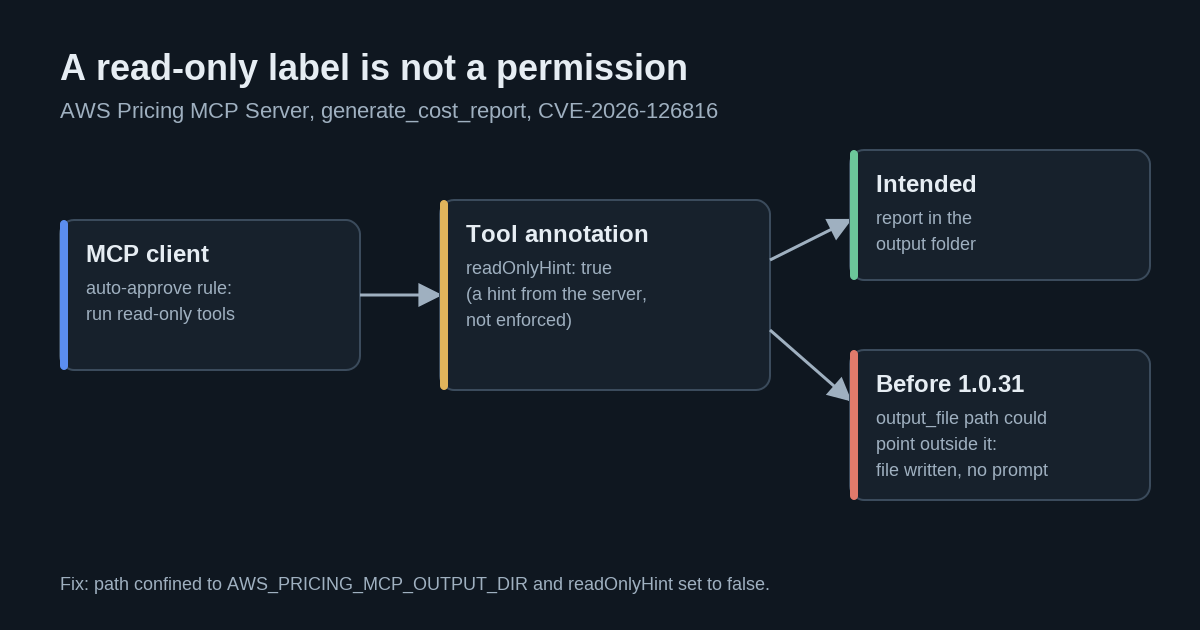
Many MCP clients let people skip the approval prompt for tools that say they only read. On 16 November 2026 AWS published an advisory for a tool that said exactly that and wasn't true: the cost report generator in the AWS Pricing MCP Server was annotated as read-only, but it wrote a file to whatever path it was given. An agent steered by text it had read could therefore create or overwrite files outside the intended folder, and a client set to auto-approve read-only tools would let it happen without asking. The bug is ordinary path traversal. The lesson is about what a client should trust.
What the advisory says
The advisory, GHSA-mqm3-w68j-75mw, covers the generate_cost_report tool of awslabs.aws-pricing-mcp-server, an open-source MCP server that gives AI assistants AWS pricing data and cost analysis.
- Identifier: CVE-2026-126816.
- Severity: moderate, CVSS 3.1 base score 5.5, vector
AV:L/AC:L/PR:N/UI:R/S:U/C:N/I:H/A:N. The weaknesses listed are CWE-22 (path traversal) and CWE-357 (insufficient warning of a dangerous operation). - Affected:
awslabs.aws-pricing-mcp-serverbefore 1.0.31, and the deprecatedawslabs.cost-analysis-mcp-serverup to and including 1.0.5. - Fixed: 1.0.31. The deprecated package will get no fix; AWS asks its users to move to the pricing server.
AWS describes the impact plainly: someone who "can place content that the victim's MCP agent reads" might cause the agent to write a cost report, containing values the attacker supplied, to a location outside the output directory. It adds the detail that matters most: "Because the tool was annotated as read-only, MCP clients configured to auto-approve read-only tools could run it without user confirmation."
The limits are stated too. The server must be installed locally, the agent must process attacker-influenced content, only files the server process can write are at risk, and no managed AWS service is affected.
What changed in the fix
The output_file parameter is now resolved and confined to a base directory, set with the AWS_PRICING_MCP_OUTPUT_DIR environment variable and defaulting to the server's working directory. Absolute paths outside it, .. segments and symbolic links that escape it are refused. And the tool's readOnlyHint annotation is now false.
A fix that is older than the advisory
The advisory was published on 16 November, but the package's release history on PyPI shows version 1.0.31 uploaded on 9 June 2026, and several releases since, up to 1.1.1 on 8 September. So the fixed code has been available for about five months; what is new is the public explanation. If your team installs MCP servers with uvx or an unpinned version, you probably already run a fixed release. If you pinned a version in the first half of the year, or still use the old cost analysis package, you may not.
Why the annotation matters more than the bug
Path traversal in a file-writing tool is a familiar flaw. What turns it into an agent problem is the label.
The MCP specification defines tool annotations as hints. In the schema reference, readOnlyHint means "the tool does not modify its environment", and the same entry warns that annotations "are not guaranteed to provide a faithful description of tool behavior" and that clients "should never make tool use decisions based on ToolAnnotations received from untrusted servers". The tools page puts it as a requirement: clients "MUST consider tool annotations to be untrusted unless they come from trusted servers".
This case shows the gap in that wording. The server here was published by AWS, in AWS's own repository: about as trusted as an MCP server gets. Nobody was lying. The annotation was simply wrong, and a client that treated it as policy inherited the mistake. "Trusted server" answers the question of intent, not of correctness.
Clients increasingly offer shortcuts based on these hints, because approval prompts for every read are tiring and people stop reading them. That is a reasonable design for convenience. It is not a security boundary, and the advisory's workaround says as much: remove generate_cost_report from any auto-approve list, so each call needs confirmation and the path can be checked first.
What it means for engineering and security leaders
Three points are worth taking from this beyond the patch.
An annotation is a claim by the tool's author. Treat it like a code comment: useful, usually right, never enforced. Where an approval decision depends on whether a tool writes, base it on a list your own team maintains, by tool name, not on what the server says about itself.
Write tools hide inside read-mostly servers. A pricing server sounds like a lookup service. One of its tools writes files. The same pattern appeared in the AWS API MCP Server's deny list issue, published six days earlier, where a policy meant to stop some operations missed them because of how names were compared. In both cases the control looked right on paper and failed on a detail.
Advisories can trail fixes by months. If you only patch when an advisory appears, you were safe here by luck if your installs floated to new versions, and exposed if they were pinned. An inventory of which MCP servers run on which computers, at which versions, is what lets you answer "are we affected?" in minutes rather than days.
Practical takeaways
- Upgrade
awslabs.aws-pricing-mcp-serverto 1.0.31 or later; the current release is 1.1.1. Replaceawslabs.cost-analysis-mcp-server, which will not be fixed. - Set
AWS_PRICING_MCP_OUTPUT_DIRto a dedicated folder, so reports can only land there. - Review auto-approve lists in every MCP client your developers use. Remove any tool whose name or parameters suggest it writes, exports, saves or generates files, whatever its annotation says.
- Look for
output_file,pathorfilenameparameters in tools you allow without approval. A tool that accepts a path can usually write to it. - Check pinned versions. Search your MCP configuration files and lock files for pinned versions of AWS Labs servers older than mid-2026.
- Keep untrusted content away from agents with write tools, or at least keep a person in the loop for those tools when the session has read web pages, issues or documents from outside.
For teams that route MCP traffic through a gateway, the same principle applies there. SpanDock's MCP gateway, on the Premium and Enterprise plans, lets an administrator allow or deny tools by name and require approval for chosen tools, per connector and per person or group; a call that needs approval doesn't run until an administrator approves that exact call. Those are rules you set, rather than labels the server supplies.
Sources
- GHSA-mqm3-w68j-75mw: Path traversal and arbitrary file write in the cost report generator of aws-pricing-mcp-server (awslabs/mcp, 16 November 2026)
- awslabs.aws-pricing-mcp-server release history (PyPI)
- Model Context Protocol specification 2026-07-28: Tools
- Model Context Protocol specification 2026-07-28: schema reference (ToolAnnotations)