
Claude Code 2.1.332: skills from MCP servers in beta, and a new hook for them
Claude Code now loads skills served by MCP servers and adds a hook to refuse a skill's inline shell commands. The approval rules, who has it, and what is open.
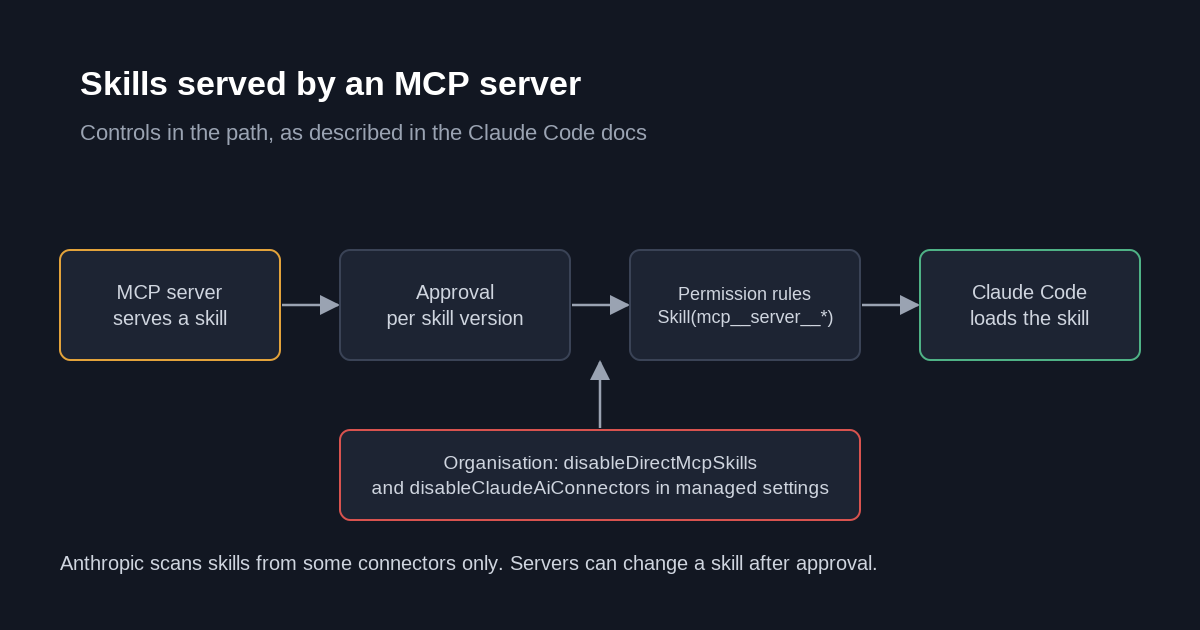
Claude Code 2.1.332, listed in the changelog on 25 November, adds skills from MCP servers as a beta. A server you have connected can now offer skills alongside its tools, and Claude Code lists them in the / menu as server:skill. The same release adds a PreSkillShellCommand hook that can refuse a skill's inline shell commands as it loads. For anyone who manages which servers developers connect, this changes what a server is allowed to teach the agent. A skill is instructions, and it can include code to run.
What changed
The changelog entry is short. Skills from MCP servers (beta) appear as server:skill, and other skills keep their names. The hook is described as able to "refuse a skill or command's inline shell commands as it loads". The changelog adds one warning for teams that share settings: on 2.1.331 and older, a settings file that names the new hook event opens a dialog at start.
The Claude Code docs describe the rest. A server's skill is named <server>:<skill>, so a server called docs with a pdf skill gives docs:pdf. Claude reads the skill's supporting files from the server as MCP resources. The feature builds on the Skills extension to MCP, and the docs say a connected server needs to support MCP revision 2026-07-28 or later.
How approval works
The docs spell out who decides when a skill loads:
- Auto mode, the default: there is no prompt. The classifier decides whether the skill loads, without reading it.
- Manual and acceptEdits modes: you see a prompt. Choosing "Allow this version" skips the prompt and the classifier until the server changes the skill's files.
- Ask rules: with an
askrule, or a connector set to "Restrict to Ask", approval is needed each time, including in auto and bypass modes. - Typed commands: typing a skill's command yourself doesn't need approval.
Rules use the form Skill(mcp__docs__*). A deny rule blocks a server's skills, including typed commands. An allow rule approves all versions of its skills, and the docs say it goes in user or managed settings and works for servers added at user or local scope and for managed servers, but not for connectors, .mcp.json servers or plugin servers. A deny rule leaves normal resource reads from the server allowed. To stop those too, the docs say to deny ReadMcpResourceTool.
What the docs warn about
The security note is blunt. Anthropic scans skills from some connectors, and a version of those loads only after it passes the scan. The docs say Anthropic does not scan skills from other connectors or servers, including directory servers added with claude mcp add. They add that skills can direct Claude to run code, that servers can change skills at any time, and that you should add only servers you trust.
Skills from servers also lose some local-skill features, because the server supplies the content. Claude Code ignores allowed-tools, disallowed-tools, hooks, model and several other frontmatter fields, does not run ! commands, and does not attach @ references. That narrows the risk from a hostile skill, and it also means a skill that depends on those features will not behave as its author expects.
Who it is on for
Availability depends on how people sign in:
- Pro, Max and Ultra with
/login: on. - Team and Enterprise with
/login: off until the organisation turns it on. For connectors an Owner switches on "Skills over MCP" in Organization settings. For other servers an administrator setsdisableDirectMcpSkillstofalsein managed settings. - API key or Console login: rolling out, off for now.
- Not supported: cloud sessions,
claude -p, GitHub Actions and the Agent SDK, a customANTHROPIC_BASE_URL, and organisations with settings such as HIPAA or zero data retention.
On devices you manage, people can sign in with a personal plan, an API key or a long-lived token, where organisation defaults don't apply. For those the docs say to set disableDirectMcpSkills and disableClaudeAiConnectors to true in a managed settings file or MDM policy.
Two things the sources don't settle
First, the version. The changelog lists skills from MCP servers under 2.1.332, but the MCP page says the feature needs "v2.1.331 or later", and so does its section on Skill(mcp__docs__*) rules. The 2.1.331 changelog entry does not mention MCP skills. Until the pages agree, check the version a developer actually has before relying on either number.
Second, the hook. The changelog describes PreSkillShellCommand, but the hooks reference did not list it when checked on 25 November. What input the hook receives and how it answers are therefore not documented there yet, and an article can't responsibly describe them.
What it means for engineering and security leaders
A skill served by a connected server is a new route for instructions into the agent, from a party you may not control, that can change after you approved it. Auto mode's classifier decides without reading the skill, and the docs' own wording is that "Allow this version" lasts until the server changes the files. The sensible reading is that the server's operator is now part of your trust boundary in a way that tool descriptions alone didn't make them.
Practical takeaways
- Decide the policy before the feature reaches your developers: on Team and Enterprise it is off by default, and a managed setting controls it.
- For devices you manage, set
disableDirectMcpSkillsanddisableClaudeAiConnectorsto match your policy, since personal logins bypass organisation defaults. - List the servers developers connect. Treat each one as a source of instructions, not only of tools.
- Add
denyrules for servers you don't recognise, and useaskrules where you want approval each time. - Don't distribute settings that name
PreSkillShellCommandto developers on 2.1.331 or older without warning them about the dialog. - Test your own skill content in the form it takes when served, since several frontmatter fields are ignored.
How SpanDock fits
SpanDock handles skills from the server side. The skills docs say an administrator turns a skill on once and every computer gets it, kept up to date and taken back out when it is turned off. Skills that run scripts are marked "Runs scripts", publishing one asks you to confirm by typing its name, and a computer installs it only if its settings allow scripts, which they don't by default. Starter skills are in every plan; publishing your own skills is on the Premium and Enterprise plans, and in the 30-day trial.