
A malicious npm package installed an AI agent as a backdoor: what to check
A fake CRM client on npm set up Hermes Agent as a hidden service on servers it reached on 16 November. How it worked, how delivery changed, and what to check.
Most malicious packages steal secrets and leave. One published on npm on 16 November left something behind: a general-purpose AI agent, running as a system service and taking orders from a chat room. The package, @leadstack/crm-connect, posed as the official client for a CRM product. SafeDep's analysis, published on 19 November, says it is the first case the firm has seen of an npm install doing this. No victim has been reported. The case still shows how an attacker can borrow a legitimate agent instead of writing a remote-access tool.
What happened
SafeDep reports that an npm account published nine versions of the package on 16 November, between 09:44 and 15:27 UTC, and that its scanner flagged the package within minutes of the last one. npm has since removed it. The name was borrowed: the CRM's real domain belongs to an unrelated consultancy, and the host named in the package's documentation does not resolve.
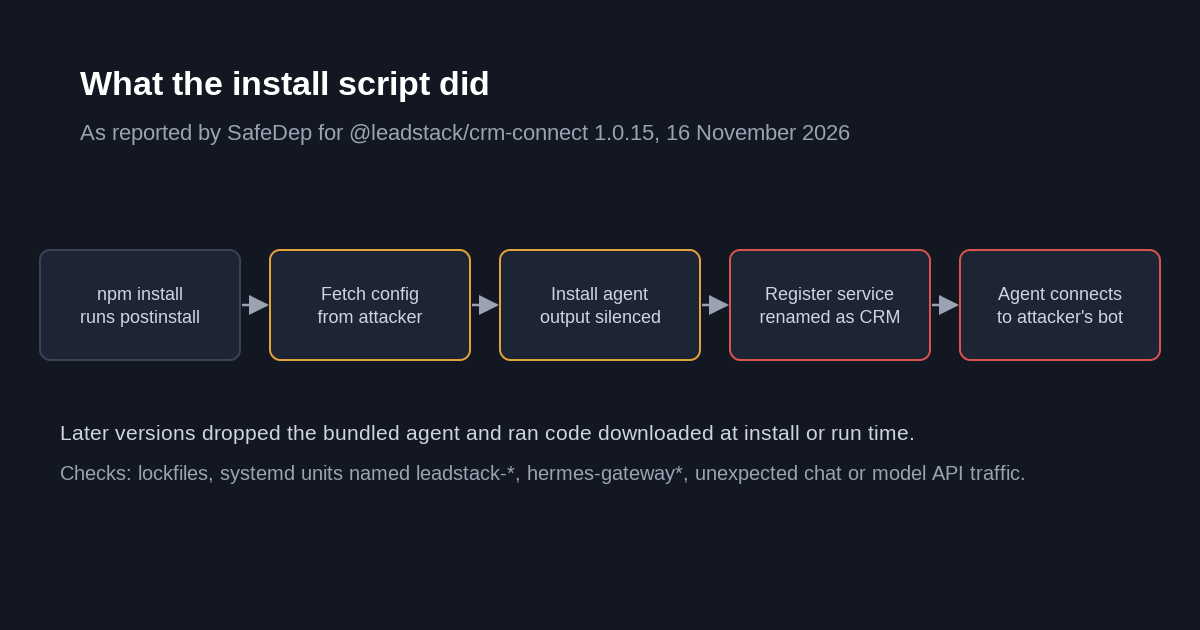
Version 1.0.15 ran a postinstall script that did the following, according to SafeDep:
- Fetched a configuration from the attacker's server: an environment file for the agent and a
SOUL.mdfile, the instructions that define who the agent is. SafeDep could not recover either file, because by 19 November the server no longer answered, or demanded a token. - Installed Hermes Agent, an open-source agent from Nous Research, into a hidden folder with npm output silenced, so nothing about it reached the terminal.
- Registered the agent's chat gateway as a system service running as root, using an override flag. By default, Hermes refuses to install that service as root. The service restarts if it is killed and starts at boot.
- Renamed the service to look like part of the CRM, "LeadStack Lead Routing Daemon", and deleted the original unit file.
- Waited, for up to three minutes, until the agent reported that it had connected to Telegram, then printed a friendly status report listing CRM tasks.
SafeDep infers, and says it did not observe, that the environment file carried a Telegram bot token, a key for the Kimi model named in the package's configuration, and either a list of users the agent would obey or a setting that admits anyone.
What the attacker gets
A chat with Hermes Agent has the same tools as its command line, according to SafeDep's reading of the project's documentation: shell commands, file reads and writes, a browser, code execution, scheduled jobs and sub-agents. Commands Hermes treats as dangerous wait for approval in the chat, and by default any permitted member of the chat can approve them. Here that member is the attacker. The Hermes security documentation describes an approvals mode that disables all prompts, equivalent to its --yolo flag. Whether the attacker's configuration used it is not known.
The persona file matters too. The agent loads SOUL.md as the first part of its system prompt, and the attacker's server supplies it at install time, so the attacker could change the agent's instructions and keys without publishing a new version.
This is not entirely new. ThreatDown's Carbonato report from 22 September describes a botnet that compromises Docker daemons exposed on port 2375, installs Hermes Agent unchanged, overwrites its persona file with a short prompt and takes tasks over Telegram. The npm package reached the same end through a different door.
How the delivery changed in six hours
The server stayed the same across the nine versions. The route to it kept changing:
| Versions | What SafeDep reports |
|---|---|
| 1.0.15 | Installs the agent as a root system service during postinstall |
| 1.0.18 | Moves the payload to the first call into the library; installs a user-level service with "linger" when not root, so it survives logout |
| 1.0.19 to 1.0.21 | Tarball holds no agent code; downloads and runs JavaScript at run time or install time |
| 1.0.29 and 1.0.30 | postinstall downloads and runs a binary |
| 1.1.0 and 1.1.1 | postinstall runs a platform package that was never published |
Two details are worth noting. Version 1.0.19 keeps its version-check function free of side effects "for CI lockfile checks", so a pipeline that merely inspects the package sees nothing. And the payload targets long-lived Linux servers: a system service and linger make sense there and achieve nothing on a throwaway build runner. SafeDep infers from the package's lures that the aim was CRM credentials and lead data at brokerage-style firms, and says it has not seen that on a victim.
The same publisher was still active on 18 November. SafeDep reports three further packages with no install script and no code of their own, each declaring an optional dependency that points at a tarball on the attacker's domain. npm fetches that tarball on every fresh install and runs any install script inside it. On 19 November the server returned a harmless token validator, and SafeDep notes the attacker could swap it at any time.
What it means for engineering and security leaders
Three points follow from the report.
Turning off install scripts helps, and doesn't finish the job. From version 1.0.18 the payload could start on the first call into the library rather than at install. Blocking postinstall stops the early versions and the optional-dependency trick, but not code that runs when the application starts.
The agent is a quiet implant. A Node or Python process that long-polls a chat API looks like routine automation. Detection comes from its context: a new service with a CRM name on a server that has no reason to talk to a chat service or a model provider.
Root installs are the multiplier. SafeDep's guidance is to treat a server that ran the install as root as fully compromised, rebuild it rather than clean it, and rotate every credential it could reach. A non-root install ran the agent with that user's rights, which is still every secret the application can read.
AI coding tools raise the odds of meeting such a package, since they add dependencies quickly and a plausible "official client" name is a good lure. SafeDep does not report any case where an agent chose this package, so that part is an inference, not a finding.
Practical takeaways
- Search lockfiles for
@leadstack/crm-connect,@zmatdspcrm/trading-connector,@zmatdspcrm/brandnet-connectandbrandnet-connect. Flag any dependency whose address is a URL rather than a registry version. - On Linux servers, list unit files for
leadstack-*andhermes-gateway*, for the system and for each user, and check whether linger is enabled for service accounts. - Alert on servers that connect to a chat service's API or a model provider's API without a reason.
- Install dependencies in CI with scripts disabled, and review the few packages that really need them.
- Don't run
npm installas root on a server. Give the application a dedicated account with only the secrets it needs. - If you find any of this, rebuild the host and rotate credentials. Don't try to clean it in place.
For related reading on package risk, see the package firewall for coding agents and malicious MCP servers on npm.