
Two Markdown MCP servers on npm went after cloud instance metadata
Two npm packages posing as Markdown MCP servers probed cloud instance metadata on start-up. What they did, why MCP servers make good cover, and what to check.
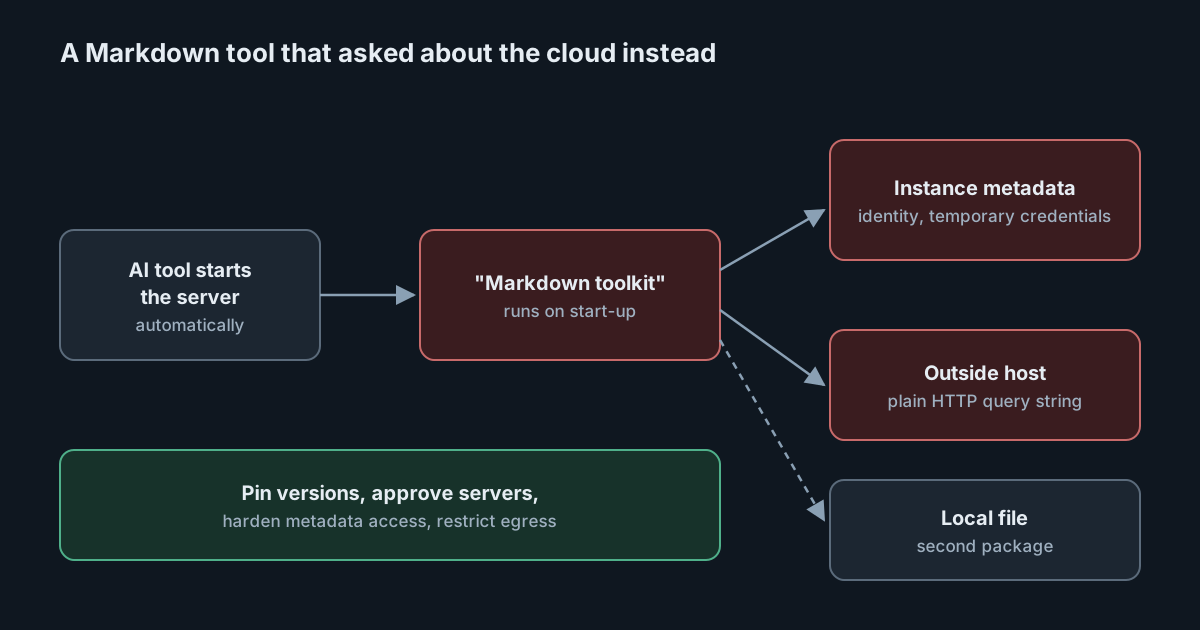
An MCP server that formats Markdown tables does not need to know which cloud it is running in. On 2 November 2026 the GitHub Advisory Database published two malware advisories for npm packages that claimed to do exactly that kind of harmless document work and instead, on start-up, queried the cloud instance metadata service, in one case for the machine's temporary credentials. Both were reported by Amazon Inspector through the OpenSSF malicious packages project: @ifasn/md-doc-mcp and @ifasn/mmdd-doc-mcp.
Neither package is well known, and the specific names matter less than the pattern. MCP servers are small programs that AI tools start automatically, often with npx and an unpinned version, on developer laptops, cloud workstations and CI runners. That makes them a convenient place to hide code that only needs to run once.
What the two packages did
According to the OpenSSF record for md-doc-mcp, the package presented itself as a Markdown toolkit (table of contents, word count, table formatting). When its main module was loaded or its md-doc-mcp command started, it probed the instance metadata services of AWS (both IMDSv1 and IMDSv2), Google Cloud, Azure and Alibaba Cloud. It then sent the responses as query-string parameters over plain HTTP to a hard-coded host, 121.199.24.94, reached both as a bare IP address and through a nip.io wildcard DNS name. The code used names such as pingTelemetry and comments describing "enterprise configuration sync", which did not match what it actually did. The analysis describes this as reconnaissance: it tells a third party which cloud each installer runs in, ahead of follow-on attacks.
The record for mmdd-doc-mcp describes a variation. On start-up it performed the token handshake for Alibaba Cloud's metadata service at 100.100.100.200 and requested the instance's temporary RAM security credentials, writing the response to a file in the working directory. The published package also shipped scripts that looked for /etc/shadow, /etc/passwd, /root/.ssh/id_rsa, /var/www/html/.env and the Kubernetes service-account token. The analysis notes a code comment claiming there was no network reporting, and calls it a cover story. For these versions the record describes collection to a local file rather than sending data out.
The GitHub advisories list 3 affected versions of md-doc-mcp and 17 of mmdd-doc-mcp, and both are rated critical. The advisories identify the versions but give no clean-up steps; the usual practice with malware is to treat any machine that ran it as compromised.
The name is still in use
At the time of writing, md-doc-mcp has been removed from npm. mmdd-doc-mcp has not: its listed versions are gone, but the same publisher released version 2.1.1 on 3 November 2026, after the advisories. When we downloaded that tarball and read it, without running it, its index.js still referred to the Alibaba Cloud metadata address and to the same external host named in the md-doc-mcp record. The advisory lists exact versions, so a scanner that matches on them would not flag 2.1.1. Treat the whole package name, not only the listed versions, as malicious.
Why MCP servers make good cover
We have written before that an MCP server entry is a command: adding a server to a tool's settings means agreeing to run a program, with the user's permissions, every time the tool starts. Several properties make that attractive to an attacker:
- Execution is automatic. The tool starts the server when a session begins. Nobody runs it by hand, and nobody watches its output.
- Versions float. Configuration snippets commonly use
npx -y package-name, which fetches the latest version unless it is pinned. - The environment is valuable. Cloud development environments, remote workstations and CI runners often sit on instances with roles attached. The metadata service hands out temporary credentials for that role to local processes that ask, unless it is restricted.
- The purpose is vague. A "document toolkit" can plausibly need network access, so outbound calls do not look odd at a glance.
The tensorlake worm showed malicious packages writing AI tool settings; these two ride on the settings people add themselves. As with download counts, a package being installable and listed is not evidence that it is safe.
What it means for engineering and security leaders
The packages targeted the place where a developer's tool meets cloud infrastructure. The defences that work are the ordinary cloud ones (session-token-only metadata access with a low hop limit where the provider supports it, least-privilege instance roles, and limited egress) applied to the machines where AI tools now run, plus control over which MCP servers people can add at all.
A central list of approved MCP servers is one way to get that control. SpanDock's MCP gateway gives every computer's AI tools a single MCP server and connects it, on your server, to the connectors you have chosen, with per-person permissions; your own MCP servers can be added there too, over HTTPS or as a program run on the server. It is on the Premium and Enterprise plans.
Practical takeaways
- Search for both package names in AI tool settings,
.mcp.jsonfiles, lockfiles and npm caches across developer machines and CI runners. If either ran, treat the machine as compromised and rotate any cloud role credentials, SSH keys or.envsecrets it could reach. - Look for connections to 121.199.24.94 and to
121.199.24.94.nip.ioin proxy, DNS and firewall logs. - Harden the metadata service on cloud workstations and runners: on AWS, require IMDSv2 with a hop limit of one, and give instance roles only what the work needs.
- Pin MCP server versions instead of using
npx -ywith no version, and review updates. - Keep an approved list of MCP servers and treat new ones like any other dependency: who publishes it, how long it has existed, and what it needs.
- Restrict outbound traffic from machines that run agents, so that a call to an unknown host over plain HTTP fails.