
GitHub Copilot in JetBrains Air: who governs a cloud task?
Copilot now runs as an agent in JetBrains Air, locally and in Air Teams cloud tasks. Where the work runs, who sees usage and spend, and what admins can control.
On 3 November 2026 GitHub and JetBrains made GitHub Copilot available as an agent in JetBrains Air, the JetBrains tool for handing coding tasks to agents, running them in parallel and reviewing the results. Developers can pick Copilot in Air's agent picker locally in a JetBrains IDE, or, with Air Teams, send it a cloud task that keeps running after the laptop is closed. Tasks run on the developer's Copilot plan, not on JetBrains AI credits.
For individual developers this is mostly a convenience. For the people who manage Copilot and AI tooling budgets, it splits control of one piece of work between two vendors' admin consoles. The GitHub changelog and JetBrains' announcement are unusually candid about where the gaps are.
How it works
Air runs the official GitHub Copilot CLI over the Agent Client Protocol (ACP), the open protocol Air uses to connect agents. Locally, a developer installs Air in a JetBrains IDE, chooses GitHub Copilot and signs in with GitHub; no Air Teams subscription is needed.
Cloud agents in Air were introduced as a preview in October and are available to organisational users. Cloud tasks need three things: a JetBrains account in a business organisation with Air Teams, a Copilot subscription, and Copilot enabled by the Air administrator. The developer connects GitHub under Settings → VCS Providers in Air, picks a repository and a remote branch, and sends the task. JetBrains notes that there is no separate Copilot sign-in: Air uses the GitHub connection to sign in to Copilot on the cloud machine when the task starts.
Air can also start cloud tasks automatically, on a schedule or on repository events such as a new pull request. With Copilot as the agent, each run uses the developer's Copilot plan.
Where a cloud task runs
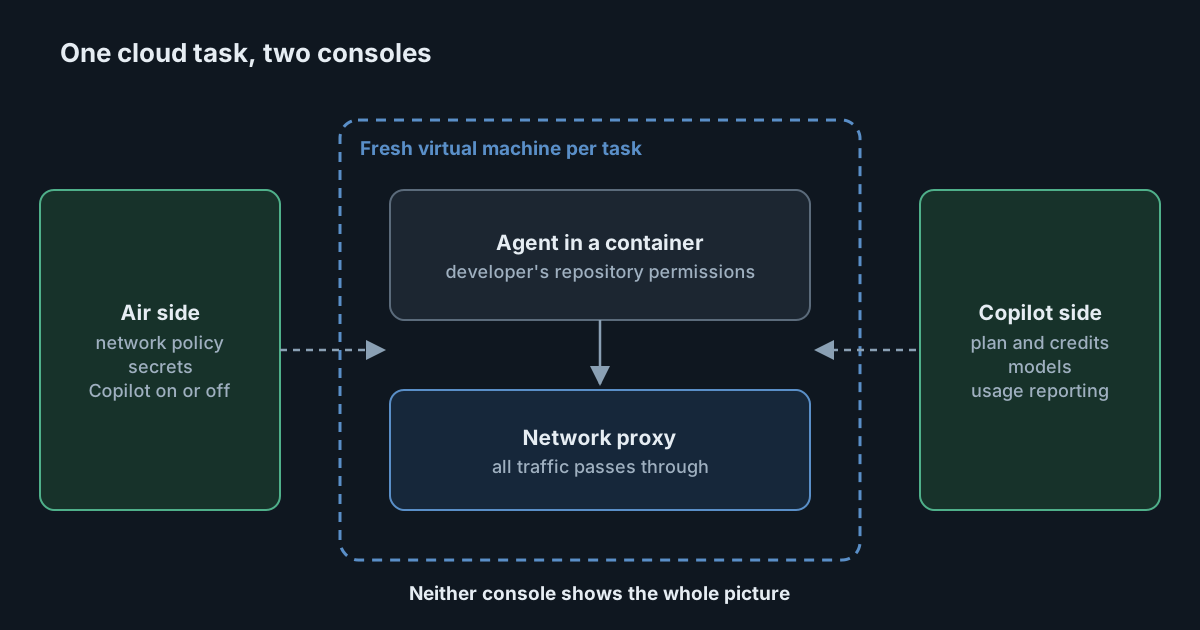
According to both announcements, each cloud task gets a fresh virtual machine, Copilot runs in a Docker container on it, all traffic goes through a proxy, and nothing carries over to the next task. JetBrains' sandboxing article adds that the VM is treated as untrusted, that secrets are stored encrypted and exposed to the task as environment variables, and that each task acts with the developer's own repository permissions. The same article says microVMs are coming soon; today the isolation is a container inside a VM.
The sources disagree on the default network policy. The sandboxing article says that by default the proxy allows only a preset list of trusted source control and package registry domains. The network access documentation says that by default a cloud environment can reach the internet, and describes four modes: required domains only, specified domains, trusted domains, and all domains. Until JetBrains reconciles the two, check what your environments are actually set to rather than relying on either default.
The documentation makes one more point worth passing on. Cloud environments connect out from a fixed pool of public IP addresses, so you can allowlist them on internal services such as a private package registry or an MCP server configured in .mcp.json. JetBrains is clear that such an allowlist admits Air Teams as a whole, not your organisation or your task, and that the service's own authentication must stay in place.
Who sees usage and who sets limits
This is where the split shows. The changelog lists the considerations plainly:
- Usage visibility. Air's governance and analytics features do not include Copilot usage.
- Spending limits. Air administrators can turn Copilot off with a governance policy, but cannot set Copilot spending limits within Air.
- Subscription checks. Connecting Copilot to Air does not request Copilot permissions. Air may only check subscription or credit availability when the cloud environment starts; if credits run out, the task fails with an error in the session.
- Plan selection. A developer cannot choose whether an individual task uses their personal Copilot plan or their organisation's plan.
JetBrains' FAQ says the same from its side: Air does not track Copilot credits for local or cloud tasks, cannot limit them, and does not warn when credits run out; runs simply start failing. It also suggests starting automations with something easy to review, such as a weekly dependency update, because an automation that reviews every pull request in a busy repository can use credits much faster.
Neither announcement says how these tasks appear in GitHub's own Copilot usage metrics. Since Air runs Copilot CLI, it is reasonable to check whether they appear under CLI usage, but we have not found that confirmed.
What it means for engineering and security leaders
The practical result is that a single Copilot cloud task in Air has two owners. JetBrains controls where it runs, what network it can reach, which secrets it receives and whether Copilot is allowed at all. GitHub controls the plan, the credits, the models and the usage reporting. Neither console shows the whole picture, and the plan-selection point means a task could be billed to a personal plan when you expected the organisation's, or the other way round.
None of that is unusual for an integration in its first week. But it is the kind of gap that becomes a surprise on an invoice or in an audit if nobody owns it. It is also a reminder of the wider point in our article on what built-in sandboxes do and don't cover: the isolation of the machine is one question, and the governance of what the agent does and spends there is another.
Practical takeaways
- Decide whether Copilot should be enabled in Air Teams at all, and use Air's governance policy to turn it off until you have.
- Set cloud environment network access explicitly to the narrowest mode that works, and verify it, given the conflicting descriptions of the default.
- Treat Air's IP pool as shared. If you allowlist it on internal services, keep their authentication in place.
- Watch Copilot usage on GitHub, since Air will not show it, and agree who reviews spend from Air automations.
- Be careful with event-driven automations. Start with scheduled, low-volume tasks before running an agent on every pull request.
- Clarify plan attribution with developers who hold both a personal and an organisation Copilot plan.