
Copilot in Xcode's coding assistant: a preview alongside the extension
GitHub Copilot is in public preview inside Xcode's built-in coding assistant from Xcode 27.3 beta. How it differs from the existing Copilot for Xcode extension.
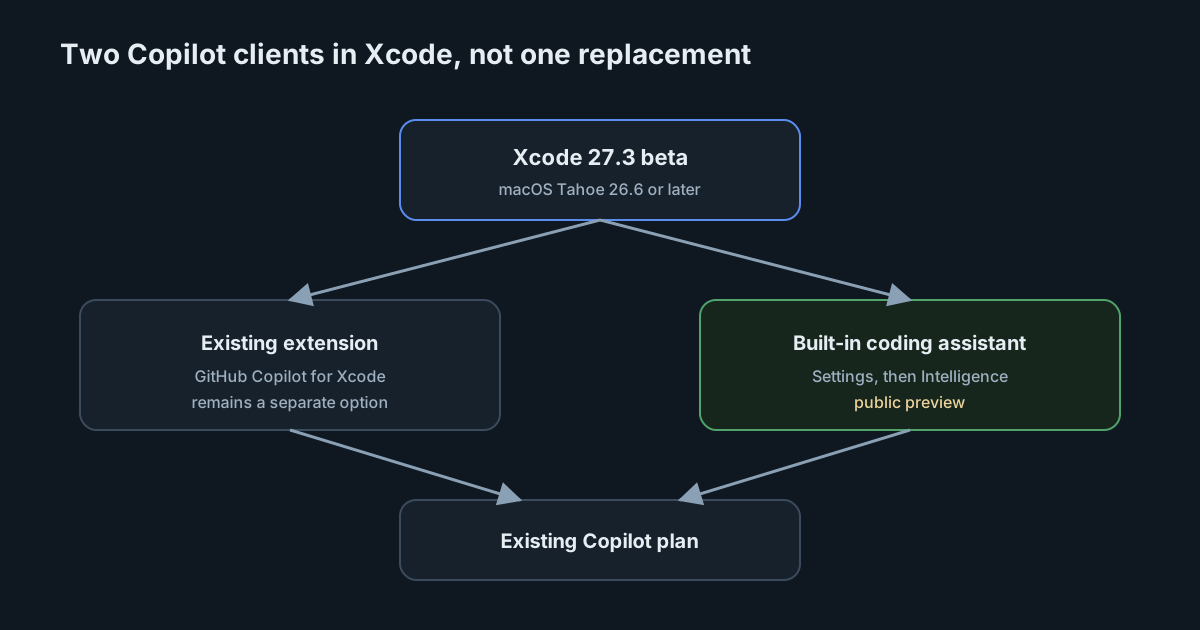
Apple's coding assistant in Xcode has been a place you enable an agent, not a place reserved for one vendor. On 4 November 2026 that list gained GitHub Copilot. The GitHub changelog says you can now work with Copilot directly in Xcode's built-in coding assistant, in public preview, starting with Xcode 27.3 beta. Apple's own Xcode 27.3 beta release notes confirm the same addition in a single line: "GitHub Copilot is now available in the coding assistant." For iOS and Mac teams this is a new Copilot client, not a replacement for the one many of them already have installed.
What shipped, and what it requires
GitHub's announcement is careful about versions and plans. The integration is in public preview. It needs Xcode 27.3 beta, downloaded from Apple Developer Downloads, on a Mac running macOS Tahoe 26.6 or later. Apple's release notes repeat the macOS requirement: Xcode 27.3 beta requires macOS Tahoe 26.6 or later. All Copilot plans are supported.
Setup, according to GitHub, is under Xcode > Settings > Intelligence. That matches Apple's Setting up coding intelligence page, which is the generic guide for enabling agents in that panel. You choose Xcode > Settings and select Intelligence in the sidebar, or click "Get Started with Agents" in the coding assistant sidebar. To enable an agent you click Get next to it, then Install. After you download and install agents, Xcode updates the downloads if it can. To sign in, you use the More button in the Account row and follow the browser or sheet prompts.
Apple's page does not walk through Copilot by name. It describes the same Intelligence settings for the agents Xcode lists, plus ChatGPT, Claude, other chat providers, and agents you add yourself through the Agent Client Protocol. GitHub's changelog is the source that names Copilot in that panel and points at Apple's setup page and the 27.3 beta release notes for more detail.
The weekly Copilot round-up dated 6 November repeats the Xcode preview and the 27.3 beta starting point. It does not add requirements beyond the 4 November post.
The existing extension is still there
The most important sentence in GitHub's announcement may be the one about the older client. "This gives you another way to use Copilot in Xcode. The existing GitHub Copilot for Xcode extension remains a separate option, so you can choose the workflow that works best for you."
That means a Mac can grow a second Copilot surface without retiring the first. The extension and the built-in assistant are not described as two skins on one process. They are two options. Teams that already deployed the extension through managed software, or trained people on its commands and settings, should not assume those controls apply unchanged to the new assistant integration. GitHub does not say they share settings, policy hooks or telemetry.
GitHub asks for feedback in the GitHub Copilot for Xcode repository or through Apple Feedback Assistant. That split is itself a hint: problems may belong to the Copilot side or to Xcode's assistant, and the public-preview label means behaviour can still change.
Apple's setup page adds a management lever that the GitHub changelog does not mention. On managed devices you can turn off the coding assistant by setting the CodingAssistantAllowExternalIntegrations key to false in a mobile device management profile. Apple points at its device-management restrictions documentation for Macs. That key is about the coding assistant and external integrations as Apple defines them, not a Copilot-specific policy in GitHub's admin pages. If your organisation wants the existing Copilot extension but not Xcode's built-in assistant (or the reverse), you will need to test what that MDM key actually blocks rather than assume it selects among Copilot clients.
What the sources do not say
Public preview announcements are easy to over-read. These four pages do not say that the built-in integration is generally available, that it replaces the extension, or that it has feature parity with Copilot in VS Code or JetBrains IDEs. They do not list which Copilot features (completions, chat, agent mode, MCP servers, cloud agents) are present in the Xcode assistant, or which are missing. They do not say how usage appears in Copilot metrics, or whether the new client sends the same editor telemetry as other Copilot IDEs.
They also do not say the preview is limited to certain Copilot plans: GitHub says all plans are supported. They do not give an end date for the preview.
Apple's privacy note on the setup page applies to whatever agent you enable: when you enter prompts, the agent may access your project files and other information, and there is an "About Intelligence in Xcode & Privacy" link under Coding Intelligence. That is Apple's general warning, not a Copilot-specific data-handling statement. For Copilot's own terms you still need GitHub's documentation, which this announcement does not restate.
Because so much is unlisted, the honest briefing for an iOS lead is: a second, preview Copilot entry point now exists inside Xcode 27.3 beta; it uses your existing Copilot plan; the old extension remains; and you should try it on a small group before you treat it as the supported way to work.
What it means for engineering and security leaders
Decide who is allowed to run Xcode betas. Xcode 27.3 beta and macOS Tahoe 26.6 are the floor. That is a different standard from "install the Copilot extension on the current stable Xcode." A public preview that needs a beta IDE should stay with people who already accept beta tooling, not with every Apple-platform developer on day one.
Inventory both clients. If you already count Copilot for Xcode as a deployed extension, add the built-in assistant as a separate item until GitHub or Apple say they are managed together. Two clients mean two places where a sign-in can appear, two places where a preview bug can show up, and two places to revoke access when someone leaves.
Use Apple's MDM key if you need to keep the coding assistant off managed Macs entirely. Do not use it as a precision Copilot allowlist until you have tested it against both the assistant integration and the standalone extension.
Watch Copilot usage reports for Xcode the same way you already watch other editors, and remember that a preview client may not send complete telemetry. This week's announcements do not say how the new assistant appears in those reports, or whether it matches the existing extension.
Feedback belongs in the channels GitHub named. If something in the preview looks like a policy bypass or an unexpected file access, write it down and send it there rather than assuming it is intended behaviour.
Practical takeaways
- Treat this as a public preview on Xcode 27.3 beta, on macOS Tahoe 26.6 or later, not as a generally available replacement for the Copilot for Xcode extension.
- Keep the existing extension in place until you have compared workflows. GitHub calls them separate options.
- Set up the preview under Xcode > Settings > Intelligence, following Apple's agent enable and sign-in steps.
- Restrict beta Xcode to a small group, then decide whether the preview should spread.
- If you manage Macs centrally, test
CodingAssistantAllowExternalIntegrationsbefore you rely on it to allow or deny the assistant. - File issues with the GitHub Copilot for Xcode repository or Apple Feedback Assistant, as GitHub asks.
- Count this as another AI coding client on Apple-platform developer machines, and check it in your tool inventory rather than assuming it is covered by the older extension.
In SpanDock, process inventory (Enterprise plan, and in the 30-day trial) shows which AI tools run on your team's computers, including the ones that send no telemetry. It is off by default. You can collect only AI tools or every process, and each computer's Processes tab shows its latest snapshot.